Web Analytics
08Jun

Is Blogging Important for your Business? Why?

Blog sign isolated on white

Some debate are going regarding this topic out of that  blogging is still relevant in today’s social media marketing domain.

Though you have a small business, or a multinational company, blogging is intrinsic for your online content marketing procedures.

 There are mainly 4 reasons behind blogging:

  • Rush  traffic to your website
  • Shoot up your SEO/ SERP results
  • Spot your brand as an industry leader
  • Enhance better customer relationships

30May

The Top 6 Online Marketing Trends That Influence Year 2016

 Online marketing industry is complex and volatile area, but its also an exciting one for anybody who likes to be in modern trends. Every year there is an implementation of a new hardware, software,  companies, and user preferences which results a host of sweeping changes that either get accepted or ignored by the business world.

2016 looks to be a great year for online marketing, and it is shaking up the game with these six trends:

Viddyad-video-ads-for-businesses

Video ads will start dominating

There is nothing new in Video ads, with social channels like YouTube dedicated to host billions of videos and advertising platforms like Facebook and Bing already offering advertisers video options. 2016 is set to be different because Google is finally getting strong with SERP video advertising. It’s a positive remark  that users are being more attracted towards the video ads online, and as that trend continues, expect to see more types of video ads popping up in more unexpected places.

26May

Digital marketing company in Kerala

digital_marketingTGI Technologies We combine an innovative approach, creative thinking and a full understanding of today’s fast-moving tech world to market a range of services to the online world. We believe in connecting your brand with the relevant people and attracting traffic that converts into sales. Our digital marketing consultants are experienced and knowledgeable and will work with you to ensure that we achieve optimal results for your business. Digital marketing agency TGI Technologies offers a personal approach with regular face-to-face meetings, updates, ensuring you are kept updated at all times.

Grow your business

We will deliver a web marketing solution to you that is relevant, adaptable, effective, and will provide an exceptional return on your investment. Our SEO team helped more than 100 clients grow their businesses online through the creative use of the available technology. We know that technology and markets change all the time, that’s why we create agile strategies for you that can be easily modified to change with the times..

16May

Email Marketing Tips For Business Generations

Email Marketing is extremely effective for nurturing your list and generating more sales.Email-Marketings

1. Create A Good Strategy

The success of your email marketing strategy begins with the opt-in experience you give your prospects. The opt-in “experience” on your website needs to be compelling, creative, and even exciting! Get this part right and you’ll have more opt-ins and happier subscribers. Get it wrong, and you risk setting the stage for unsubscribes and lost opportunities.

2. Your Headlines Should Be Catchy

The next step is your headlines. This is what gets someone to click through. It needs to be catchy and relevant and pass any spam guidelines. The last thing you want is your email going straight to the spam box.

08May

Guide to Create a WordPress Blog Post

create WordPress blog postWordPress is the most popular Content Management System. It is such a good tool to create a blog post and also landing pages. If you are an SEO expert or content writer you may come across with WordPress. Getting familiar with WordPress is a best move. On these days most people go for WordPress as their CMS choice because it is easy to use and maintain and also to customize.
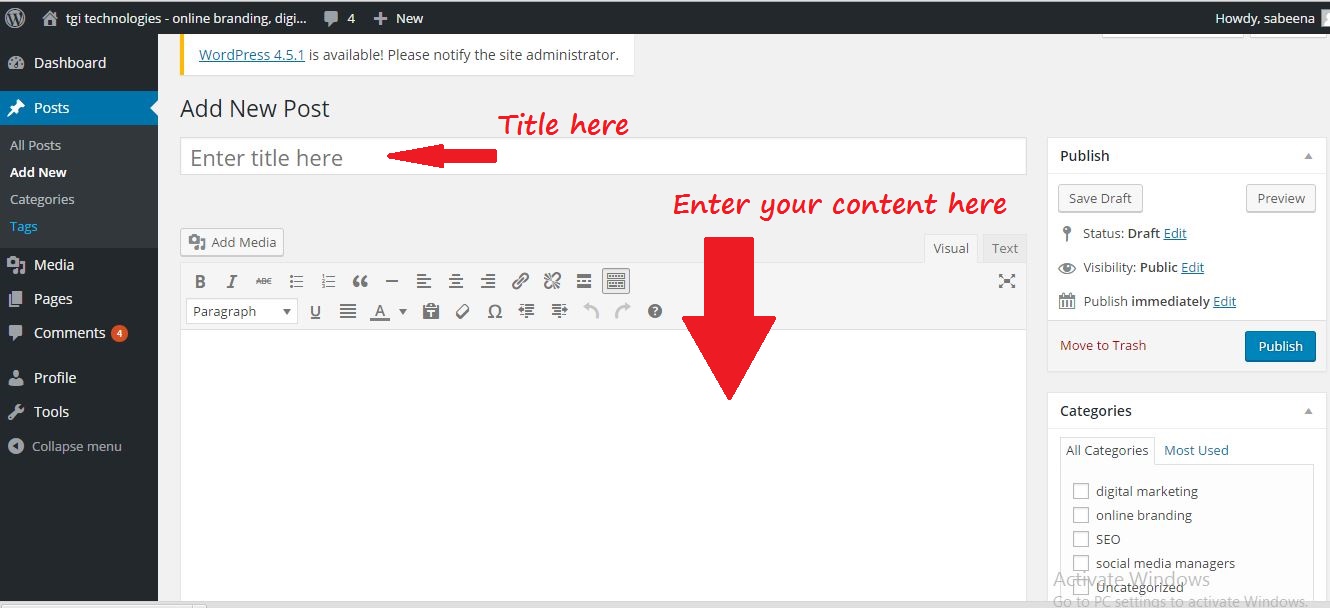

Here we first go with how to upload a WordPress blog post. Before optimizing a blog post, you should upload it and make it live.

Uploading Blog Post

1. After log in to your site you may enter to your dashboard. There you can see the “Post” option click on it and select “Add New”.

2. Now you enter into a page where you can start your blog post. Give a title to your post in “Enter  title here”.

3. Under that section you can start your blog. Content can be directly enter into the blog post and  publish it or make it as a draft if you are not ready to publish it. Some people write all the blog post separately in some programs(like word). Then copy paste the content once they are ready to publish.

enter content in wordpress post

4. You can add links to your post. For this select the text you want to make it hyperlink. Then click on the symbol showing the link. A small window opens and there you can add the url. Then click add link. add links and images

5. Adding images in your post is also simple. If you have images, place your cursor where you want the image. Click on “Add Media” and select “Upload Files.” After choosing your preferred settings, click “insert into post” to add your image in your blog post. Sizing and aligning your image can be done by selecting your image.

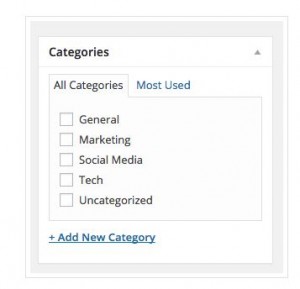
6. There is a “Categories” section on the right side of your screen. No need to categorize your post (unless your site is organized by categories), but you can add one if you wish. If you do so, WordPress will create category pages that pull in posts within that category.

categories in blog post

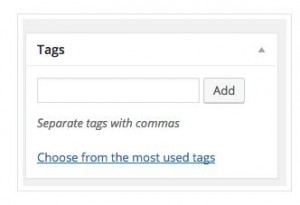
7. Under the “Categories” section, you’ll see the tags section.  You can add tags to your post here.

tags

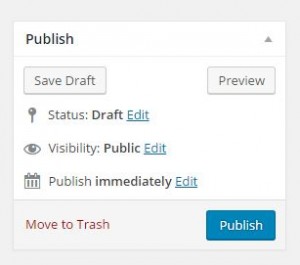
8. On the right side up there is a section called “Publish.” Here you can choose “Preview” to make sure everything looks right in your post before uploading it. If something doesn’t look the way you want,  just edit that section.

create blog post

Basic Optimization Tips

As an SEO you should focus on the blog post optimization. There are so many things you have to consider while go for optimization. Usually WordPress offers Plugins to optimize your post. In SEO perspective the best Plugin is Yoast SEO.

Yoast SEO is one of the popular Plugin available. In Yoast SEO you have the option to add SEO title, Meta description and also option to edit the post URL and so on. You can also share your post through this. I will share the detailed description about Yoast SEO in my next post.

Now we can go through some basic tips on optimization other than plugins.

  1. <h1> is the most important tag in your post. Usually people add more than one <h1> in their post.  In blog posts the title you entered will automatically work as <h1>. So make sure that your post has only one <h1>.
  2. Blog should be not less than 300 words.
  3. Title of your post should include main focusing keyword. Include 50- 60 characters in your post title.
  4. Include Alt tags for your image. This tag describes what the image is about. Try to include keywords on this alt tag.  There are various ways to add alt tags for your image, but it all comes down with whether you are using the visual editor or the text editor. visual or text editorVisual: Click on the image you want to add alt text, and click on the “Edit” icon. Add your alt text in the “Alternative Text” field. Make sure to click on “Update” after.                           Text: Simply add the alt=“” snippet of code inside the image tag. For example :
    <img src="http://www.domain.com/images/1" alt="describe image">

If everything is complete you can publish your post. Sometimes you should find some mistake after publishing the post. If it happends just go to the edit section and clear out the problems and click on “update”.