

Here we’ll cover the nine best tools out there for performing keyword research for your website content. Before we get started though, let’s briefly go over two important things to consider as you do your research: relevance and (if applicable) location.
Relevance is the most important factor to consider when choosing the right keywords for SEO. Why? Because the more specific you are, the better.
For instance, if you own a company that installs swimming pools, it’s likely that you’d attract more qualified prospects by targeting a keyword such as “fiberglass in-ground pool installation,” rather than “swimming pools.” That’s because there’s a good chance that someone searching for “fiberglass in-ground pool installation” is looking for information on installation or someone to perform the installation … and that could be you!
Sure, optimizing for “swimming pools” has its place. But there’s no doubt that this keyword will attract a much more generic audience that may not be looking for what you have to offer. Go for the relevant, long-tail keywords instead.
Another major factor to consider when optimizing for the right keywords is location-based searches. When looking for contractors and services in their specific area, search engine users will usually include their location in the search. So, “fiberglass in-ground pool installation” becomes “fiberglass in-ground pool installation in Boston, MA.”
If you operate in one geo-location, you may want to consider adding location-based keywords to all of your pages, since traffic from other locations isn’t going to be very much help to you. If your business operates in several geo-locations, it is also a wise choice to create a separate web page dedicated to each location so you can make sure your brand is present when people are searching for individual locations.
Now, how do you choose the right keywords for your business? We certainly don’t recommend guessing, for obvious reasons. Instead, there are many ways to research and find long-tail keywords that are right for your business.
Here are nine awesome free and paid keyword research tools you can use to quickly and easily identify strong long-tail keywords for your SEO campaign.
Google has a few tools that make it easy to conduct keyword research, and their free AdWords tool called Keyword Planner is a great place to start — especially if you use AdWords for some of your campaigns. (Note: You’ll need to set up an AdWords account to use Keyword Planner, but that doesn’t mean you have to create an ad.)
When you input one keyword, multiple keywords, or even your website address into Keyword Planner, Google will spit out a list of related keywords along with simple metrics to gauge how fierce the competition is around each one and how many searches it gets on both a global and local search level.
It’ll also show you historical statistics and information on how a list of keywords might perform — and it’ll create a new keyword list by multiplying several lists of keywords together. Since it’s a free AdWords tool, it can also help you choose competitive bids and budgets to use with your AdWords campaigns.
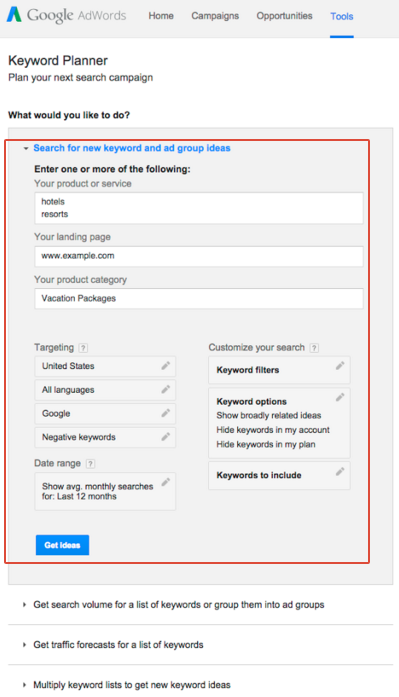
Image Credit: Google
Unfortunately, when Google transitioned from Keyword Tool to Keyword Planner, they stripped out a lot of the more interesting functionality — but you can make up for it somewhat if you take the information you learn from Keyword Planner and use Google Trends to fill in some blanks.
Which brings me to the next tool …
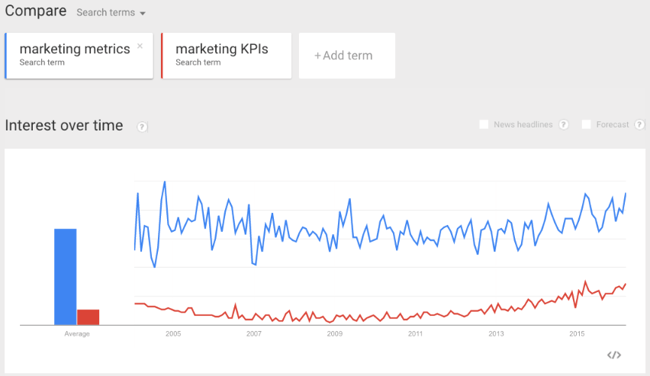
Google Trends is another free tool from Google. It lets you enter multiple keywords and filter by location, search history, and category. Once you enter that information in, it’ll give you results that show how much web interest there is around a particular keyword, what caused the interest (e.g., press coverage), and where the traffic is coming from — along with similar keywords.
The best part about Google Trends is that it doesn’t just give you static keyword volume numbers like most keyword research tools. Instead, it generates colorful, interactive graphs that you can play with, download, and even embed on your website. It’ll also give you more dynamic insight into a keyword with information like relative popularity of a search term over time.
Interestingly, its data doesn’t include in repeated queries from a single user over a short period of time, which makes results cleaner. It also groups together searches that it infers to mean the same thing, like misspellings.
One way to use Google Trends? If you’re trying to decide between two keyword variations for your latest blog post title. Simply perform a quick comparison search in Google Trends to see which one is getting searched more often.
Keyword Tool is pretty rudimentary online keyword research tool, but if you’re just looking for a list of long-tail keyword suggestions related to one you already have in mind, then it can be useful. It’s also totally free — to use the most basic version, you don’t even need to create an account.
What Keyword Tool does is use Google Autocomplete to generate a list of relevant long-tail keywords suggestions. The search terms suggested by Google Autocomplete are based on a few different factors, like how often users were searching for a particular term in the past.
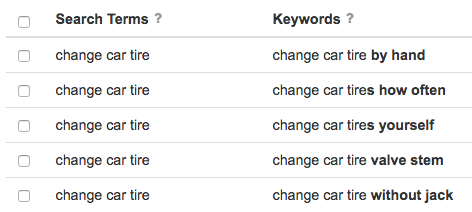
This type of suggestion tool can help you understand what people are searching for around your topics. For example, bloggers might use a tool like this to brainstorm blog post titles that’ll do well in search.
Again, all the free version does for you is generate other keyword suggestions in alphabetical order — it doesn’t tell you anything about search volume or cost-per-click (CPC). To get that information, you’ll have to upgrade to Keyword Tool Pro. The Pro version will also let you export the keywords and use them for content creation, search engine optimization, CPC/PPC, or other marketing activities.
Term Explorer offers probably the deepest research reports of any keyword research tool on the market. From one single seed term, you can get over 10,000 keyword variations.
Best of all, the tool does a great job of keeping the results as relevant as possible and pulling through lots of supporting metrics with them.
It’ll give you data for all the results on page one of search engine results pages (SERPs), including the number of results, link strength, trust score, and keyword difficulty. To help you get a handle on your competitors, you can use the tool to research domain age, page ranking, and links, as well as the word count, page rank, links, outbound links, and the number of keyword occurrences in title, URL, and headers for individual webpages. You can also export all this data into a CSV for your own analysis.
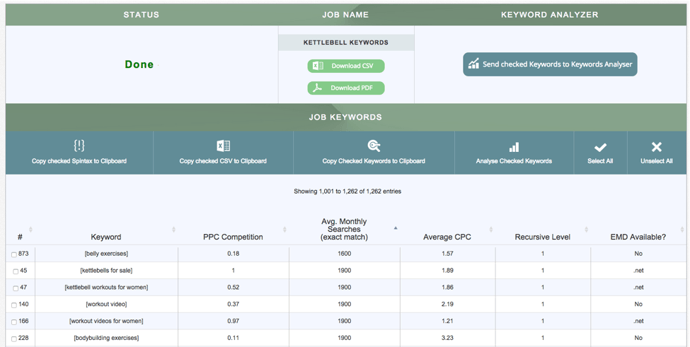
Image Credit: Term Explorer
Note: If you only plan on using it a few times a day, there is actually a free version of this tool that’ll do five tiny keyword jobs and five keyword analyses per day, with no queue priority.
The keyword difficulty tool from Moz is one of the most useful components of their paid suite. It’s a fantastic resource for analyzing the competitiveness of a keyword and for unearthing low-hanging fruit.
When you input a keyword into this tool, it’ll find the top 10 rankings for that keyword. Then, it’ll assign that keyword a “Difficulty Score” based on the pages that currently rank for that word. You can look at search volume data for your keywords, then pull up the SERP to see the top 10 results for each term.
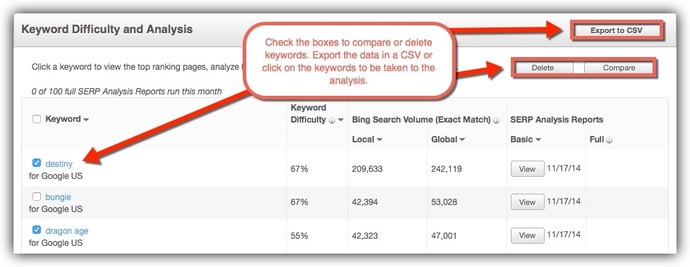
Image Credit: Moz
Want to do some competitive keyword analysis? You can use the tool to see who else is ranking for your targeted keywords, along with information like each site’s page authority and the number of root domains linking to their page.
You can also export all this data into a CSV for your own analysis.
SEMrush is a competitive research tool that lets you keep an eye on on your competitors’ keywords to find opportunities to bump them out for a top position in Google’s and Bing’s organic search results. You can compare a number of domains against one another to evaluate the competitive landscape, including their common keywords and positions in Google’s organic, paid, and shopping search results.
Position tracking is kind of like a sophisticated version of Google Trends, letting you see a keyword’s position in SERPs and analyze the history of rises and drops. Their colorful, visual charts are also super helpful for more quickly understanding trends and analyzing results.
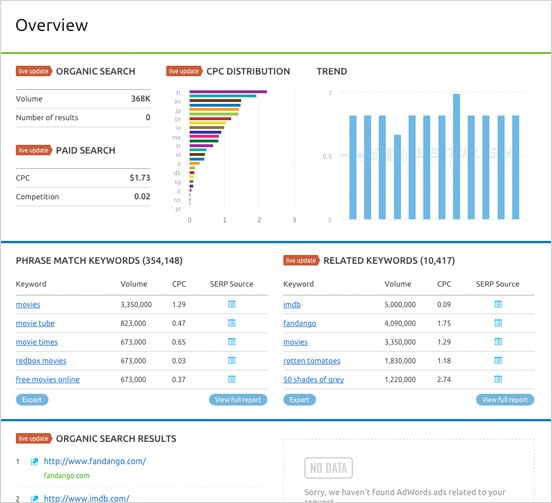
Image Credit: SEMrush
Position Explorer is similar to SEMrush, but with some added bonuses — and a much more intuitive design.
For example, the Site Explorer part of the tool will let you find the URL rating and domain rating for any website you put in there, along with number of backlinks, number of referring domains, and social metrics for Google+, Facebook, and Twitter. It’s also great for finding link targets: You can use it to get a quick analysis of a site, and you can also use its extensive index when you want to do a deeper dive.
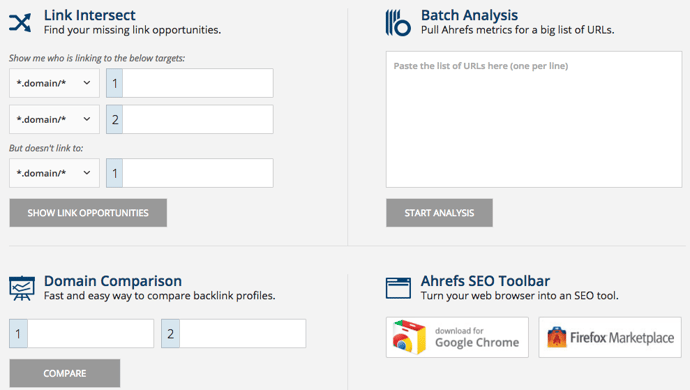
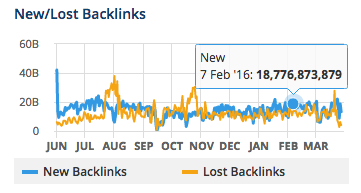
Ahrefs’ user interface is a big plus. It’s not just black-and-white tables filled with numbers; instead, you’ll get colorful, interactive charts of things like number of indexed pages, internal and external backlinks, new vs. lost backlinks — all over time.
Brian Dean, founder of Backlinko, say that Ahrefs is his #1 go-to tool for backlink analysis: “I’ve tested over 25 link analysis tools and none come close to Ahref’s in terms of index size, freshness, and overall usability.”
The Position Explorer part of the tool lets you find keyword opportunities where your competitors are ranking, while also giving you a ton of extra link metrics that help you determine keyword competitiveness. And the Content Explorer lets you browse through the most shared content for any topic.
Accuranker is a keyword rank tracking tool with a key differentiator: It’s lightning fast while being extremely precise. So if you’re used to spending hours monitoring the rank progression of your keywords, this’ll end up saving you a ton of time.
Other advantages of this tool? It has built-in proxies to get a quick glance at whose ranking within the SERPs for any given keyword. If you plan to report keyword metrics to your manager or your team, you’ll like its scheduled weekly reports features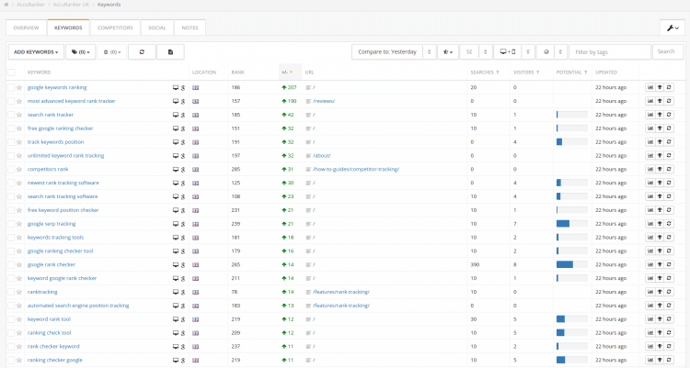
It’s also one of the best rank trackers out there that offers highly localized search engine rankings for your keywords. So if you’re marketing your business to an international audience, it’s a great tool for analyzing which pages are ranking in different countries.
Finally, it has integrations available with Google Analytics, Google Search Console, Social Monitoring, and YouTube so you can keep an eye on statistics and estimated search traffic for your keywords straight from your AccuRanker dashboard.
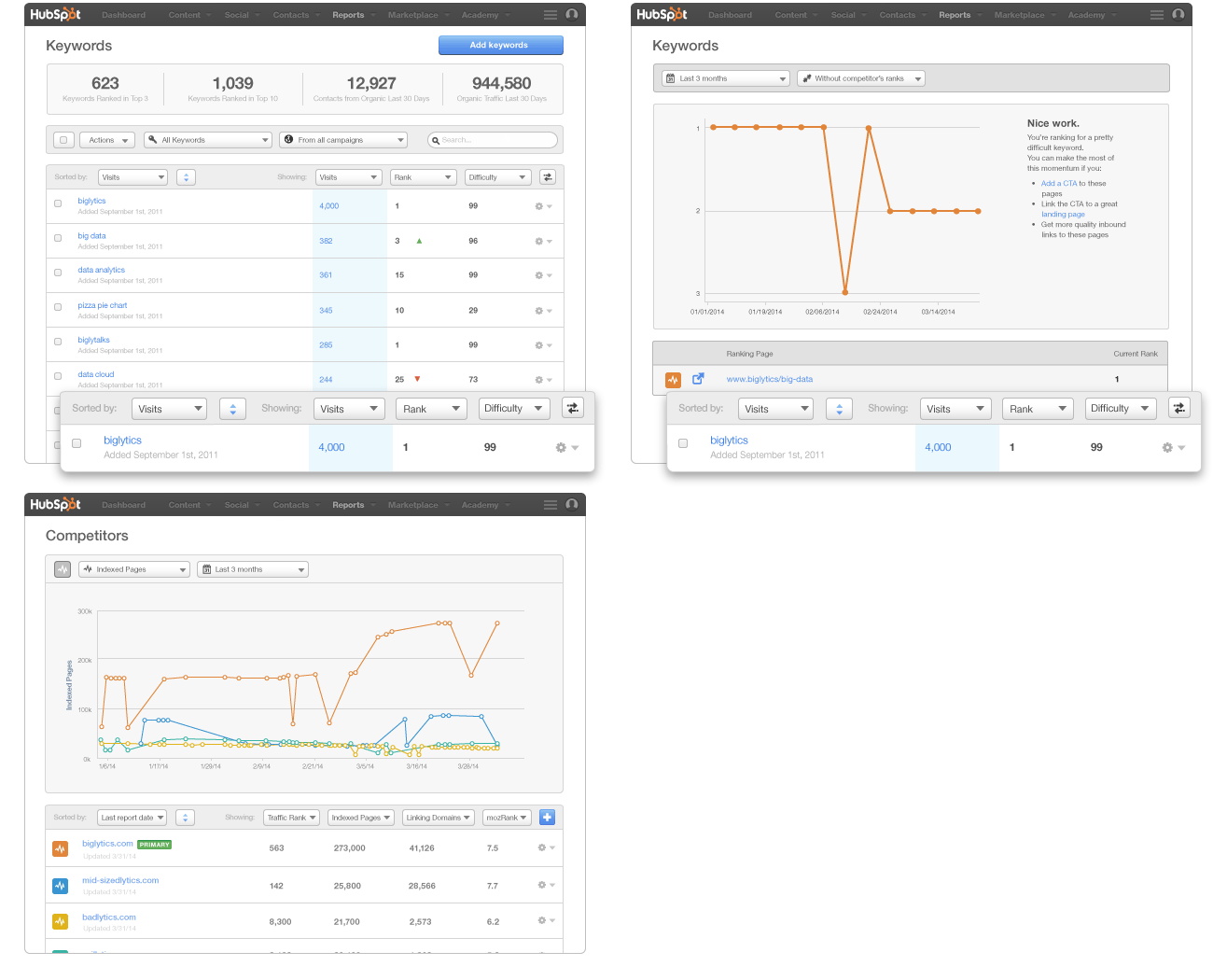
HubSpot also has its very own Keywords Tool within the software. The Keywords Tool helps you research keywords, identify the best keywords for optimizing your site, and track results from each one. This tracking feature allows you to see which keywords are actually driving traffic and leads, so you can use this information to continue optimizing your keywords over time.
The tool will also show you how your competitors rank for specific keywords, and help you monitor and build high quality inbound links.
(HubSpot customers: You can access the Keyword Tool in HubSpot by clicking here or going to Reports > Keywords.)
Now that you know about all these great tools, get out there and start discovering your best keywords for SEO.
Google Analytics provides some great reports to work with out of the box, but the ability to customize and build your own reports from scratch is what allows marketers to gain truly valuable insights from the tool.
Not only is this a huge time saver, it’s also a great way to get ideas for reports you might not otherwise think to create. After all, you’ve got access to the templates and systems that some of the best thinkers in analytics use on a day-to-day basis, and you can customize them even further according to your needs!
One of the most common money leaks on websites is incompatibility with certain browsers. He suggests creating a custom report showing conversions per browser and segmenting the report by device (mobile, desktop, tablet) so as not to skew your numbers.
Search Engine Watch links to a similar pre-made report in their list of time-saving custom reports. If you’re not selling products on your site you can swap out Revenue and Unique Purchases for conversion and goal value-related metrics. And don’t forget to segment by device!

This report was to organize key methods that reveal the performance of each stream of traffic to a website. You’ll see total sessions, unique users, new users, goal conversion rate and goal value per session, all organized by source and medium.
The report reveals how behavior varies between new and returning users in terms of overall traffic, conversion patterns and event completion.
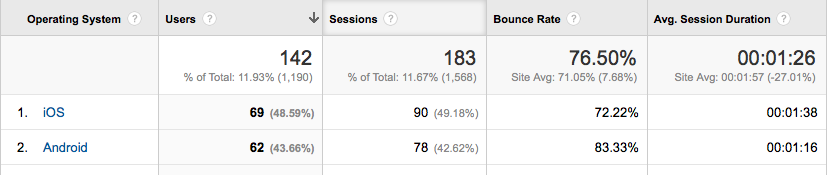
This report is ideal for understanding how well your site is optimized for mobile and where you need to make improvements. For example, the site pictured below has a super-high bounce rate for Android; the site’s developers have got some work to do!
The report is part of a bundle of dashboards and reports created by Avinash Kaushik. >> Get it here.
It instantly provides details about problematic pages that need your attention. You’ll discover which pages are taking extra long to load as well as which have an uncomfortably-high bounce rate.
Rachelle recommends that you switch from the “data” table view to the “comparison” table view in order to compare load time to bounce rate; this allows you to view the bounce rate for each page against the site average.
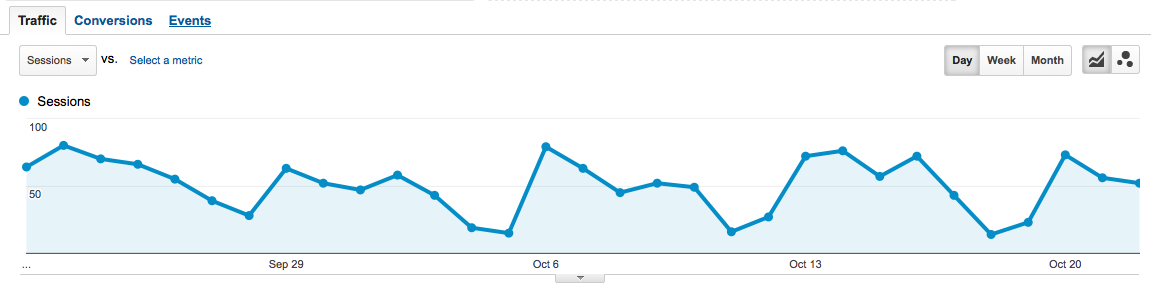
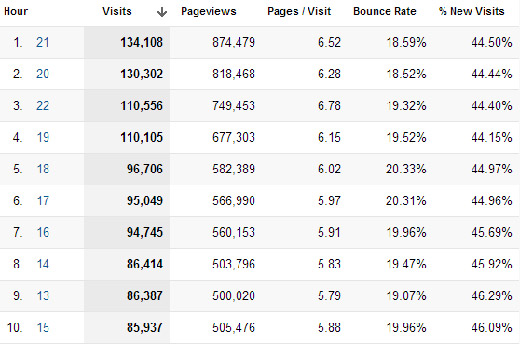
The Hours & Days Report shows you which day of the week and at what time of the day your website receives the most traffic. If you set a large time span––say a couple of months––you can use this data to guide experiments with blog post times.
Great for identifying the referring sites that provide the most value. It tells you not only which referring sites are generating the most traffic but also how they’re contributing to goal conversions.
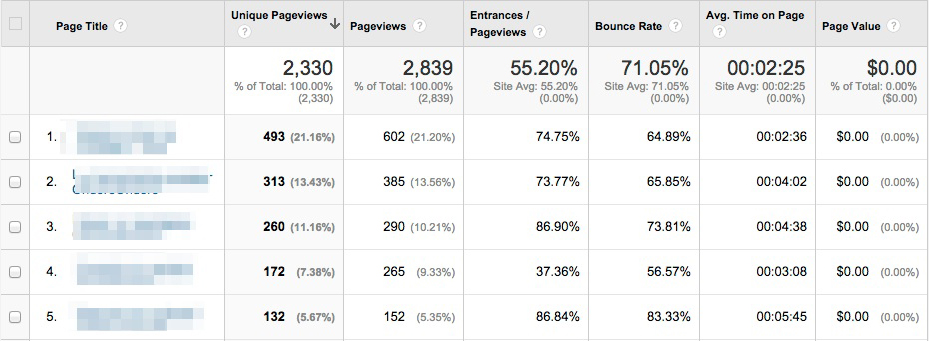
This report to focus on key metrics that will help you identify which pages are performing the best and which need a little optimization. It’s especially useful for sites that produce a lot of content; as, it can help marketers answer important questions like:
This report shows you not only which social media channels are driving the most traffic to your site but also whether or not that traffic is translating into tangible results for your business. Metrics like Goal Conversion Rate and Goal Value will tell you which social media sites you should pay more attention to.
This one comes with the Google Analytics starter bundle, and it’s a great way to gauge the effectiveness of your link building efforts and track the top referring links to your website. The “Referral Path” column will tell you exactly which page your links are coming from (not just which website). Bounce Rate and Avg. Session Duration will indicate which links are high-quality, and Per Session Value will tell you which links are generating real business results
The Google Organic Insights Custom Report provides insights for your “(not provided)” keywords. Showing the landing page URLs along with their page titles gives you a sense of the general keyword themes that people are searching for on Google before arriving at your site.
This report, which I found via Econsultancy, lists your most popular keywords (excluding the ones encrypted by Google, of course) alongside visitor metrics, conversion rates, goal completions and page load time for each one. There’s also a tab measuring engagement for each keyword, which is interesting for content marketers, and a tab showing revenue metrics.
Installing these Custom Reports templates and then personalizing them even further according to your needs will save you time and most likely reveal insights about your data that you hadn’t expected. Now I’d like to hear from you: Did I miss any of your favorite Custom Reports? Let me know in the comments below.

Google and Siri started voice search, but Amazon’s Echo really got the ball rolling. When it was launched in 2015, it was seen as a fun voice recognition that everyone would want for a few months before forgetting all about it.
No surprise, then that Google has been quick to join the fray, with the launch of Google Home, to build on Google Voice already on Android. And of course, there is the iPhone’s Siri and Microsoft Cortana.
Single page websites going popular right now. Most of the companies are choosing them over elaborate multi-page sites to meet the needs of their businesses. But does the design of your website impact your SEO? Could a single page site actually hurt your chances of ranking with Google? Below, we’ve explored some of the pros and cons of single page sites and how the simple format could potentially impact your SEO.
For some, writing for SEO purposes and writing to attract and captivate your audience could seem two contradictory goals. I totally disagree with this. Indeed, if you not only want a good but also an SEO-friendly blog post, the words you want to be found on should be in a very prominent place. But, using your keywords too often severely damages the readability of your text.
In post, I would like to give some tips on writing blog posts that are both very readable as well as SEO-friendly. I genuinely think those two goals should (and easily can!) go hand in hand.
Before anything, your blog post just has to be a good piece of writing! A lot of bloggers just begin to write when creating a new blog post. They just type what comes to mind. For some, this may be sufficient because they are natural writing talents. Others might need some help. I always follow the next set of ‘rules’ myself.
Think deeply about the message of your text. What do you want to tell to readers or which central question do you want to ask? What’s the purpose of your text? And what do you want your readers to do at the end of the page? Write down the answers to these questions before you begin writing.
Start your post with creating a clear structure. Every post should have:
Write down what you want to write in all these three sections. You now have a kind of summary of your post. The real writing can begin.