26Apr

Google Analytics 4 Migration Guide: Best Practices for a Smooth Transition

Google Analytics 4 (GA4) is the latest version of Google Analytics, which offers a more comprehensive and sophisticated set of features compared to its predecessor, Universal Analytics. As a result, many businesses are choosing to migrate their website tracking from Universal Analytics to GA4 to take advantage of its enhanced capabilities.

But in order to achieve a smooth transition, migrating to GA4 can be a challenging process that needs careful planning and execution. In this guide, we will explore some best practices that can help you migrate to GA4 successfully, including how to prepare for the migration, how to set up your GA4 account, and how to ensure your data is accurately tracked and reported. By following these best practices, you can ensure a seamless transition to GA4 and take advantage of its advanced features to gain valuable insights into your website’s performance.

Best Practices for a Smooth Transition

  • Review your current Universal Analytics setup: Before starting the migration process, review your current Universal Analytics setup, including your goals, events, and custom dimensions. This will help you identify what needs to be migrated and what can be left behind.


  • Create a new GA4 property: Start by creating a new GA4 property within your Google Analytics account. This will allow you to start collecting data and testing the new features of GA4 without affecting your existing Universal Analytics data. Digital marketing in Kochi,  Kerala. 


  • Implement GA4 tracking code: Once you’ve created a new GA4 property, implement the GA4 tracking code on your website. This will allow you to start collecting data in your GA4 property and ensure that your tracking is working correctly.


  • Set up data streams: Set up data streams for each platform or device you want to track, such as your website, mobile app, or other digital properties. This will help you to collect data across all your digital properties in one place.


  • Configure data settings: Configure data settings such as data retention, data sharing, and data deletion to ensure that you comply with relevant data privacy regulations and to manage your data effectively.


  • Configure events and conversions: Set up events and conversions in your GA4 property, such as button clicks, form submissions, and purchases. This will help you track user behavior and measure the success of your marketing campaigns.


  • Verify data accuracy: Verify that data is being collected accurately by comparing the data in GA4 to the data in Universal Analytics. This will help you identify any discrepancies and ensure that your data is accurate.


  • Test and iterate: Test and iterate on your GA4 setup to ensure that it is working correctly and providing you with the data and insights you need. Continuously review your data and update your configuration as needed.


By following these best practices, you can ensure a smooth transition to GA4 and take advantage of its new features and capabilities. Digital marketing services in Kochi are more relevant and Provides best service for you. By the way for a smooth transition from Google we can easily appear that too. 

13Mar

Artificial Intelligence in Digital Marketing

In the last five years, artificial intelligence improved a lot especially the method marketers interact with customers. It became easier to target and arrange marketing campaigns as they got access to the customer’s data and much more advanced technology.

AI (Artificial Intelligence) is one of the factors which help to improve various sections of digital marketing. 50% of digitally stable organizations with advanced digital practice described the AI method and mostly 85% of business executives say that AI helps the company to become successful in the competitive advantage.

Artificial Intelligence shows the human role in marketing trends. The brand and marketers use AI to improve the experience of the customers and to spend less time and resources through digital marketing services. With the help of AI, it is easy to gain customers, improve sales and move applicable in traffic, and keep the present customers.

The major intention of AI is to make human life easier with the help of daily tasks like a personal assistant. This is the same in digital marketing. 

Some applications of AI in digital marketing:

Personalization

The machines can understand the behaviour and the choice of the users. The future of AI in digital marketing is around personalization. The choice or the liking of the customer will be helpful, so they can interact with similar products. This also helps to take users to customized sales. For more clearance, you can see recommendations on your shopping that on your preference. They get to know about what customers like and give more content on your likings.

Chatbots

Chatbots is to stimulate conversation with human users. They are the greatest example of AI technology. It is more like a virtual tutor, like when you asked Alexa or Siri to play your favorite movie or to set a timer.

Chatbots make the response to potential users who frequently ask questions, they even provide links to search for the product or the services they want. They were able to talk like humans. The bots are in a natural learning method and the system tries to find the correct one.

The brand selects a few users to have a live call with the customer service representative after the automatic response The best feature is the 24-hour services in the whole week. Many digital marketers consider it as a way to give customized customer services, which is slightly related to digital marketing not straight to the marketing function. It also helps to lead the customer to purchase.

Digital Advertising

It is the section in which AI successfully works. The use of digital marketing in online platforms like Facebook, Instagram, etc.. makes for a great experience. These platforms have personal information like gender, age, likes, and more which help to show the applicable ads for the increase of digital advertisements.

It seems like spending a huge amount on digital ads. With the help of AI, marketers can identify micro trends and sometimes can predict trends. So it can make plans to see where to spend its budget and what they are targeting.

Then they can lessen their spending on digital ads that are for no gain and make sure to spend it for the best results, Only the right audience can make a success in a marketing campaign. With AI, it seems easy to get the user’s information and predict future changes. By this, brands can make ads as their user’s choice.

E-Mail Marketing

It is one of the effective marketing methods. Around 61% of people used to get promotional emails. In other words, it can create higher conversion than any other method. Customization is what every marketer aims for, AI uses the data collected from the user and makes personalized emails to the user based on their last interaction. It can be done on the base of the wish list or the page they mostly interact with and more. If the user goes to the content with your link or the user skips your link and directly goes to the content, AI can send separate mail on your likes.

Once the system understands your data and creates a few questions like which time the user comes, continuous marketing campaigns, the content which can get the user’s attention, and which title and email can create more clicks. AI came to know all about the customer and sent customized mail to everyone. 

Enhanced Shopping Experience

AI in digital marketing has the power to change the way that we shop. Brands try many versions of AI to increase the shopping experience. Before buying a product, you can try it rather than browsing again and again. If you provide a good user experience users will spend time on your site.

AI will make amazing changes to your brand. With the use of AI strategies, you can improve the customer’s experience and you can market your brand systematically. If you understand how these features work it will be beneficial to your brand as it is going to lead soon.

Artificial Intelligence makes marketers advantageous; it shows solutions to their business problems and also saves money. Follow up Digital Marketing Agency in Kerala for more.


20Feb

Everything you need to know about ChatGPT

Chat GPT, or Generative Pre-trained Transformer, is a type of language model that has gained a lot of attention in recent years. Developed by OpenAI, GPT uses deep learning techniques to understand and generate human-like language. In this blog, we’ll take a closer look at what Chat GPT is, how it works, and its potential applications. 
 
What is Chat GPT? 
 
Chat GPT is a type of artificial intelligence model that uses natural language processing to understand and generate human-like language. It is based on the Transformer architecture, which was first introduced by Google in 2017. The Transformer architecture uses a self-attention mechanism to process input sequences and generate output sequences. Chat GPT takes this one step further by pre-training the model on large amounts of text data, allowing it to generate more accurate and coherent language. 
 
How does Chat GPT work? 
 
Chat GPT works by processing input text and generating output text based on the patterns it has learned from pre-training. The model is first trained on a large corpus of text data, such as the entire English Wikipedia or a large dataset of books. During training, the model learns to predict the next word in a sequence based on the previous words in the sequence. This pre-training allows the model to learn patterns and structures in language that it can then use to generate new text. 
 
Once the model has been pre-trained, it can be fine-tuned on specific tasks, such as question answering or language translation. During fine-tuning, the model is trained on a smaller dataset that is relevant to the current job. The model then uses the patterns it learned during pre-training to generate output text that is relevant to the specific task. 
 
Applications of Chat GPT 
 
There are numerous potential uses for Chat GPT, including: 
 
Chatbots: Chatbots are computer programs that can engage in conversation with humans. Chat GPT can be used to train chatbots that can understand and generate human-like language. 
 
Language translation: Chat GPT can be fine-tuned on language translation tasks, allowing it to translate text from one language to another. 
 
Content creation: Chat GPT can be used to generate content for websites, social media, and other platforms. 
 
Question answering: Chat GPT can be fine-tuned on question answering tasks, allowing it to answer questions based on a given input. 
 
Conclusion 
 
Chat GPT is a powerful language model that has the potential to transform the way we interact with computers. By understanding and generating human-like language, Chat GPT can be used for a wide range of applications, from chatbots to language translation. As the field of natural language processing continues to advance, we can expect Chat GPT and other language models to become even more sophisticated and powerful. 

22Aug

iPhone 14: everything you need to know

As we all know iPhone is a well-established brand during this time. As their iPhone 13 was hugely popular, as it is considered one of the best in the market.

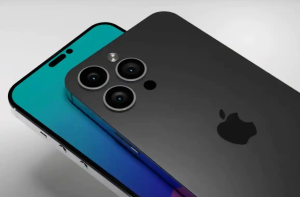
iPhone is coming out with a new launch of iPhone 14, in fact these aren’t rumors. It is a more exciting upgrade of iPhone 13. The new upgrades as of now is its redesign, removal of face id notch and they improvised their camera set up too.

Now we are going to discuss about the new iPhone release

iPhone had officially unveiled their iPhone 13 in September 2021; hence it is quite some time since they released a new idea. There aren’t any solid or satisfying dates mentioned. But iPhone releases tend to happen during the month of September . So, with that in mind we could actually assume that their new iPhone 14 release will be in September 2022.
Now we can think about when in September? As apple haven’t revealed about the confirmed date, but since iPhone 13 was announced on 14th September 2021 and iPhone 11 was announced on 12th of September 2019. It is a common talk that apple tends to release it on Tuesdays and probably second week of September.

iPhone 14 design

If you are an apple follower, you might have already guessed the design of the launch. iPhone 14 is going to look more like the departure than the iPhone 13 was. As we know that iPhone 13 is one of the best phones availableiphone 14 design in the market. And iPhone 14 is an incremental upgrade of what we have in iPhone 13. Since apple is facing competition from other famous brands in the field like Samsung and newcomers in the field like the phone nothing. It might seem like the company apple is aiming to bring out more noteworthy product to the market.

If you have guessed the design, then you are right, it’s the notch. Many of the users of apple have decried with the infamous iPhone notch which was introduced in the beginning with the iPhone X, ever since then it has been the same in all the subsequent iPhone models. Notch is not only for aesthetics but also for the face id to work. There is also a rumour that notch has been removed for the upcoming iPhone 14, in favour of the punch hole camera.

iPhone 14 display

A smartphone display level shows you a lot about the handset you hold. iPhone 13 screens have turned out to be the strength of apples current smartphone line-up. Always iPhone stands out from this because of their colourful screen and adaptive 120Hz which brings it to the next level. It also implies apples pro phones can adjust to their fast-changing displays refreshes. As far as now rumours have come up with a picture of more or less than iPhone 13. But you will find some exciting enhancements to the iPhone 14 displays that can be taken as noticeable improvements. It is because of the competitor’s pressure that iPhone has taken seriously about the display upgrade for their own handset. The iPhone 14, iPhone 14 pro and iPhone 14 pro max keeps the 6.7-inch screen size featured same like the iPhone 13 pro max. one of the expected change in the iPhone 14 pro display is they are tipped to lose the notch, it has been there ever since after the debut of iPhone x in 2017. And there are two cut outs to house the front camera and face id sensors. This can free up little extra space on both phones.

iPhone 14 camera

iPhone 14 will be in here in just a few weeks. As always camera is a big question, it has been a talk that iPhone 14 pro will have 48 MP wide camera for the first time ever in the history of iPhone. It is a massive change from standard 12 MP camera to 48MP camera. This actually means you can take sharper pictures and 8K videos. Everyone who upgraded from the iPhone 12 pro to the iPhone 13 pro got a bigger bump camera. It is expected that this time iPhone 14 camera array is expected to get much bigger.


Follow TGI Technologies , to get updated about the latest trends and news in the digital world.


19Jul

Google’s Mobile first indexing Explained

Google’s mobile-first indexing uses the mobile version of a given content for indexing and ranking. Earlier, the index used the desktop version of the page’s content when evaluating the relevance of a page to the user’s query. Now, since a majority of users access Google Search with a mobile, Google indexes the page with the smartphone agent going forward.

Since July 1, 2019, mobile-first indexing was enabled as default for all new websites. For older or existing websites, pages are continuously monitored and evaluated based on the practices detailed in the guide. Google informs site owners in the Search Console of the date when their sites were switched to mobile-first indexing.

Mobile-first indexing just means that Google uses the mobile version of the webpage for ranking and indexing. That is, if your website has both desktop and mobile URLs, Google presents the desktop URL to desktop users and mobile URL to mobile users. The indexed content, however, will be the mobile version.

MOBILE-FIRST INDEXING AS DEFAULT FOR NEW WEBSITES

Websites published after July 1, 2019, have mobile-first indexing enabled by default. This announcement was made by Google in May 2019 and further explained that the change applied to websites were previously unknown to Google Search. The reason why Google made mobile-first indexing default for new websites were detailed in the announcement.

MAKING MOBILE AND DESKTOP EXPERIENCES THE SAME

An emphasis on providing a similar experience on mobile and desktop was added to mobile-first indexing’s best practices on January 2020. A summarized list of what was meant by providing a similar experience is given below:

  • Ensuring access to desktop and mobile page content and resources to Googlebot.
  • Ensuring that both mobile and desktop content are the same.
  • Using meta robot tags on mobile and desktop site.
  • Using the same headings on mobile and desktop sites
  • Ensuring that mobile and desktop sites have the same structured data.

Google warns that a purposeful lack of content on the mobile version of a page than the desktop version will likely cause a drop in traffic. According to Google, the users wouldn’t be able to access much information from the page as before, that is, while using the desktop version. Instead, it is recommended that the primary content be the same on both the mobile and desktop pages, including the headings.

BEST PRACTICES OF GOOGLE’S MOBILE-FIRST INDEXING

A comprehensive list regarding the best practices of mobile-first indexing by Google is given below. Most of the information given in the list isn’t really new. The list itself is a compilation of recommendations and advice provided by Google over the years. In addition to recommendations regarding the creation of similar experiences on both mobile and desktop pages, the list also includes:

  • Ensuring that the error page status remains the same for both mobile and desktop pages.
  • Avoiding fragmented URLs on mobile version.
  • Ensuring desktop pages and mobile pages are equivalent.
  • Verifying desktop and mobile sites on Search Console.
  • Checking the hreflang links on separate mobile URLs.
  • Ensuring that the mobile site can handle an increased crawl rate.
  • Ensuring robot.txt directives are the same on desktop and mobile sites.

Google also offers an entire section on suggestions for separate URLs. In Google’s mobile-first indexing documentation, it is strongly recommended to have a mobile version of your pages, even if it isn’t required.

HOW TO IMPROVE PERFORMANCE IN GOOGLE’S MOBILE-FIRST INDEX

  1. Make sure important content is shown on all versions, if you own multiple versions

Ensure that important content- including structured data, internal links, images etc. is on the mobile version of your website. Google warns that less content on mobile page than desktop page will lead to a decrease in traffic.

  1. Letting Googlebot access and render content

It is recommended by Google to use the same meta robot tags on the mobile site, avoid lazy-loading primary content and to allow Googlebot to access your resources.

  1. Verify structured data

Check that the structured data is same on both desktop and mobile versions and make sure that the URLs are correct.

  1. Improving mobile page speed

Page speed is an important factor to consider and it has become even more important with mobile-first index and Page Experience update.

  1. Keeping an eye on mobile errors

Getting a site to perform well in the mobile-first index is not an easy task. The Search Console needs to be closely monitored so that mobile errors can be identified and fixed.


Follow TGI Technologies,  to get updated about the latest  news and informations regarding Google and Tech world.


10May

WhatsApp is rolling out some New Features!

Whatsapp is rolling out a new major update and some new features are coming on board for all whatsapp Users.

Now the Admins can delete the Messages.

Gone are the days of WhatsApp admins looking at members’ toughness as helpless. Whatsapp is changing from the old style to the new style where the admins get the power to delete messy messages.

The maximum number of group members can be doubled. With the new update, you can send an entire movie through WhatsApp if needed.

According to the Users needs the Makers are adding new features and making it available in the coming weeks at various stages.

For every single message, the users can use emoji reactions for easy communication is one the latest update WhatsApp is providing. Apart from this, these are the latest updates announced by WhatsApp.

  • The limitation of 256 members in a group will be increased to 512 members. This is to help Businesses and various organisations, because of the limitation of 256 people the same organisation had to form multiple groups.
  • With the help of the new update, If a group member posts any unwanted message the admins can delete it by long pressing the message.
  • Files upto 2 GB in size can be sent as currently 100 MB files can only be sent. With the rising limit of Files size an entire movie can be shared with others. WhatsApp also strongly protests against the misuse of Telegram, Messenger and Movie Piracy which can share large files.
  • Up to 32 people can be added to a voice call at a time, where as currently only 8 people can be added. For more than 32 people voice call, we can use the existing group system itself.

There is no need of worrying if the new updates are working even after the updating WhatsApp. In a few weeks it will reach all the lines.

Emoji Reaction Feature of WhatsApp.

Emoji reactions help the users to react individually to each message with an emoji. This feature is already available on Instagram, Facebook and Messenger Applications.

Nowadays Emoji reactions are gaining more popularity among the general public. It has become an alternative way to text-based replies primarily a nonverbal way of responding to a text message. The main benefit of using it is that it can convey emotions for a specific message.

  1. Way to get Emoji Reaction in WhatsApp.

First of all, we need to download or update the most recent version of the WhatsApp mobile application from the Google Play Store if it’s Android or from Apple App Store if it’s IOS. Even after updating the application still, you don’t see Emoji reactions on WhatsApp, it’s owing to the package update delivery is rolling out server-side. It might take only a few weeks for everyone to get this feature available.

  1. Steps to best know before reacting to a message on WhatsApp Mobile.

  • Update the most recent version of WhatsApp via google play Store or Apple App Store
  • Double-tap or Long-press on a message.
  • Six totally different emojis will appear on the screen.
  • Select from one of the reactions and click on it.
  • In the form of a notification, the emoji reaction will be sent to the user.
  • Exactly like on Instagram, The reactions will be displayed below the messages.
  1. Steps to best know before reacting to a message on WhatsApp Desktop.

  • Download the most recent version of the WhatsApp application.
  • Open up a chat.
  • Move the mouse over messages sent by others and check if an emoji icon appears near the messages.
  • Select one of the reactions from the available options and click on it.
  • In the form of a notification, the emoji reaction will be sent to the user.
  • Exactly like on Instagram, The reactions will be displayed below the messages.
  1. The six different Emoji Reactions offered by WhatsApp:

  • Thumbs Up.
  • Heart.
  • Face with tears of Joy.
  • Face with mouth Open.
  • Crying Face.
  • Person with folded hands.

WhatsApp also promised to that sooner or later the support for all the emojis and skin tones that we can typically use in messages.

  1. Platforms which offer Emoji Reactions.

  • Instagram, Facebook and Messenger are the Meta-owned applications and services that have had this feature for a while now. In these applications, the users can simply long-press or double press or simply move their mouse pointer on the message or comment to open the emoji reaction popup.
  • Zoom — allows the users to send meeting reactions. This video conferencing platform offers two options – one is the standard emojis as quick action and the other one is where the users can select any emoji as the meeting reaction.
  • Microsoft Teams – also provides the feature of Emoji reaction for teams meetings. It only offers quick reactions where the users need to hover their mouse over the message and select from the available options.
  • Google Messages — Google also recently added this feature in the Messages application and allows the user to respond to a text message by means of a standard set of emojis.
  • iMessage – Apple was the first to introduce the idea of Emoji Reactions. This quick messaging application allows the users to react to a text message using emojis by a simple long-press or double-tapping on the message.
  • Google also recently announced that the Emoji Reactions will be coming to YouTube, Docs and Meet.

Since this feature is currently in its introduction stage, it might not be available to all users. There are more than two billion users around the world who are currently using WhatsApp and it’s normal that this feature takes a few days before being accessible to all the users.