Web Analytics
11Nov

Featured Snippet

In recent years Google has been adding more and more information to the search results, aside from the organic search results, in order to improve the search experience.

What is Featured Snippet?

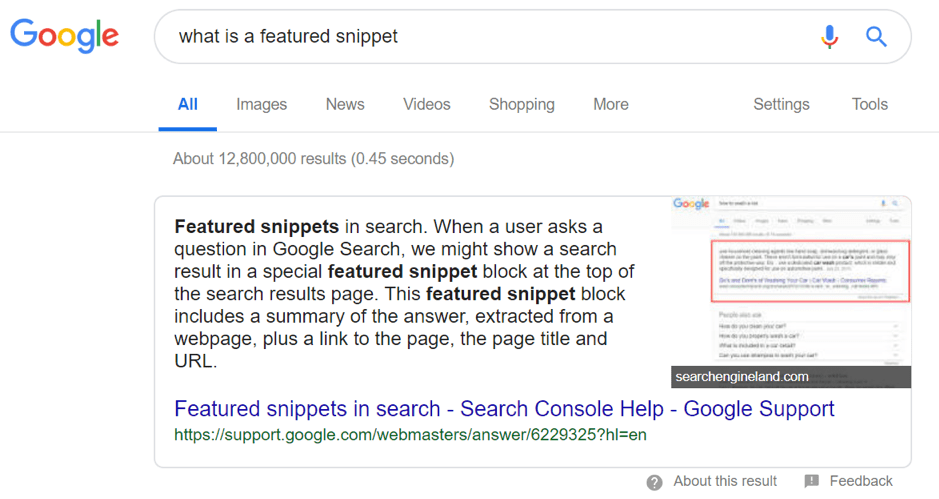
In January 2014 Google introduces the Featured Snippet format. Featured Snippet is the selected search results that are featured on top of Google’s organic results below the ads in a box.  The featured snippets are a format that aims at answering the user’s question right away.

For example, when a person searches for something Google shows results list with Normal snippets and Rich snippets.

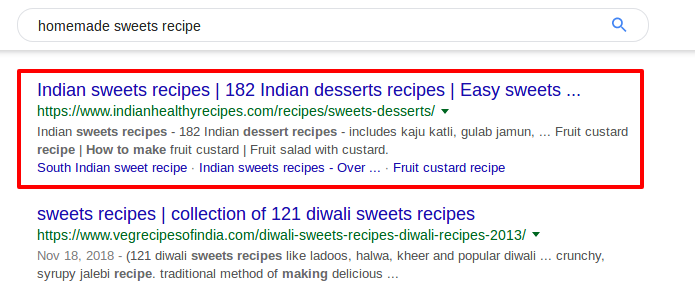
Normal Snippet
Featured Snippet format

Google shows the title in blue, URL in green and the description of what the page is about.

Rich Snippet
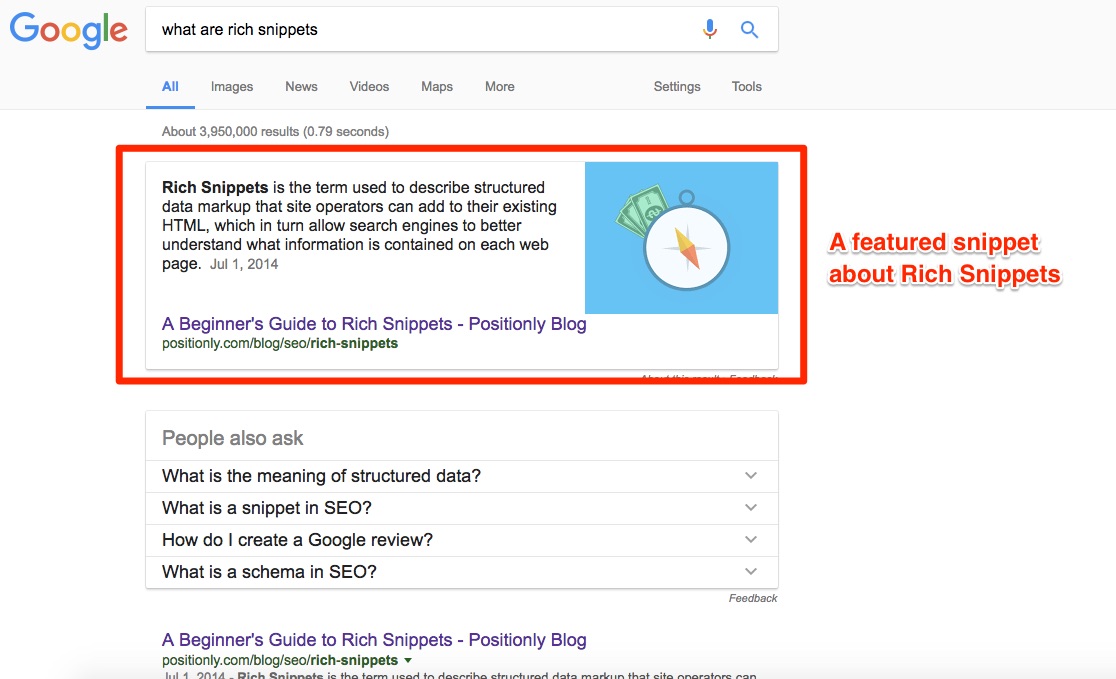
Featured Snippet formatA rich snippet contains an additional piece of information that the search engine is able to identify on the page. It helps to understand the value of the specific page. A rich snippet always contains more information than the normal snippet that’s why we call it a rich snippet.

 How rich snippet helps in the SEO platform?

At present, SEO World has been facing the same question “How to achieve the number one position in the search results?”

A rich snippet is looking much acceptable and helps to know more, just by looking at them. The rich snippet has a higher click-through rate than the normal snippet because people like to click on rich snippets. When the click-through rate of a snippet increases you will get more traffic into your website and your position in the search results will change. As many people click on your search result, Google will find out that people prefer your page more than other pages. That will definitely improve your site rankings in the Search Engine Result Page.

How to get Rich Snippet? 

If you want rich snippets on your website you can add structured data to your site. Structured data is a search engine understandable code within a specific format. Search engines read the code and use it to create rich snippets.

Types of Featured Snippets

Generally, featured snippets are in three formats.

  • Paragraph Snippets
  • List Snippets
  • Table Snippets

Paragraph Snippets

Featured Snippet format

Paragraph featured snippets are most common, with about 82% of featured snippets are in this format. In this type of featured snippet, Google uses the source page text for answering searcher’s questions.

List Snippets

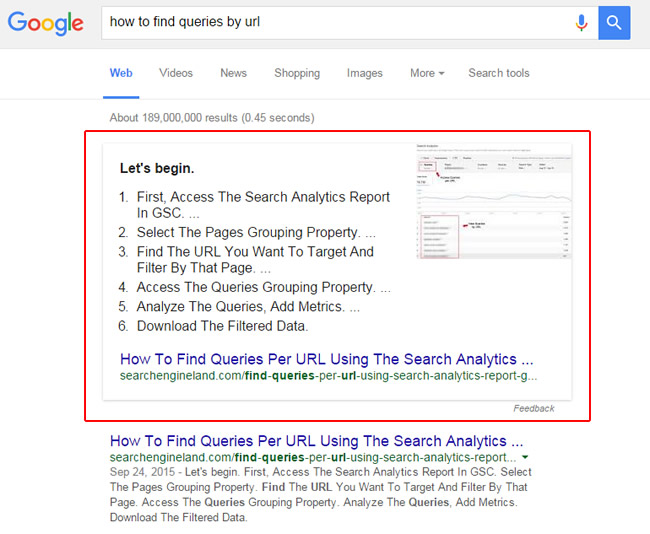
The list snippets are categorized into two: Numbered list featured snippet and Bulleted list featured snippet.

  • Numbered List Featured Snippet

Featured Snippet format

In this numbered list featured snippet the list of items presented in a specific format.

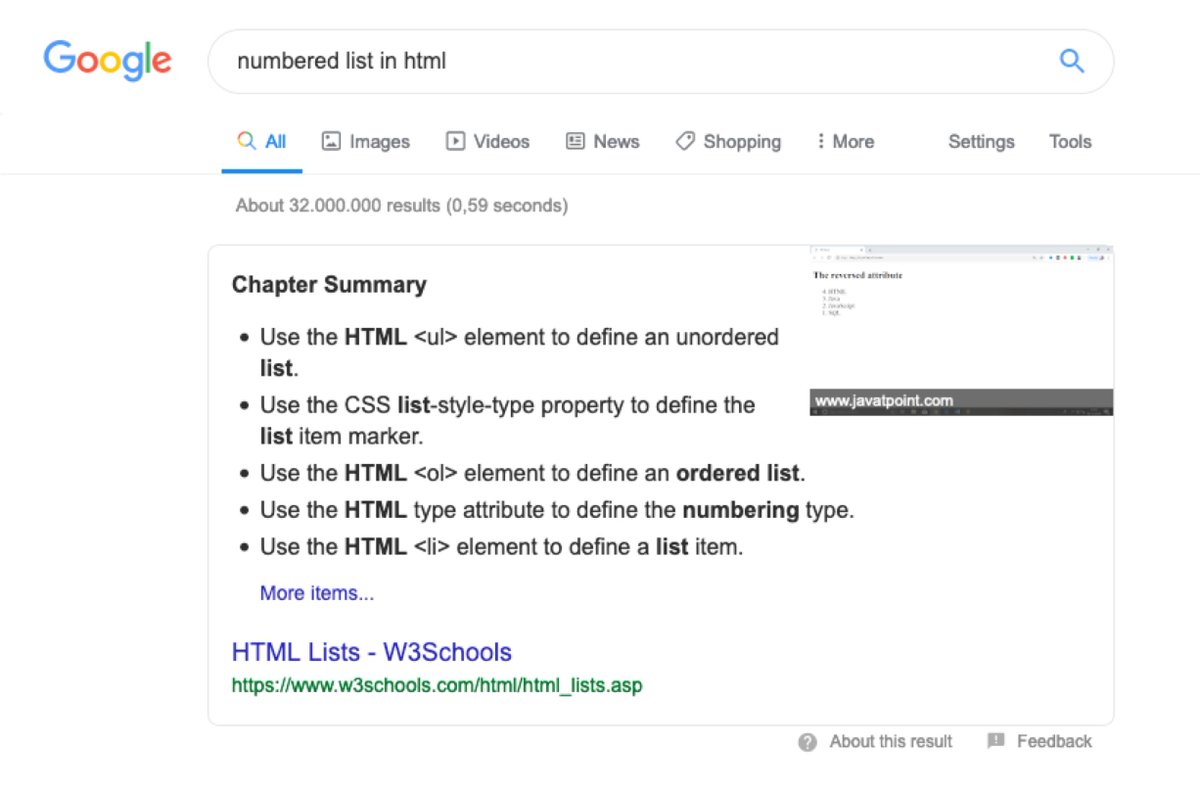
  • Bulleted List Featured Snippet

Featured Snippet format

In this type of snippet Google presenting a list of items that need not be in a specific order. 

Table Snippets
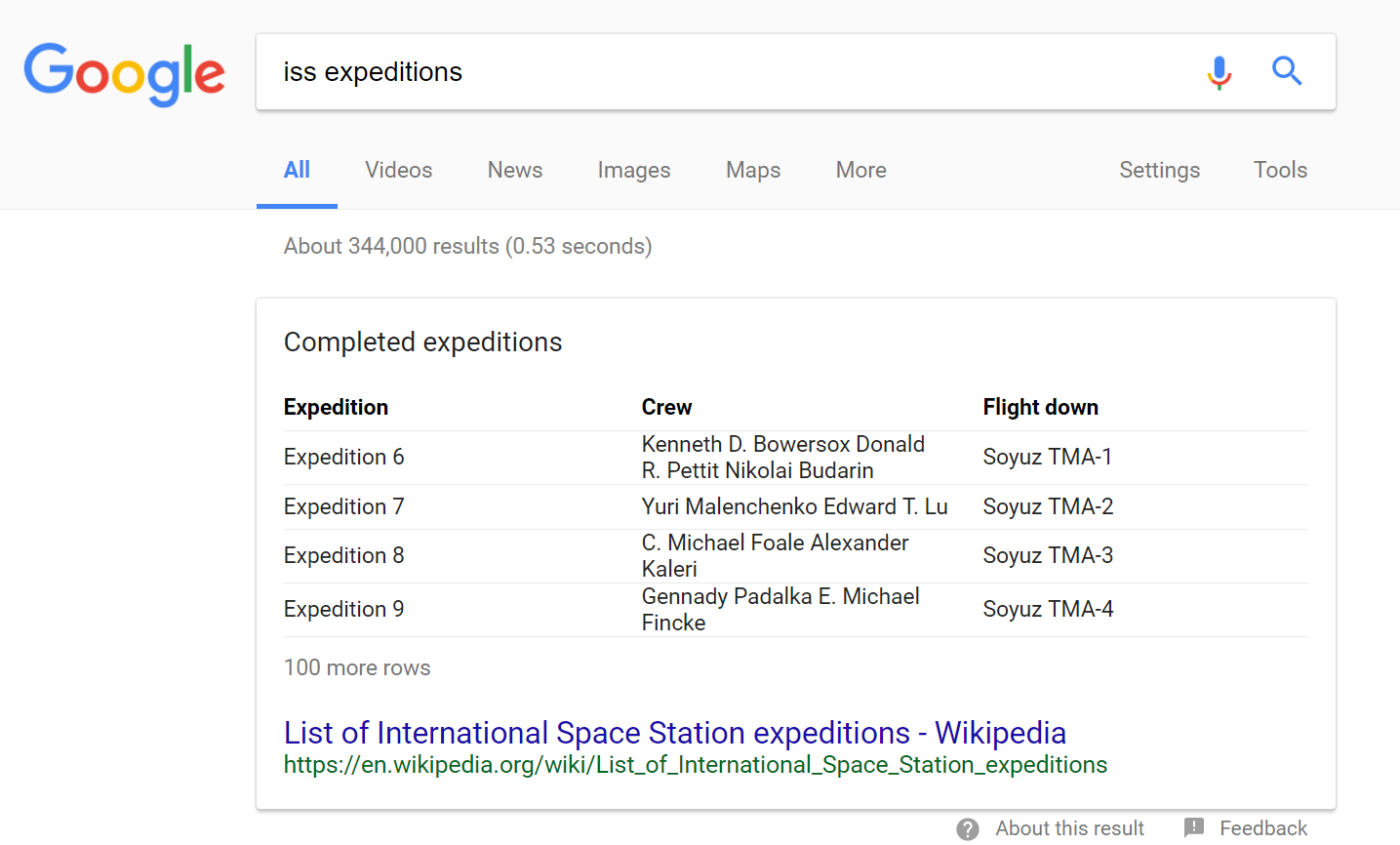
Featured Snippet formatTable snippets are very popular because it can pull the specific information the user is looking for, and recreate its own table in a user understandable format.

Featured Snippets are one of the best ways to get more traffic to our website. Obtaining a featured snippet means that you rank for position zero, which is the highest-ranking spot in the Search Engine Result Page.


 

13Mar

How to Boost Your Blog Traffic through Social Media

People are changing their lives daily with blogging, whether it is through personal stories, building resources for others or using a blog to generate some extra money on the side. Traffic is one of the most important parameters for your blog; the more people who find your blog, the more people who will read your ideas. If you’re ready and willing to have your blog admired in the online community, then try a few different methods of increasing blog traffic. You’ll create better content in the end, and probably have dozens of new viewers each day.

blopic

                                                       Once you come up with a great blog idea.

                                                                   Then the real fun begins!

That was before millions of people were connecting with new people every day to exchange information — before social networks dominated online news distribution.

Your social media engagement and conversion rates have a lot to do with the kind of blog content you create. If the quality of your content is low, then most of your optimization techniques will be ineffective. In general, social media users prefer highly actionable and interesting content written in a fun way.

14Jul

Top 10 Services Offered By Digital Marketing Companies In Kerala

Digital Marketing

Services of Digital marketing companies in Kerala  is considered to be are an important element for any business model, and should always be part of your overall marketing strategy.  While it is possible to undertake online marketing yourself, unless you have a thorough understanding the concepts, you may not use it to its best effect. Hiring an outside company to take care of your online marketing will leave you to focus on growing your business, but if you’re unsure about how an outside company could help your business, here’s 10 top services offered by great digital marketing companies.

SEO services

A key element of digital marketing, search engine optimization services or SEO, should include keyword research, link building and copywriting. To maximise the potential of SEO, it’s important to use a digital marketing company that offer a complete site audit before they even begin to create their strategy.

Pay-per-click (PPC)

PPC is a model of internet/digital marketing where advertisers pay a fee each time one of their ads is clicked. Put simply, it’s a method of buying visits to your website. Professional advice will help you to develop a coherent strategy to bring you a good return on your investment.

Google Ads

Which leads us onto Google Ads. Probably the most popular PPC advertising system in the world, it enables users to create ads which will appear on Google’s search engines, and can prove to be a really effective way to promote your website.

Website Design and Programming

As your website is the digital face of your company, you need the most appropriate design for your business, which will operate on multiple viewing platforms, including mobile. The best online marketing experts will help you to redesign your website to ensure that it’s fully optimized.

Content Marketing

Having high-quality, relevant and consistent content plays a key part in attracting and retaining your audience, and ultimately driving profitable customer interaction. Therefore, you should choose a digital marketing company who not only knows which content you need on your site, but will take the time to understand the nature and ethos of your business.

Social Media Marketing

Together with your website, your social media channels, such as Facebook, Twitter and Instagram, make up the vast majority of your online brand. Having a social media strategy is very important, as it shows the nature of your brand and how you interact with your customers. Good online marketing companies will help you to set up and manage this interaction, and provide advice on strategies to adopt.

Conversion Marketing

Good online marketing companies can help you to come up with effective strategies to convert the people who browse your site into paying customers. This is known as conversion marketing, and is measured by the percentage of visitors who take up your offers.

Email Marketing

Email marketing is sometimes seen as the poor relation to social media, however you shouldn’t underestimate the power of this marketing strategy. There are almost three times as many email user accounts than Facebook and Twitter combined, plus email marketing offers a more personal and more businesslike marketing approach.

Mobile Marketing (optimizing a website for mobile)

As more and more people rely on their mobiles and tablets for shopping and other kinds of business, it makes sense to ensure that your website is fully functional on all devices.

Help and support

Not a marketing strategy as such, but knowing that you have access to help and support whenever you need it, is vital for ensuring that you keep your online presence relevant and up-to-date.


To get more details get in touch with best digital marketing company in Kerala

18May

7 top cases to increase your Twitter engagement

1. Insert Links Into Your Tweets  

Who says social media marketing is not an effective strategy?

On average, tweets with links generate about 86% more re-tweets. This is because link insertions elevate reader interaction.

When 36% of tweets are made with links, it is worth considering as a viable strategy.


View image on Twitter

In order to set your business on an uptrend, customers should know about your product. Links increase engagement metrics of your page and in return, drive clientele to your product.

22Apr

How to examine the performance of your social media channels?

You people will be wondering if your social media marketing efforts are paying off?

Do you want to  understand what’s going on?

A social media analysis will help you to find the impact of your social media tactics.

In this article, you’ll discover how to perform an audit of your social media channels.

How to Conduct a Social Media Audit by Ana Gotter on Social Media Examiner.

When you conduct a social media audit, you collect and analyze detailed data from all of your social media accounts. You look closely at your activity, results, audience, and financial investments (including ad spend).

Ultimately, you want to find out if your social media efforts are relevant to your current objectives and goals. Do you still have a Facebook group for an old subscription-based coaching program that you no longer run? Have you pinned posts to send users to your latest landing pages? An audit can help you pinpoint these details.

Doing an in-depth audit is similar to creating a budget for the first time, where you may discover you spend $2,000 a year on pizza delivery or new equipment you don’t need. For the social media equivalent, you may find you’re spending too much time or money on a platform that’s not delivering results, or that you’re lacking key demographics in your audience on Twitter but not Facebook.

You need to audit every aspect of your social media marketing to get a complete picture. Examine traditional metrics such as engagement and clicks, and also look at frequently overlooked factors, including:

  • General sentiment of engagement from users.
  • Average response rates and response times.

Response times are an easy-to-miss factor to include in your social media audit, but they're something users will notice, especially now that Facebook shares how responsive you are.

Response times are an easy-to-miss factor to include in your social media audit, but they’re something users will notice, especially now that Facebook shares how responsive you are.

  • Referral traffic from each social platform to your site. Do certain platforms have higher bounce rates than others?
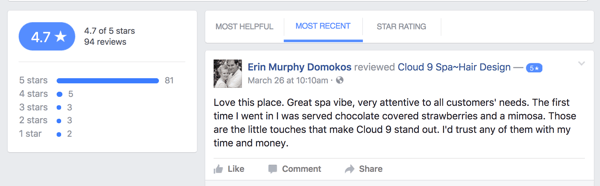
  • How users are interacting with you. Are they leaving reviews, comments, or direct-messaging you?

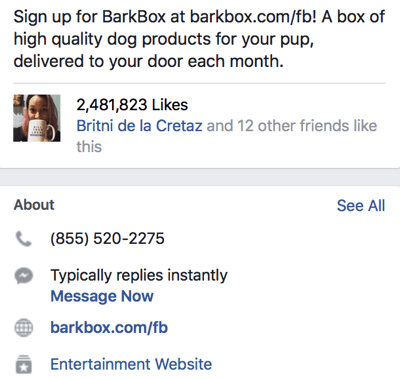
Examine the different ways users contact you on your social media channels.

Examine the different ways users contact you on your social media channels.

Breaking down your social media audit into four parts will make organizing and evaluating results a little easier. Because you’ll be comparing data from different platforms, it’s helpful to compile all of your results in a single spreadsheet. Here’s how to get started.

#1: Measure Overall Results

#2: Analyze Audience Demographics and Interests

#3: Check for Consistency and Quality Across All of Your Channels

#4: Review Your Budget and Calculate ROI


#1: Measure Overall Results

The first step in your audit is to compile all of the social media metrics you can to evaluate your overall results. These metrics include:

  • Number of followers
  • Likes
  • Shares
  • Comments
  • Clicks
  • Video views
  • Number of followers
  • Post reach
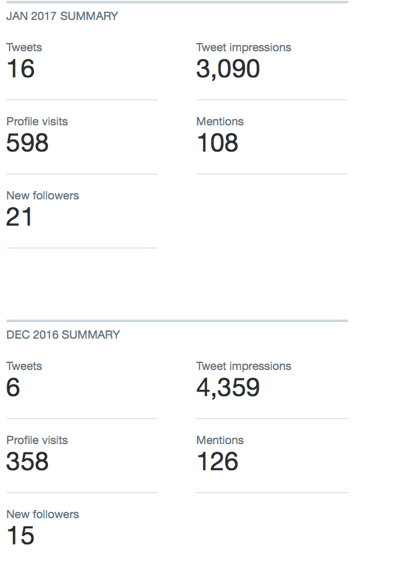
  • Number of mentions (Twitter)

Creating a spreadsheet to compare metrics across multiple platforms is just as important as tracking the growth of activity on one site.

Creating a spreadsheet to compare metrics across multiple platforms is just as important as tracking the growth of activity on one site.

While you can access these metrics with on-platform analytics tools (with the exception of Snapchat), third-party social analytics tools let you create reports to show this information. (See the end of this article for some recommendations.)

Get into the details when analyzing these metrics. Take a close look at how they compare on different types of posts, too. Do you get more engagement from Facebook when you tag influencers than when you share blog posts? Do your video views get more engagement on Instagram or Twitter? Are they steadily increasing over time?

Monitoring the growth (or decline) of social engagement, post reach, or number of followers is essential to a successful audit.

Monitoring the growth (or decline) of social engagement, post reach, and number of followers is essential to a successful audit.

Sometimes our assumptions are wrong, which is why it’s so important to track this data. For example, you might be frustrated with comparatively low on-platform engagement on Pinterest compared to your other social profiles. However, after an audit, you might discover Pinterest actually sends you the most (and best) site traffic.

In this part of the audit, determine what types of posts work best on each platform, which platforms are most valuable to you, and how your audience is engaging with you on each platform.

Third-party tools may provide additional information such as what times of day or days of the week your posts get the most engagement. Take this information into consideration, too.

#2:  Audience Demographics and Interests

Your social media followings might be different for each platform. If you market your business on Pinterest or Snapchat, you know how true this can be.

You also may be missing one demographic of your target audience on one platform. You probably don’t have as many male followers on Pinterest or lack older followers on Snapchat, for example; however, that wouldn’t make sense on Facebook.

Understanding your audience can help you create more relevant content for them and find out whom you still need to reach.

Understanding your audience can help you create more relevant content for them and find out whom you still need to reach.

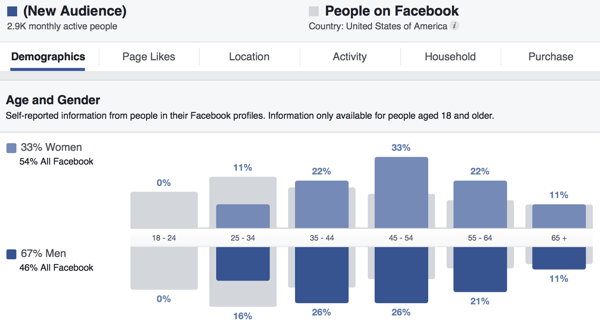
Most social media sites provide audience information, like Facebook’s Audience Insights or Pinterest’s Analytics. Some third-party analytics tools, including Sprout Social, also provide this information.

Compare your social media audiences, looking at factors like demographics and interests. If you’re not reaching a key demographic on one platform and you know that demographic is on the platform, figure out why.

#3: Check for Consistency and Quality Across All of Your Channels

Now that you know who your target audience is and how people are interacting with you on social media, it’s time to take a closer look at how you’re using your social media platforms. Ultimately, you want to monitor your presence for consistency and quality.

In many cases, there are discrepancies between platforms, but they may be difficult to notice. For example, do you respond rapidly to Facebook messages and emails, but not Twitter direct messages? Is your branding consistent across all platforms (including your bios, logo, and About Me sections)? Is your voice the same on each platform? If not, is that deliberate?

Is your branding consistent among your social media channels? Using the same logo on multiple platforms lends authenticity to your accounts.

Is your branding consistent among your social media channels? Using the same logo on multiple platforms lends authenticity to your accounts.

Also look at the types of content you share across your social platforms and over time. Have you shifted from sharing predominantly blog posts to publishing more user-generated content (UGC) updates?

Ensure your profiles match current best practices for formatting and incorporate any new platform features you may have missed. Facebook often changes the layout for pages and now allows pages to save pinned posts to the top of the timeline, for example.

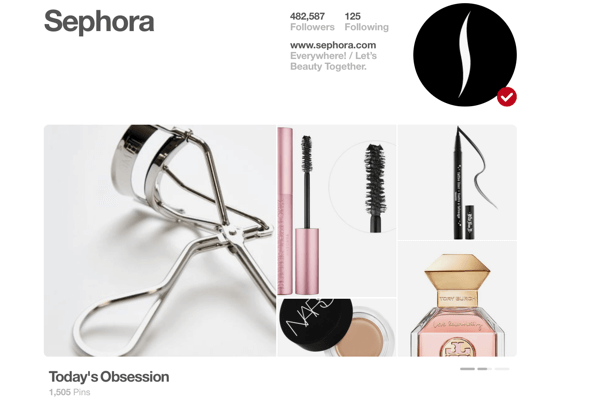
Pinterest’s Showcase feature is relatively new, and it’s a fantastic way to show off what your brand is about in a few seconds. Taking time to make any necessary updates will benefit your business in the long run.

During your audit, make sure your profiles are all up to date and use all relevant features to full benefit.

During your audit, make sure all of your profiles are completely up to date and use all relevant features to full benefit.

#4: Review Your Budget and Calculate ROI

Reviewing your budget and calculating your ROI are important aspects of a social media audit but are often overlooked. While many businesses and marketers have a firm grasp of money, calculating total ROI from social media is more difficult, especially when you’re looking at purely social ROI instead of financial ROI.

To tackle this part of your audit, pull up all of your records and look at how much you’re spending on social media. Potential costs include:

  • Ad spend
  • Consultant or agency fees
  • Third-party analytics and management tools
  • Contest software
  • Apps and tools to create images
  • Employees who help with your social media efforts
  • Tools to curate and display UGC on your site
  • Professional photographers or equipment to take photos

Determine how much money you're spending on social media.

Determine how much money you’re spending on social media.

Compare the costs and results. If you spend $199 on contest software and generated 304 leads and 102 conversions on a $20 per month subscription, for example, you’ll be able to see that ROI clearly.

When examining third-party analytics, management, and social listening tools, look at both the costs and benefits you’ve received. Have these tools made you more efficient? Also, look at whether they’ve helped you generate better results from your content.

Helpful Social Media Analytics Tools

There are some excellent tools that will help you gather the information you need for your social media audit. Here are several to consider adding to your toolbox:

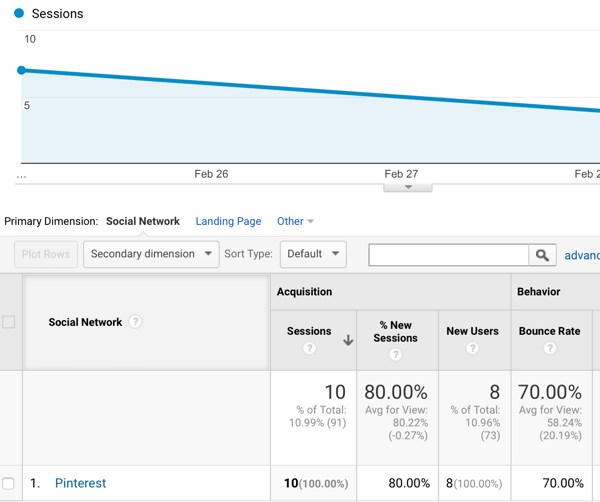
Google Analytics provides information about referral traffic to your site and breaks down that traffic by social network.

Google Analytics tells you which social sites are sending you the most traffic and how long visitors are staying on your site.

Google Analytics tells you which social sites are sending you the most traffic and how long visitors are staying on your site.

Sprout Social, Agorapulse, and Hootsuite offer social listening, analytics, and social media reporting tools that make it easier to find the data you need for your audit.

Snaplytics provides reporting details on your Snapchat activity and engagement.

Quintly offers analytics data for Pinterest and other platforms.

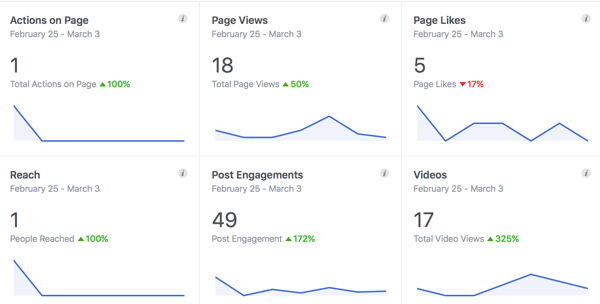
In addition to third-party tools, each platform’s on-site analytics (especially Facebook’s Insights and Twitter’s Analytics) give you informative data about your audience. Also, on-platform ad managers show you how much you’re spending on your campaigns and what results you’re getting.

 The on-site analytics for many social media networks, like Facebook's Insights, provide valuable data for free.

The on-site analytics for many social media networks, like Facebook’s Insights, provide valuable data for free.

These are just a few of the many tools you can choose from. Your goal is to find the tool that’s the best fit for your business based on your budget or the features you need. You may want to test a few tools (many offer free trials) and see what works best for you. Remember, many of these tools track data only after you’ve created an account, so you need to have them up and running before conducting your audit.

Final Thoughts

Performing a social media audit may seem intimidating, but you have all of the tools and know-how you need to do it on your own. Although an audit will take some time, it’s a worthwhile investment. You can find out what’s working for you on social media, what you can improve, and who your audience is. The results will help you create stronger social media calendars and campaigns moving forward.

10Mar

What you mean by bounce rate? How to improve this?

Bounce Rate in Deep

Before we search for our bounce rate, we have to fully understand what bounce rate is. Bounce rate is the percentage of visitors who come to your website and leave without viewing any other pages on your website. If you look on the statics in Google Analytics, you will see a percentage. If you have average bounce rate, for example, is 75%, this means that 75% of the people who come to your website leave after only viewing the page they entered on, whether it was your homepage or an internal page.

What this conclude to is the fact that your website isn’t retaining its visitors. People are coming to your site and either finding what they want but not anything else or not finding what they want at all. The key is to make sure that once visitors land on a page, they are drawn to visiting even more pages throughout your site.

That all Begins With Google Analytics

Your first stop in figuring out how to improve your bounce rate is in Google Analytics. When you sign into your Google Analytics profile for your website, you are greeted with an average bounce rate. While you want this to go down, it isn’t the one you really need to look into. Here are some things you can learn from your bounce rate throughout Analytics.