05Apr

How to integrate Digital Marketing with Business

Integrated Digital Marketing

Integrated Digital marketing is no longer about simply adding online channels to the media mix, it is about integrating digital marketing into all streams of marketing. Digital marketing engagements are always various, solving for specific digital marketing challenges while building ongoing client efficiencies and potentials. Integrated digital marketing puts the limelight on the importance of a consistent, logical, smooth, multidimensional brand experience for the consumer.


23Aug

Voice Search: 8 Strategies to Optimize Your Website SEO

In a world increasingly dominated by digital assistants like Siri, Google Assistant, and Alexa, voice search has emerged as a game-changing trend that’s reshaping the landscape of search engine optimization (SEO). As more users turn to voice search for convenience and hands-free interactions, businesses need to adapt their SEO strategies to remain competitive. In this blog, we’ll explore eight effective strategies to optimize your website for voice search and enhance your online visibility.

1. Understand User Intent:

Voice searches are often longer and conversational in nature compared to traditional text-based searches. Focus on identifying and understanding the natural language queries users are likely to make when speaking to their devices. This understanding will guide your content creation and optimization efforts.

2. Long-Tail Keyword Research:

Voice searches tend to incorporate more natural language and longer phrases. Conduct thorough research to identify relevant long-tail keywords that match user queries. Tools like Google’s Keyword Planner and SEMrush can help you uncover these conversational phrases.

3. Featured Snippets Optimization:

Featured snippets hold significant value within voice search outcomes. Aim to provide concise and informative answers to common questions related to your industry. Structured content, bullet points, and numbered lists can increase your chances of earning featured snippets.

4. Local SEO is Crucial:

Many voice searches are location-based, such as “restaurants near me” or “closest gas station.” Optimize your Google My Business listing and ensure your website is optimized for local SEO to capture these location-specific queries.

5. Mobile-Friendly and Fast Loading:

Mobile-friendliness and fast loading times are critical for voice search optimization. Users performing voice searches are often on the go and expect quick results. Google’s mobile-first indexing also emphasizes the importance of a responsive design.

6. Natural Language Content:

Create content that mirrors the way people speak naturally. Incorporate conversational language and provide comprehensive answers to common questions. FAQ sections and “How-to” articles can be particularly effective.

7. Schema Markup Implementation 

Schema markup assists search engines in grasping the context of your content.

Implement schema markup to provide context for your content, making it easier for search engines to deliver relevant results to voice search queries.

8. Aim for Position Zero:

Position zero, also known as the featured snippet, is a prime spot for voice search results. Structure your content to provide concise answers to common questions, making it more likely to be selected by voice assistants.

Voice technology plays a pivotal role in enhancing customer engagement and optimizing local SEO strategies for Digital Marketing Companies in Kerala, driving personalized interactions and fostering stronger connections with the audience.

Voice search is fundamentally transforming the approach to SEO for companies in Kerala, prompting SEO firms to prioritize conversational keywords, local optimization, and user intent to ensure clients maintain a competitive edge in this dynamic digital landscape.

Conclusion:

As voice search continues to gain prominence, optimizing your website for this trend is no longer optional—it’s a necessity. By understanding user intent, conducting thorough keyword research, and implementing the strategies mentioned above, you can position your website to excel in the world of voice search. Embracing these strategies will not only enhance your SEO efforts but also ensure that your business remains relevant and accessible to a growing base of voice-activated device users.

28Dec

Digital Marketing Trends in 2019

The Digital Marketing Trends that was used last year may not be used in this year as new technologies continue to evolve. Every year, new technologies come out, existing technologies get smarter and prospects get smooth and more bombarded with marketing. The world of social media is constantly changing, bringing new trends, ideas, and unspoken rules each year.Here we points out the latest innovations in digital media, technology, and data to support digital transformation.

13Mar

How to Boost Your Blog Traffic through Social Media

People are changing their lives daily with blogging, whether it is through personal stories, building resources for others or using a blog to generate some extra money on the side. Traffic is one of the most important parameters for your blog; the more people who find your blog, the more people who will read your ideas. If you’re ready and willing to have your blog admired in the online community, then try a few different methods of increasing blog traffic. You’ll create better content in the end, and probably have dozens of new viewers each day.

blopic

                                                       Once you come up with a great blog idea.

                                                                   Then the real fun begins!

That was before millions of people were connecting with new people every day to exchange information — before social networks dominated online news distribution.

Your social media engagement and conversion rates have a lot to do with the kind of blog content you create. If the quality of your content is low, then most of your optimization techniques will be ineffective. In general, social media users prefer highly actionable and interesting content written in a fun way.

22Apr

How to examine the performance of your social media channels?

You people will be wondering if your social media marketing efforts are paying off?

Do you want to  understand what’s going on?

A social media analysis will help you to find the impact of your social media tactics.

In this article, you’ll discover how to perform an audit of your social media channels.

How to Conduct a Social Media Audit by Ana Gotter on Social Media Examiner.

When you conduct a social media audit, you collect and analyze detailed data from all of your social media accounts. You look closely at your activity, results, audience, and financial investments (including ad spend).

Ultimately, you want to find out if your social media efforts are relevant to your current objectives and goals. Do you still have a Facebook group for an old subscription-based coaching program that you no longer run? Have you pinned posts to send users to your latest landing pages? An audit can help you pinpoint these details.

Doing an in-depth audit is similar to creating a budget for the first time, where you may discover you spend $2,000 a year on pizza delivery or new equipment you don’t need. For the social media equivalent, you may find you’re spending too much time or money on a platform that’s not delivering results, or that you’re lacking key demographics in your audience on Twitter but not Facebook.

You need to audit every aspect of your social media marketing to get a complete picture. Examine traditional metrics such as engagement and clicks, and also look at frequently overlooked factors, including:

  • General sentiment of engagement from users.
  • Average response rates and response times.

Response times are an easy-to-miss factor to include in your social media audit, but they're something users will notice, especially now that Facebook shares how responsive you are.

Response times are an easy-to-miss factor to include in your social media audit, but they’re something users will notice, especially now that Facebook shares how responsive you are.

  • Referral traffic from each social platform to your site. Do certain platforms have higher bounce rates than others?
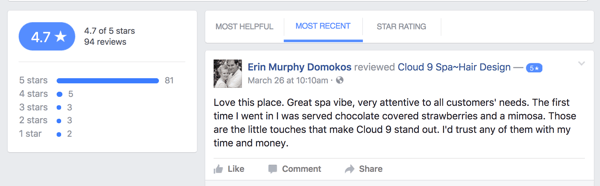
  • How users are interacting with you. Are they leaving reviews, comments, or direct-messaging you?

Examine the different ways users contact you on your social media channels.

Examine the different ways users contact you on your social media channels.

Breaking down your social media audit into four parts will make organizing and evaluating results a little easier. Because you’ll be comparing data from different platforms, it’s helpful to compile all of your results in a single spreadsheet. Here’s how to get started.

#1: Measure Overall Results

#2: Analyze Audience Demographics and Interests

#3: Check for Consistency and Quality Across All of Your Channels

#4: Review Your Budget and Calculate ROI


#1: Measure Overall Results

The first step in your audit is to compile all of the social media metrics you can to evaluate your overall results. These metrics include:

  • Number of followers
  • Likes
  • Shares
  • Comments
  • Clicks
  • Video views
  • Number of followers
  • Post reach
  • Number of mentions (Twitter)

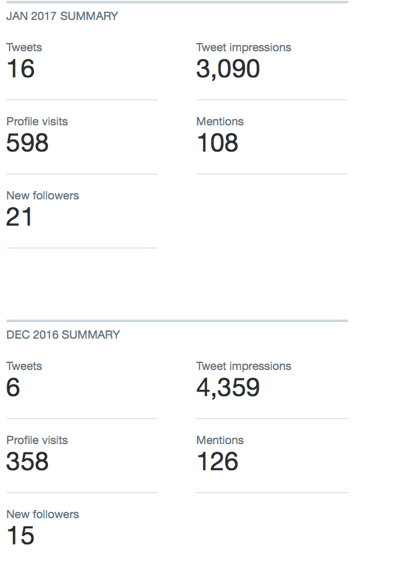
Creating a spreadsheet to compare metrics across multiple platforms is just as important as tracking the growth of activity on one site.

Creating a spreadsheet to compare metrics across multiple platforms is just as important as tracking the growth of activity on one site.

While you can access these metrics with on-platform analytics tools (with the exception of Snapchat), third-party social analytics tools let you create reports to show this information. (See the end of this article for some recommendations.)

Get into the details when analyzing these metrics. Take a close look at how they compare on different types of posts, too. Do you get more engagement from Facebook when you tag influencers than when you share blog posts? Do your video views get more engagement on Instagram or Twitter? Are they steadily increasing over time?

Monitoring the growth (or decline) of social engagement, post reach, or number of followers is essential to a successful audit.

Monitoring the growth (or decline) of social engagement, post reach, and number of followers is essential to a successful audit.

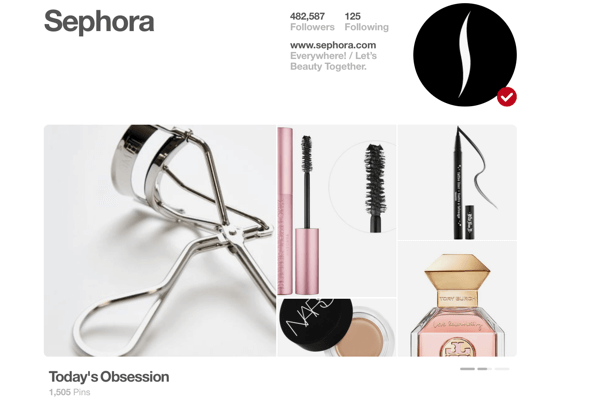
Sometimes our assumptions are wrong, which is why it’s so important to track this data. For example, you might be frustrated with comparatively low on-platform engagement on Pinterest compared to your other social profiles. However, after an audit, you might discover Pinterest actually sends you the most (and best) site traffic.

In this part of the audit, determine what types of posts work best on each platform, which platforms are most valuable to you, and how your audience is engaging with you on each platform.

Third-party tools may provide additional information such as what times of day or days of the week your posts get the most engagement. Take this information into consideration, too.

#2:  Audience Demographics and Interests

Your social media followings might be different for each platform. If you market your business on Pinterest or Snapchat, you know how true this can be.

You also may be missing one demographic of your target audience on one platform. You probably don’t have as many male followers on Pinterest or lack older followers on Snapchat, for example; however, that wouldn’t make sense on Facebook.

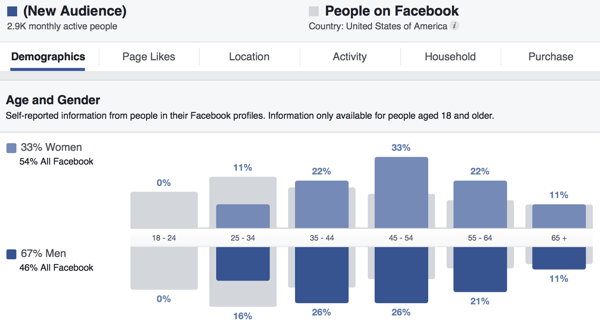
Understanding your audience can help you create more relevant content for them and find out whom you still need to reach.

Understanding your audience can help you create more relevant content for them and find out whom you still need to reach.

Most social media sites provide audience information, like Facebook’s Audience Insights or Pinterest’s Analytics. Some third-party analytics tools, including Sprout Social, also provide this information.

Compare your social media audiences, looking at factors like demographics and interests. If you’re not reaching a key demographic on one platform and you know that demographic is on the platform, figure out why.

#3: Check for Consistency and Quality Across All of Your Channels

Now that you know who your target audience is and how people are interacting with you on social media, it’s time to take a closer look at how you’re using your social media platforms. Ultimately, you want to monitor your presence for consistency and quality.

In many cases, there are discrepancies between platforms, but they may be difficult to notice. For example, do you respond rapidly to Facebook messages and emails, but not Twitter direct messages? Is your branding consistent across all platforms (including your bios, logo, and About Me sections)? Is your voice the same on each platform? If not, is that deliberate?

Is your branding consistent among your social media channels? Using the same logo on multiple platforms lends authenticity to your accounts.

Is your branding consistent among your social media channels? Using the same logo on multiple platforms lends authenticity to your accounts.

Also look at the types of content you share across your social platforms and over time. Have you shifted from sharing predominantly blog posts to publishing more user-generated content (UGC) updates?

Ensure your profiles match current best practices for formatting and incorporate any new platform features you may have missed. Facebook often changes the layout for pages and now allows pages to save pinned posts to the top of the timeline, for example.

Pinterest’s Showcase feature is relatively new, and it’s a fantastic way to show off what your brand is about in a few seconds. Taking time to make any necessary updates will benefit your business in the long run.

During your audit, make sure your profiles are all up to date and use all relevant features to full benefit.

During your audit, make sure all of your profiles are completely up to date and use all relevant features to full benefit.

#4: Review Your Budget and Calculate ROI

Reviewing your budget and calculating your ROI are important aspects of a social media audit but are often overlooked. While many businesses and marketers have a firm grasp of money, calculating total ROI from social media is more difficult, especially when you’re looking at purely social ROI instead of financial ROI.

To tackle this part of your audit, pull up all of your records and look at how much you’re spending on social media. Potential costs include:

  • Ad spend
  • Consultant or agency fees
  • Third-party analytics and management tools
  • Contest software
  • Apps and tools to create images
  • Employees who help with your social media efforts
  • Tools to curate and display UGC on your site
  • Professional photographers or equipment to take photos

Determine how much money you're spending on social media.

Determine how much money you’re spending on social media.

Compare the costs and results. If you spend $199 on contest software and generated 304 leads and 102 conversions on a $20 per month subscription, for example, you’ll be able to see that ROI clearly.

When examining third-party analytics, management, and social listening tools, look at both the costs and benefits you’ve received. Have these tools made you more efficient? Also, look at whether they’ve helped you generate better results from your content.

Helpful Social Media Analytics Tools

There are some excellent tools that will help you gather the information you need for your social media audit. Here are several to consider adding to your toolbox:

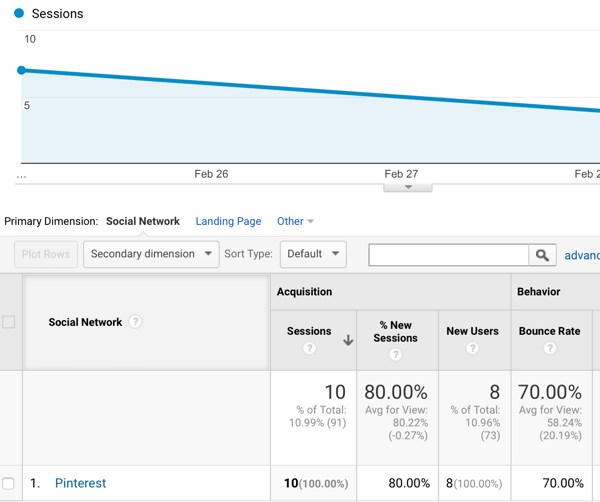
Google Analytics provides information about referral traffic to your site and breaks down that traffic by social network.

Google Analytics tells you which social sites are sending you the most traffic and how long visitors are staying on your site.

Google Analytics tells you which social sites are sending you the most traffic and how long visitors are staying on your site.

Sprout Social, Agorapulse, and Hootsuite offer social listening, analytics, and social media reporting tools that make it easier to find the data you need for your audit.

Snaplytics provides reporting details on your Snapchat activity and engagement.

Quintly offers analytics data for Pinterest and other platforms.

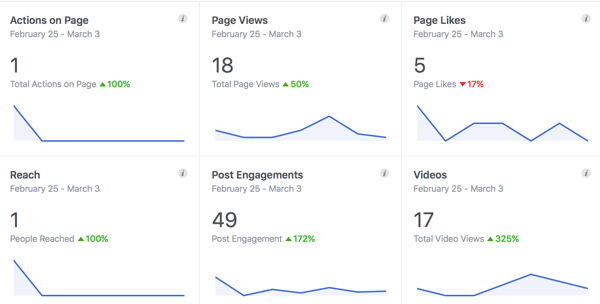
In addition to third-party tools, each platform’s on-site analytics (especially Facebook’s Insights and Twitter’s Analytics) give you informative data about your audience. Also, on-platform ad managers show you how much you’re spending on your campaigns and what results you’re getting.

 The on-site analytics for many social media networks, like Facebook's Insights, provide valuable data for free.

The on-site analytics for many social media networks, like Facebook’s Insights, provide valuable data for free.

These are just a few of the many tools you can choose from. Your goal is to find the tool that’s the best fit for your business based on your budget or the features you need. You may want to test a few tools (many offer free trials) and see what works best for you. Remember, many of these tools track data only after you’ve created an account, so you need to have them up and running before conducting your audit.

Final Thoughts

Performing a social media audit may seem intimidating, but you have all of the tools and know-how you need to do it on your own. Although an audit will take some time, it’s a worthwhile investment. You can find out what’s working for you on social media, what you can improve, and who your audience is. The results will help you create stronger social media calendars and campaigns moving forward.

18Apr

How would you can analyse your branding reports from Google Analytics ?

Google Analytics provides some great  reports to work with out of the box, but the ability to customize and build your own reports from scratch is what allows marketers to gain truly valuable insights from the tool.

Not only is this a huge time saver, it’s also a great way to get ideas for reports you might not otherwise think to create. After all, you’ve got access to the templates and systems that some of the best thinkers in analytics use on a day-to-day basis, and you can customize them even further according to your needs!


Reports for Measuring Site Performance & Acquisition Patterns

1. Browser Report

One of the most common money leaks on websites is incompatibility with certain browsers. He suggests creating a custom report showing conversions per browser and segmenting the report by device (mobile, desktop, tablet) so as not to skew your numbers.

Search Engine Watch links to a similar pre-made report in their list of time-saving custom reports. If you’re not selling products on your site you can swap out Revenue and Unique Purchases for conversion and goal value-related metrics. And don’t forget to segment by device!

browser report

2. Visitor Acquisition Efficiency Analysis Report

This report was to organize key methods that reveal the  performance of each stream of traffic to a website. You’ll see total sessions, unique users, new users, goal conversion rate and goal value per session, all organized by source and medium.

3. Customer Behavior Report

The report reveals how behavior varies between new and returning users in terms of overall traffic, conversion patterns and event completion.


customer behavior report

4. Mobile Performance Report

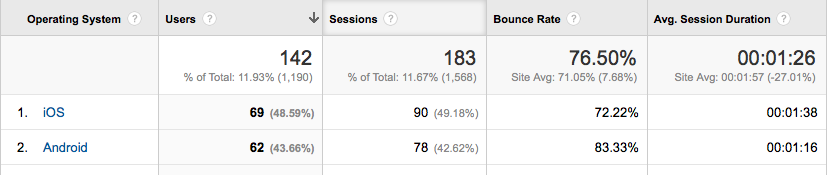
This report is ideal for understanding how well your site is optimized for mobile and where you need to make improvements. For example, the site pictured below has a super-high bounce rate for Android; the site’s developers have got some work to do!

mobile report avinash

The report is part of a bundle of dashboards and reports created by Avinash Kaushik. >> Get it here.

5. Site Diagnostics: Page Timing Report

It instantly provides details about problematic pages that need your attention. You’ll discover which pages are taking extra long to load as well as which have an uncomfortably-high bounce rate.

Rachelle recommends that you switch from the “data” table view to the “comparison” table view in order to compare load time to bounce rate; this allows you to view the bounce rate for each page against the site average.


Reports That Tell You How Your Content is Doing

6. Hours & Days Report

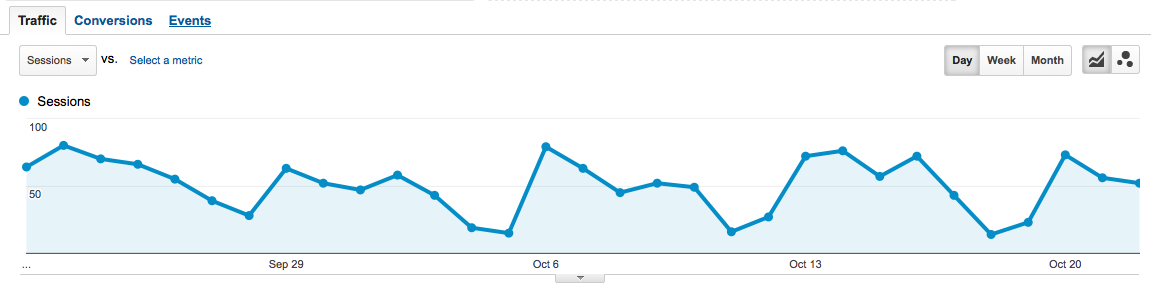
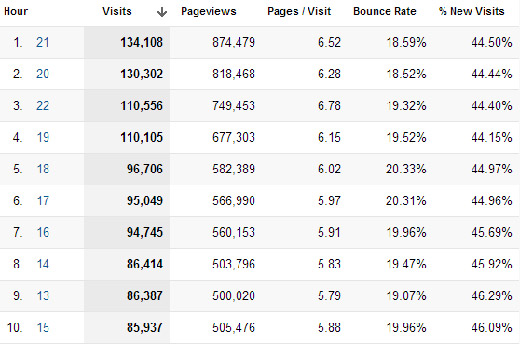
The Hours & Days Report  shows you which day of the week and at what time of the day your website receives the most traffic. If you set a large time span––say a couple of months––you can use this data to guide experiments with blog post times.


hour day report dan barker


7.  Referring Sites Report

Great for identifying the referring sites that provide the most value. It tells you not only which referring sites are generating the most traffic but also how they’re contributing to goal conversions.

8. Content Efficiency Report

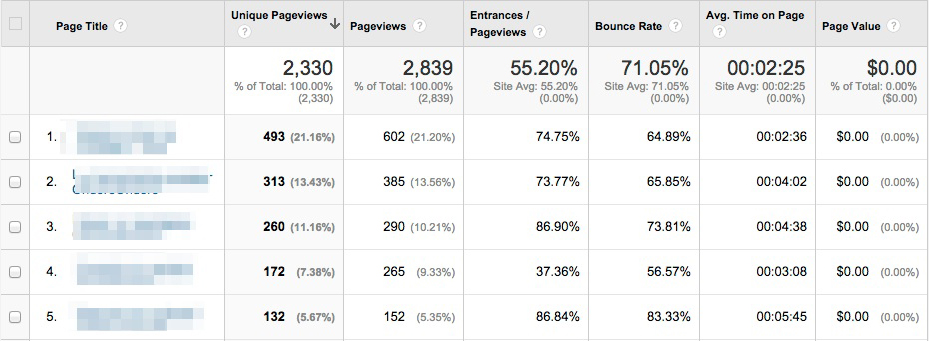
This report to focus on key metrics that will help you identify which pages are performing the best and which need a little optimization. It’s especially useful for sites that produce a lot of content; as, it can help marketers answer important questions like:

  • Which content is most engaging?
  • Which subject matter experts should we hire more of?
  • What type of content (videos, demos, pictures, reviews etc.) do visitors value more?
  • Which content delivers business or non-profit value?


content analysis report avinash


9. Traffic Acquisition from Social Media Report

This report shows you not only which social media channels are driving the most traffic to your site but also whether or not that traffic is translating into tangible results for your business. Metrics like Goal Conversion Rate and Goal Value will tell you which social media sites you should pay more attention to.

Reports for SEO

10. SEO: Referring Pages Report

This one comes with the Google Analytics starter bundle, and it’s a great way to gauge the effectiveness of your link building efforts and track the top referring links to your website. The “Referral Path” column will tell you exactly which page your links are coming from (not just which website). Bounce Rate and Avg. Session Duration will indicate which links are high-quality, and Per Session Value will tell you which links are generating real business resultsseo refferal report

The Google Organic Insights Custom Report provides insights for your “(not provided)” keywords. Showing the landing page URLs along with their page titles gives you a sense of the general keyword themes that people are searching for on Google before arriving at your site.


12. Keyword Analysis Report

This report, which I found via Econsultancy, lists your most popular keywords (excluding the ones encrypted by Google, of course) alongside visitor metrics, conversion rates, goal completions and page load time for each one. There’s also a tab measuring engagement for each keyword, which is interesting for content marketers, and a tab showing revenue metrics.


Wrapping it Up

Installing these Custom Reports templates and then personalizing them even further according to your needs will save you time and most likely reveal insights about your data that you hadn’t expected. Now I’d like to hear from you: Did I miss any of your favorite Custom Reports? Let me know in the comments below.