29Oct

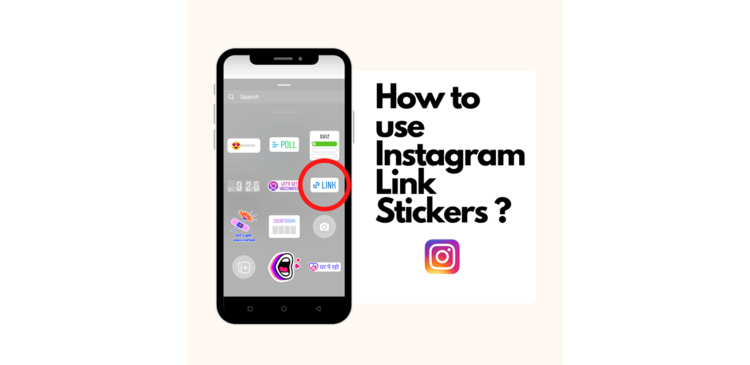
How to use Instagram Link Stickers ?

Would you like to include a link in your Instagram Story? According to a business announcement, Instagram’s Link Stickers will now be available to all users on the social media network. Previously, the function, which allows users to embed hyperlinks in the form of stickers in their Instagram Stories, was only available to verified accounts and handles with a large number of followers.

In June of this year, the social networking platform began testing its Link Stickers function. After multiple users requested access to the feature, Instagram said that the sticker will now be available to everyone, regardless of their number of followers.

Link Stickers, according to the company, are highly valuable for creators, businesses, and other members of the community who may use them to distribute information and resources. Instagram, on the other hand, stated that accounts that consistently breach community norms and disseminate disinformation and hate speech will be denied access to the function.

In June, Instagram stated that the Link Stickers feature would not be added to the main Instagram feed or other portions of the program. According to The Verge, the company’s stance has not changed.

The sticker has taken the position of Instagram’s ‘swipe up’ feature, which was formerly used to direct followers to other websites from the platform. However, in August of this year, the firm removed the feature, which was only available to accounts with over 10,000 followers.

What does an Instagram link sticker entail?

The Instagram link sticker, which takes the place of the swipe up feature, allows users to add an external link to their Instagram Story. Story link stickers are the simplest method to promote various pieces of content and items on Instagram, while also allowing you to use analytics to improve your Stories strategy. When it comes to links, Instagram claims that the sticker has three significant advantages over the swipe-up feature:

  • Stickers are well-known and popular among users, who utilize them to express themselves through music, questions, locations, and polls.
  • Stickers provide you more creative control over the aesthetic of your Story than swipe up links did previously.
  • Furthermore, stickers allow viewers to interact with a Story, whereas the swipe-up feature did not allow for replies or reactions.

Simply said, Instagram link stickers, like swipe-up before them, are a crucial component for any Instagram business strategy.

What is the best way to use the Instagram link sticker?

Although Instagram Stories only last 24 hours, including a link in your story can help you drive conversions, increase organic engagement, and make it easier for your followers to share the material you want to.

  • Press the + sign in the bottom centre of the Instagram app.
  • Select Story by scrolling down (rather than Post or Live).
  • Use all of the beautiful media you have at your disposal to create your story.
  • In the top row, tap the Sticker symbol.
  • Put your link here.
  • After that, just submit it to your Story and you’re done!
  • Don’t forget to track your analytics once you’ve put your first link sticker so you can improve your click-through rate.

Instagram is also working on customizing the stickers so that when users hit on the link, “it’s clear what they’ll see.”
 

26Oct

Facebook has new ways to generate leads and connect with customers.

Facebook is not as impressive as it once was. It is more of an ancient relic these days. But, it is still a major platform that businesses consider when advertising their brand and products.

Facebook is still useful in that regards. It is not entirely useful. A large number of people are still on Facebook and they do get online. Lead generation might not be as impressive as we would expect. Facebook plans to change that, it seems.

They have developed a few features which are still in testing and are not available to the public. Businesses are going to get a boost from this when the big update drops. Facebook seems to have read the souls of the various entrepreneurs hoping to make it big.

Let’s get a sneak peek at the various tools and new features that Facebook has come up with. Please note that these are still being tested.

Versatile Messaging

Facebook’s counterparts — WhatsApp, Instagram are doing way better than Facebook in a lot of things. Whatsapp, for example is more suited for messaging than Facebook. And, Instagram has gathered a huge base and many people have permanently switched over to Instagram from Facebook. Facebook has undoubtedly lost it’s out of the box freshness.

So, Facebook advertisements will come with an option to start chat in other platforms owned by Facebook like WhatsApp and Instagram. All the business talk can be carried out where the customers are more comfortable.

Requesting Quotes

Facebook has made it easier to get quotes by automating the whole process. Businesses can make questions regarding the thing and according to the responses by the customers, they will get a quote.

The Merge

Facebook will be kind of flowy in that. it will help you generate leads in other platforms owned by Facebook (like Instagram). That’s a good move from the part of Facebook. This is a win for businesses who are trying to get leads in multiple platforms.

The different platforms working together can ensure wider reach and target and audience copies can be identified faster, leading to more conversion rates. This is an unexpected surprise that would be welcomed.

Facebook Business Suite

Facebook Business Suite is made especially for businesses trying to get leads and all the good stuff on Facebook.

First, it tries to enable e-mail responding from within the platform. This would make things much easier and would save time switching between two entirely different platforms with entirely different UIs.

Second, it brings a file manager from where you can manage your posts.

Third, they give you a much awaited option of tracking how well your ads are doing. Imagine you have two similar ads. With the help of this feature, you can know which of the two posts is performing better and engaging customers. This will help you in future campaigns and can give you clarity on which direction to take with the advertisements you have planned.

Accounts for the Business Person

Facebook is introducing a new kind of account — a business account. This is for the people who strictly log in for business related stuff. With a business account, you can use the manager that we mentioned before without creating a normal account and going through the hassle of establishing it as a business-related account.

This will help businesses to manage employees and their accounts, which at the moment is not really easy. The features are expected to be launched to the public in 2022. Well, can’t imagine how it is going to be then. Undoubtedly, this is going to bring back a few users who instinctively quit Facebook.


For more such information, visit our website. We at TGI Technologies, one of the best digital Marketing companies in Kerala, are dedicated to bringing you the latest news and advancements in Digital Marketing. We can help you get your foot through the door to the digital world and help you get a strong foothold.

06Oct

Google’s new feature – ‘About This Result’

Now, Internet is a part of our daily life . Though deserving of trust, one must be careful treading the wonderful place that the internet is. We all use browsers to get to the places we want on the internet. And, Google is undoubtedly the most used of the browsers. They do have the interests of users and their well being in mind.

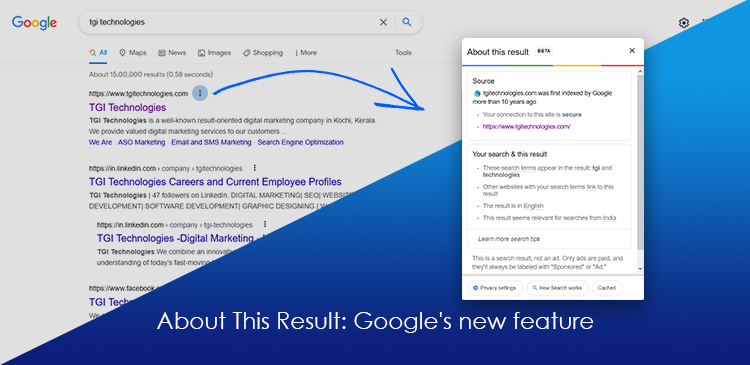
In this regard, they have introduced an ‘About This Result’ feature that would allow users to get more information about the search result that popped up with regard to their query. This has made Google more transparent, in a way, allowing users to trace the source of something without any hassle.

What does this feature contain and what to expect?

This feature contains a few details that you might find interesting and what to expect? We are not quite sure as the feature is still in it’s BETA phase and it’s too early to say anything.

Is this available here in India?

This feature has been available in the U.S. for quite some time and it is finally available here in India. It is not a finished, polished feature. It is still in early BETA, so, you must know there might be a few bumps here and there.

Where is this feature?

Search for anything and you’ll see 3 dots to the right of each result. Pressing that will bring up the “About” for that result.

What does it contain?

  • Website information

It contains general information about the website whose result you are checking up. This information is usually taken from Wikipedia and is cited so.

  • Why it showed up

There must be a reason as to why the result is relevant to your query. In this About, these are listed out. As of now, it is usually the keywords you used or something related to the keyword. It also states if other websites using the keywords have linked to this particular result (which makes it more relevant).

It will also let you know if an image related to your keyword is the reason you’re seeing a particular website.

  • Connection

It also states whether connection to the site is secure or not. Most of the times it is. This is a handy feature to avoid scams and clickbaits and non-secure sites in general.

  • Language

This also states which language the content of the particular webpage is written in.

  • Location relevance

The feature also allows us to know how a particular location is relevant to the query.  It simply states “Relevant for searches near ______”

Advertisements

This new feature clearly states whether it is an advertisement or not and also tells how one can distinguish between an advertisement and an organic Search Engine Result.

Why the ad?

This feature states why you got a particular advertisement. It might be either due to Google’s estimation of your location or things that may interest you according to your past activity on the browser.

Who put up the ad?

It also gives the advertiser’s name (who put up the particular advertisement) and their location (the country).

What about images and videos?

This feature does not support Images and videos as of now.

If by some chance, a video comes up as the most relevant, i.e., at the top of the results, the ‘About’ will show up and will say that it’s source us simply “from across the web”. This is the same for images. These videos and images are groused together and are only available on the ‘All’ tab.

If a video does pop up in the ‘all’ tab during a search, the about will contain information about the site on which the video is hosted (source). The other things listed are the same as what has been previously mentioned.

In case of results that pop up as a single word or sentence that Google sources from different places, the ‘About This Result’ feature says the information comes from Google’s Knowledge Graph.

Learn more search tips

This sub-feature is currently unavailable. We can expect  it in the future.

Feedback

Google also provides an option to send feedback on the given piece of information corresponding to a search result.


We at TGI Technologies, one of the best digital marketing agencies in Cochin, Kerala, are dedicated to keeping you updated on the digital world especially in regards to marketing. For more information of the sort that you do not wish to miss, check up on our website occasionally.

20Sep

Google Ads vs Facebook Ads: Which is good for your business growth?

Google and Facebook, both, are big players in the advertisement industry. They are true giants that put everything else of the same kind in their shadows. So, when you want to choose one, which do you choose? Both, of course. Who’s stopping you? But, let’s suppose you really need to pick one and need to know the strengths and weaknesses of each.

Which one is better then? Well, depends. Depends on a few things, in fact. What is your objective? Is it getting customers and conversion? Or is it just brand awareness? There are a lot of questions to answer. But, let’s get a general idea of the whole thing.

How it works

Google advertisements or AdWords depend on keywords. They use textual data to attract people using these keywords in their search queries. These keywords are the core of what you need to promote and are usually no more than a couple of words and corresponding to search queries, your ad pops up.

Facebook ads depend on your company’s reach on social media and your social media presence to attract customers. Ads can be tailored to a certain kind of audience unlike Google ads which just puts it out there for anyone using the keywords you paid for.

Which one has a wider reach?

Undoubtedly, Google has a wider reach. A wider reach doesn’t not mean more conversion rates. It just means wider reach. Google has a wide variety of suites to offer and a wide variety of environments when it comes to advertisement. Like, YouTube ads or through Gmail. Facebook on the other hand is limited to Facebook, Instagram and such media platforms.

Google has a wider reach but, the conversion rates could not be as high. Facebook, on the other hand, has a smaller reach but better conversion.

Budget

Budget is a very important part of the advertising process. Which is more budget friendly? Depends on your objective, length of the campaign and which business you are in.

For Google, the business you are in is really important due to their Cost per Click (CPC) or Price per Click (CPC) thing. When someone clicks your ad that takes them to an external site or an ad in the SERP (Search Engine Results Page) when clicked will cost you. And, this price depends on the kind of business you’re doing.

If your business doesn’t have a lot of competition, the price you’re looking at is really low. But, if your business has really tough competition, the prices you’re looking at will be high.

Facebook has a more stable rate for advertisements when compared to Google. But, to see results, you will have to invest long term. Because to see which kind of ads work best and getting things set up specifically for something is going to take time. We’re talking months here.

The Model/Structure

Google has a funnel model – a top, a middle, and bottom. The top is people who are in no way interested in your business or any other business of your kind. They are hard to convert into clients as Google has a wide reach and not everyone is looking for your products. The conversion rate is extremely low at the top of the funnel.

Then, there is the middle, where people are mildly interested in your products and people who come down from the top of the funnel. Here conversion rates are a bit higher, but not a considerable increase. Then, there is the bottom, where people are really looking unto your products. Here the conversion rates are high.

Facebook uses an entirely different approach. They use advertisements that look just like normal posts in the form of a picture or video, so people won’t just scroll past it. They will take the time to understand your products and what you offer. Is this why the conversion rate is high? Makes no sense. Of course not. There are things in play behind the scene.

Facebook is somewhere people’s personal lives, interests, and a lot of stuff come to be public. They do it themselves. This makes it easier to sort people with similar behaviors with regard to purchasing products or things they like. This is called “lookalike” something. So, when you have lookalikes and target them, the conversion rate is incredibly high.

Ease of use

Which one is more user-friendly from a beginner perspective? With a lot of similarities between the two platforms, such a question is to be expected. Which indeed is more user friendly? Both have their pros and cons in this…field. Google has a simple UI in the basic section. But, the basic section is very limited and if you need more control and be able to do more, you will have to switch to advanced, which can be quite daunting.

Facebook has a very simple UI where you know what everything is. It is very beginner friendly. Too friendly to the point where you can make mistakes because of it. For instance, you could just delete an entire campaign when all you wanted to do was delete a post that wasn’t attracting customers.

It all comes down to the user.

Local services

Which of the two help get a boost for local businesses? Here, Google takes the lead. Because of apps like Google Maps, Google can know where a person is. When they are within proximity of your business, Google will automatically suggest your business if they are searching for something related to it.

Facebook, unfortunately, has no such service to offer. So, if you’re a local business trying to make a name for yourself, Google is the way to go.

When can you start?

For Google ads, you can start whenever. You can think of it today and get the campaign underway today itself. With Facebook, there is ad preparation. Then, there’s a lot of trial and error to find the best thing that works for you. This could be weeks or months of preparation. And, more waiting to get results that you might like.


If you are looking to get ads made for Google or Facebook, we at TGI Technologies, one of the best digital marketing companies in Kerala can help your business. We have been helping people like you and will continue to do so. It’s for a reason why we are the best digital marketing company in Kochi. Our team can get you running in the span of a few days.