17Jul

How To Quickly Build Brand Awareness with These Easy Digital Marketing Strategies

In today’s digital age, building brand awareness is crucial for businesses to stand out and reach their target audience. With the vast array of digital marketing strategies available, it’s easier than ever to effectively promote your brand and increase visibility. We will explore some easy and actionable digital marketing strategies that can help you quickly build brand awareness. 

  • Define your target audience:

Before implementing any marketing strategy, it’s essential to have a clear understanding of your target audience. Identify their demographics, interests, and online behaviours to tailor your marketing efforts specifically to them. This will allow you to create relevant, engaging content that resonates with your audience, boosting brand awareness.

  • Develop a strong social media presence:

The emergence of social media platforms has empowered businesses to effectively build brand awareness and recognition. Choose the platforms that align with your target audience’s preferences and invest time in creating a consistent brand image across all channels. Regularly post engaging content, interact with your audience, and leverage social media advertising to reach a wider audience and increase brand visibility.

  • Content marketing:

Content marketing plays a vital role in building brand awareness. Create valuable and shareable content such as blog posts, videos, infographics, and eBooks that educate, entertain, or inspire your target audience. Optimize your content for search engines to increase its visibility and consider guest posting on reputable websites to expand your reach.

  • Influencer marketing:

Leverage the power of influencers to quickly boost brand awareness. Identify influencers in your industry whose brand values align with yours and who possess a substantial following. Collaborate with them to create sponsored content or have them endorse your products/services. Their recommendations can help expose your brand to a wider audience and build credibility.

  • Utilize email marketing:

Email marketing remains a highly effective strategy for brand awareness. Create an email list by providing valuable content or exclusive discounts to visitors to your website, enticing them to subscribe and stay connected. Send regular newsletters, product updates, and personalized offers to keep your audience engaged and informed about your brand. Implement automation to nurture leads and maintain consistent communication.

  • Search engine optimization (SEO):

Optimizing your website for search engines is crucial for increasing brand visibility. Research and include relevant keywords in your website’s content, meta tags, and headings. Focus on providing a seamless user experience with fast page load times, mobile responsiveness, and easy navigation. High search engine rankings will drive organic traffic and boost brand recognition.

  • Online advertising:

Investing in online advertising can significantly accelerate brand awareness. Platforms such as Google Ads and various social media platforms enable precise targeting of specific demographics, interests, and behaviours for effective advertising campaigns. Design eye-catching ad creatives that effectively convey your brand’s message and lead users to a compelling landing page. Monitor and optimize your campaigns regularly to maximize their impact.

Leading digital marketing companies in Kerala that provide a wide range of services, including social media marketing, SEO, PPC advertising, content marketing, and web development.  SEO companies in Kerala, provide specialized services to optimize websites, improve search engine rankings, and drive organic traffic. 

Building brand awareness is an ongoing process that requires consistent effort and adaptability in the digital landscape. By defining your target audience, utilizing social media, content marketing, influencer collaborations, email marketing, SEO, and online advertising, you can quickly establish your brand’s presence and capture the attention of your target audience. Embrace these easy digital marketing strategies and watch your brand awareness soar to new heights.
08Jul

Pinterest Launching New Product Display Options, Updated Shopping API.

Pinterest declared that it’s rolling out new merchant options, along with product tagging on Pins and a Pinterest API for shopping. The corporate says all of the new options are designed to create it easier for merchants to form participating shopping experiences for users.

With the introduction of the new Pinterest API feature for shopping, merchants can now get access to new catalogue management and the products metadata options to alter additional efficient data quality for merchant products. The company says that the merchants who have used this tool have already seen a 97% accuracy level for the price and accessibility of data or information.

The new shopping feature “Product Tagging on Pins” permits merchants to create their lifestyle Pins purchasable. With the product tagging, merchants will be able to add products from their catalogue to their seen images. Users will then buy the exact things from the images they find. Pinterest also says that the users show a 70% higher shopping intent on product Pins tagged in seen images than standalone product Pins in initial tests.

Additionally, Pinterest is sanctioning video assets in product catalogues to give users a correct look at items from multiple angles when they are making the purchase decision. With the launch of this feature, Pinterest says that it seems a promising result from video-like advertising formats.

Finally, Pinterest is launching a brand new Shop Tab on business profiles that may enable merchants to simply display purchasable products. The company also noticed that the new feature not only allows easier product group management directly on a merchant’s Shop Tab, but it additionally brings customizable product descriptions and an enhanced mobile interface.

Jeremy King the senior vice chairman of Engineering at Pinterest, said in a statement that “At Pinterest, our goal is to turn inspiration into action, and our vision for shopping is to create potential to shop for anything and Pinners are inspired by the platform.”

The new shopping option like the API for shopping enables the brands and retailers to succeed in high-intent Pinners throughout the earliest stage of their shopping journey with the foremost updated catalogue data.”

Pinterest has set its eyes on the rising of the online shopping experience on its platform over the past few months because the company recently declared that it is getting an AI-powered shopping service for fashion which is known as the Yes. The company was supported by the e-commerce veteran and former stitch Fix COO Julie Bornstein and technical co-founder Amit Aggarwal. Pinterest said that the acquisition will be facilitated to determine a brand new strategic organization among the company to assist to drive the company’s shopping efforts, along with the development of features for each shopper and retailer.

Pinterest also says that these new shopping options for merchants, the acquisition of the Yes and also the appointment of Google executive Bill Ready as Pinterest’s new chief executive officer, show that it’s targeted on creating Pinterest the house of taste-driven shopping and dealing toward a vision of creating it potential for shoppers to shop for something they’re impressed by on the platform.


Follow TGI Technologies, One of the best Digital marketing company in Kerala to get updated about the new informations and news regarding the digital world.

10May

WhatsApp is rolling out some New Features!

Whatsapp is rolling out a new major update and some new features are coming on board for all whatsapp Users.

Now the Admins can delete the Messages.

Gone are the days of WhatsApp admins looking at members’ toughness as helpless. Whatsapp is changing from the old style to the new style where the admins get the power to delete messy messages.

The maximum number of group members can be doubled. With the new update, you can send an entire movie through WhatsApp if needed.

According to the Users needs the Makers are adding new features and making it available in the coming weeks at various stages.

For every single message, the users can use emoji reactions for easy communication is one the latest update WhatsApp is providing. Apart from this, these are the latest updates announced by WhatsApp.

  • The limitation of 256 members in a group will be increased to 512 members. This is to help Businesses and various organisations, because of the limitation of 256 people the same organisation had to form multiple groups.
  • With the help of the new update, If a group member posts any unwanted message the admins can delete it by long pressing the message.
  • Files upto 2 GB in size can be sent as currently 100 MB files can only be sent. With the rising limit of Files size an entire movie can be shared with others. WhatsApp also strongly protests against the misuse of Telegram, Messenger and Movie Piracy which can share large files.
  • Up to 32 people can be added to a voice call at a time, where as currently only 8 people can be added. For more than 32 people voice call, we can use the existing group system itself.

There is no need of worrying if the new updates are working even after the updating WhatsApp. In a few weeks it will reach all the lines.

Emoji Reaction Feature of WhatsApp.

Emoji reactions help the users to react individually to each message with an emoji. This feature is already available on Instagram, Facebook and Messenger Applications.

Nowadays Emoji reactions are gaining more popularity among the general public. It has become an alternative way to text-based replies primarily a nonverbal way of responding to a text message. The main benefit of using it is that it can convey emotions for a specific message.

  1. Way to get Emoji Reaction in WhatsApp.

First of all, we need to download or update the most recent version of the WhatsApp mobile application from the Google Play Store if it’s Android or from Apple App Store if it’s IOS. Even after updating the application still, you don’t see Emoji reactions on WhatsApp, it’s owing to the package update delivery is rolling out server-side. It might take only a few weeks for everyone to get this feature available.

  1. Steps to best know before reacting to a message on WhatsApp Mobile.

  • Update the most recent version of WhatsApp via google play Store or Apple App Store
  • Double-tap or Long-press on a message.
  • Six totally different emojis will appear on the screen.
  • Select from one of the reactions and click on it.
  • In the form of a notification, the emoji reaction will be sent to the user.
  • Exactly like on Instagram, The reactions will be displayed below the messages.
  1. Steps to best know before reacting to a message on WhatsApp Desktop.

  • Download the most recent version of the WhatsApp application.
  • Open up a chat.
  • Move the mouse over messages sent by others and check if an emoji icon appears near the messages.
  • Select one of the reactions from the available options and click on it.
  • In the form of a notification, the emoji reaction will be sent to the user.
  • Exactly like on Instagram, The reactions will be displayed below the messages.
  1. The six different Emoji Reactions offered by WhatsApp:

  • Thumbs Up.
  • Heart.
  • Face with tears of Joy.
  • Face with mouth Open.
  • Crying Face.
  • Person with folded hands.

WhatsApp also promised to that sooner or later the support for all the emojis and skin tones that we can typically use in messages.

  1. Platforms which offer Emoji Reactions.

  • Instagram, Facebook and Messenger are the Meta-owned applications and services that have had this feature for a while now. In these applications, the users can simply long-press or double press or simply move their mouse pointer on the message or comment to open the emoji reaction popup.
  • Zoom — allows the users to send meeting reactions. This video conferencing platform offers two options – one is the standard emojis as quick action and the other one is where the users can select any emoji as the meeting reaction.
  • Microsoft Teams – also provides the feature of Emoji reaction for teams meetings. It only offers quick reactions where the users need to hover their mouse over the message and select from the available options.
  • Google Messages — Google also recently added this feature in the Messages application and allows the user to respond to a text message by means of a standard set of emojis.
  • iMessage – Apple was the first to introduce the idea of Emoji Reactions. This quick messaging application allows the users to react to a text message using emojis by a simple long-press or double-tapping on the message.
  • Google also recently announced that the Emoji Reactions will be coming to YouTube, Docs and Meet.

Since this feature is currently in its introduction stage, it might not be available to all users. There are more than two billion users around the world who are currently using WhatsApp and it’s normal that this feature takes a few days before being accessible to all the users.

29Oct

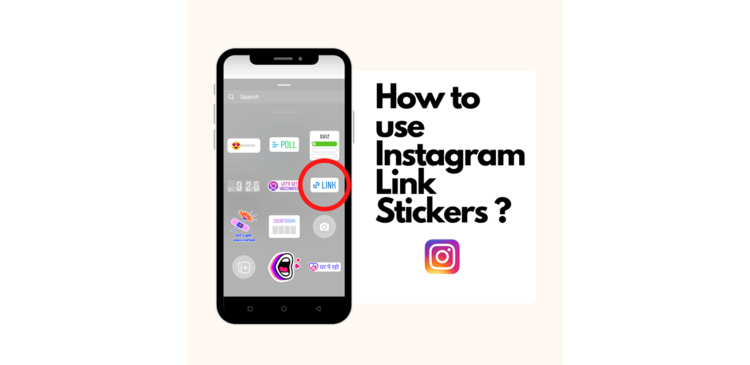
How to use Instagram Link Stickers ?

Would you like to include a link in your Instagram Story? According to a business announcement, Instagram’s Link Stickers will now be available to all users on the social media network. Previously, the function, which allows users to embed hyperlinks in the form of stickers in their Instagram Stories, was only available to verified accounts and handles with a large number of followers.

In June of this year, the social networking platform began testing its Link Stickers function. After multiple users requested access to the feature, Instagram said that the sticker will now be available to everyone, regardless of their number of followers.

Link Stickers, according to the company, are highly valuable for creators, businesses, and other members of the community who may use them to distribute information and resources. Instagram, on the other hand, stated that accounts that consistently breach community norms and disseminate disinformation and hate speech will be denied access to the function.

In June, Instagram stated that the Link Stickers feature would not be added to the main Instagram feed or other portions of the program. According to The Verge, the company’s stance has not changed.

The sticker has taken the position of Instagram’s ‘swipe up’ feature, which was formerly used to direct followers to other websites from the platform. However, in August of this year, the firm removed the feature, which was only available to accounts with over 10,000 followers.

What does an Instagram link sticker entail?

The Instagram link sticker, which takes the place of the swipe up feature, allows users to add an external link to their Instagram Story. Story link stickers are the simplest method to promote various pieces of content and items on Instagram, while also allowing you to use analytics to improve your Stories strategy. When it comes to links, Instagram claims that the sticker has three significant advantages over the swipe-up feature:

  • Stickers are well-known and popular among users, who utilize them to express themselves through music, questions, locations, and polls.
  • Stickers provide you more creative control over the aesthetic of your Story than swipe up links did previously.
  • Furthermore, stickers allow viewers to interact with a Story, whereas the swipe-up feature did not allow for replies or reactions.

Simply said, Instagram link stickers, like swipe-up before them, are a crucial component for any Instagram business strategy.

What is the best way to use the Instagram link sticker?

Although Instagram Stories only last 24 hours, including a link in your story can help you drive conversions, increase organic engagement, and make it easier for your followers to share the material you want to.

  • Press the + sign in the bottom centre of the Instagram app.
  • Select Story by scrolling down (rather than Post or Live).
  • Use all of the beautiful media you have at your disposal to create your story.
  • In the top row, tap the Sticker symbol.
  • Put your link here.
  • After that, just submit it to your Story and you’re done!
  • Don’t forget to track your analytics once you’ve put your first link sticker so you can improve your click-through rate.

Instagram is also working on customizing the stickers so that when users hit on the link, “it’s clear what they’ll see.”