12Jul

How to Promote Travel Tourism Website and Enquiries ?

Importance of SEO for Travel Industry

Allow the figures to do the talking. A recent study conducted by  Travel Commission concluded that as many as 72% of the trips were booked through internet. This is not it. There is a rise in the internet bookings by 45% since 2009. Hence, it is clear that more and more customers are relying upon online channels to fulfill their travel requirements and this trend is sure to get more popular, all thanks to the widespread use of smartphones and internet using devices.

SEO allows you to target customers for a range of keywords. Unlike other strategies (PPC, Facebook admangers), targeting keywords in SEO is fairly easy and pocket friendly. SEO lets you target a large number of keywords along with their variations, for no extra costs. For example, if you are in the business of booking hotels, you might like to target keywords like ‘hotel reservation’ and ‘hotel booking’. But why restrict yourself? You could also try your hands on other related keywords like ‘kerala hotels’, ‘best hotels in kerala’ and so on. SEO doesn’t restrict your keywords with a budget. SEO gives you the liberty to explore more and target a range of related keywords for no extra costs.

travel

Positive Online Customer Reviews
Positive online customer reviews instill the confidence in your brand. Positive reviews speak of your good will in the market. Manage your reputation online by earning some good customer reviews. You could do this by asking your customers to leave positive reviews on popular travel forums. TripAdvisor is one of them. Make sure that the reviews are honest and left from genuine people. Further, also keep a close eye over the negative reviews and take all possible measures to address them.

30Jun

Best keywords to promote your SEO strategy for websites

Keywords are essential to every aspect of your SEO campaign, from on-site optimization and usage to link prospecting and acquisition. Knowing which terms to target and how to target keyword to produce great result.

  1. Think from client side view and chose keywords

keywords are terms and phrases your target audience uses when talking about your business or industry. These phrases are usually very broad and generic, so they are often much harder to rank for than others; nonetheless, they are still extremely important.

keywords-seoThese terms are critical in your on-page optimization. Following SEO best practices, add these terms throughout your site pages. keywords are also helpful in jump-starting your content creation. Framing these keywords inside broader questions can help you develop some great content for your site or blog.


When it comes to link acquisition, use these terms to prospect for link- or community-building opportunities. I know manual link building is not the most glamorous thing these days, but it works better than any other method. These terms may uncover some other great sites within your field that you can partner with.

keywords

Customer-defining keywords are the terms and phrases your customers use to define themselves. What do your customers call themselves?  How do they refer to others in their group?  These two questions will guide you to uncovering these powerful keywords.

This type of keyword is important because it will help you discover others who relate to your target audience. Some may be directly related to your customer base, and others may be in a similar niche. Either way, by using these terms, you can uncover some great insight into how your audience speaks and how you can frame your site in a way that entices them to interact.

SEO is much more than just search; it’s about creating a connection. Customer-defining keywords will help connect you with those who want or need your product or service. By understanding how your audience defines themselves, you can create better content, build more contextually appropriate links and build better, more authentic connections online.

Use Google Keyword Planner , Use google trends for what people are mostly used for find the result

Use Long tail keywords those three and four keyword phrases which are very specific to whatever you are selling. You see, whenever a customer uses a highly specific search phrase, they tend to be looking for exactly what they are actually going to buy.

More details : www.tgitechnologies.com

08Jun

Is Blogging Important for your Business? Why?

Blog sign isolated on white

Some debate are going regarding this topic out of that  blogging is still relevant in today’s social media marketing domain.

Though you have a small business, or a multinational company, blogging is intrinsic for your online content marketing procedures.

 There are mainly 4 reasons behind blogging:

  • Rush  traffic to your website
  • Shoot up your SEO/ SERP results
  • Spot your brand as an industry leader
  • Enhance better customer relationships
08May

Guide to Create a WordPress Blog Post

create WordPress blog postWordPress is the most popular Content Management System. It is such a good tool to create a blog post and also landing pages. If you are an SEO expert or content writer you may come across with WordPress. Getting familiar with WordPress is a best move. On these days most people go for WordPress as their CMS choice because it is easy to use and maintain and also to customize.
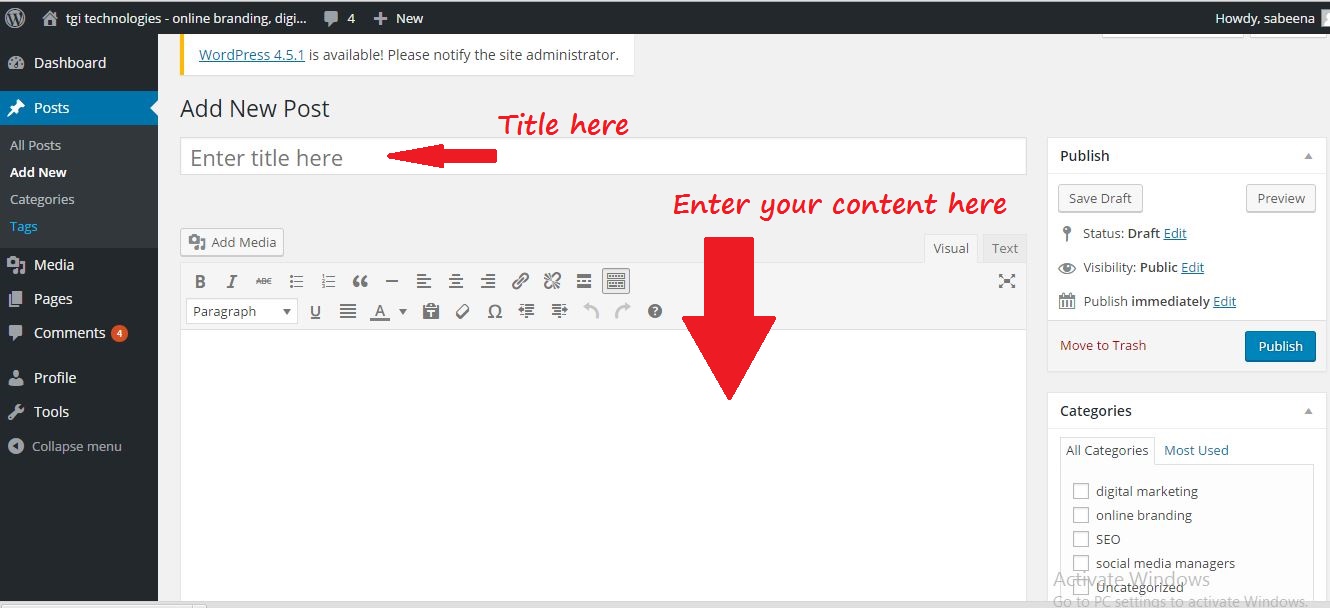
Here we first go with how to upload a WordPress blog post. Before optimizing a blog post, you should upload it and make it live.

Uploading Blog Post

1. After log in to your site you may enter to your dashboard. There you can see the “Post” option click on it and select “Add New”.

2. Now you enter into a page where you can start your blog post. Give a title to your post in “Enter  title here”.

3. Under that section you can start your blog. Content can be directly enter into the blog post and  publish it or make it as a draft if you are not ready to publish it. Some people write all the blog post separately in some programs(like word). Then copy paste the content once they are ready to publish.

enter content in wordpress post

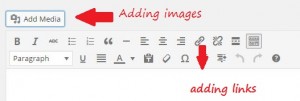
4. You can add links to your post. For this select the text you want to make it hyperlink. Then click on the symbol showing the link. A small window opens and there you can add the url. Then click add link. add links and images

5. Adding images in your post is also simple. If you have images, place your cursor where you want the image. Click on “Add Media” and select “Upload Files.” After choosing your preferred settings, click “insert into post” to add your image in your blog post. Sizing and aligning your image can be done by selecting your image.

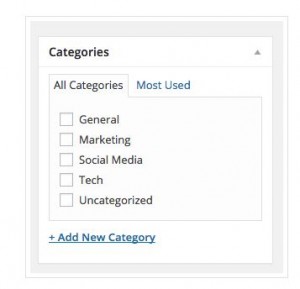
6. There is a “Categories” section on the right side of your screen. No need to categorize your post (unless your site is organized by categories), but you can add one if you wish. If you do so, WordPress will create category pages that pull in posts within that category.

categories in blog post

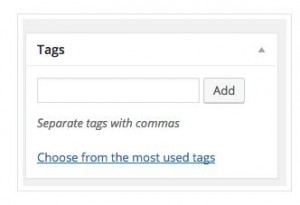
7. Under the “Categories” section, you’ll see the tags section.  You can add tags to your post here.

tags

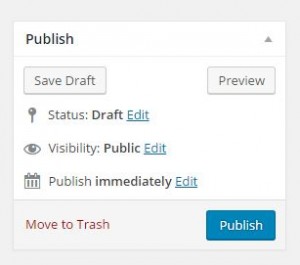
8. On the right side up there is a section called “Publish.” Here you can choose “Preview” to make sure everything looks right in your post before uploading it. If something doesn’t look the way you want,  just edit that section.

create blog post

Basic Optimization Tips

As an SEO you should focus on the blog post optimization. There are so many things you have to consider while go for optimization. Usually WordPress offers Plugins to optimize your post. In SEO perspective the best Plugin is Yoast SEO.

Yoast SEO is one of the popular Plugin available. In Yoast SEO you have the option to add SEO title, Meta description and also option to edit the post URL and so on. You can also share your post through this. I will share the detailed description about Yoast SEO in my next post.

Now we can go through some basic tips on optimization other than plugins.

  1. <h1> is the most important tag in your post. Usually people add more than one <h1> in their post.  In blog posts the title you entered will automatically work as <h1>. So make sure that your post has only one <h1>.
  2. Blog should be not less than 300 words.
  3. Title of your post should include main focusing keyword. Include 50- 60 characters in your post title.
  4. Include Alt tags for your image. This tag describes what the image is about. Try to include keywords on this alt tag.  There are various ways to add alt tags for your image, but it all comes down with whether you are using the visual editor or the text editor. visual or text editorVisual: Click on the image you want to add alt text, and click on the “Edit” icon. Add your alt text in the “Alternative Text” field. Make sure to click on “Update” after.                           Text: Simply add the alt=“” snippet of code inside the image tag. For example :
    <img src="http://www.domain.com/images/1" alt="describe image">

If everything is complete you can publish your post. Sometimes you should find some mistake after publishing the post. If it happends just go to the edit section and clear out the problems and click on “update”.