22Jun

Google’s May 2022 Core Algorithm Update.

In the last week of May, which is on the 26th, Google released Google’s May 2022 core update. This update kicked into high gear quickly, with a large amount of volatility noticed among 24-hours after it was formally launched. And this update was one of the biggest core updates or Google algorithm updates we have seen in some time, at least in terms of the SEO impact.

How does Google’s May 2022 Core Update influence your Website Metrics?

Google introduced a “broad core update” to its search engine algorithm on May 26th, 2022, as declared by Danny Sullivan, a public liaison for Google Search.

Its full effects took a few weeks to manifest as a result of Google rolling out major updates bit by bit or gradually. This is Google’s 1st broad core update in over six months since November 2021.

An algorithm update is a huge deal. Where it means that Google is processing how its programme or search engine interprets web pages which impacts your company’s ranking, traffic and, subsequently, revenue.

It is very hard to assess and let alone prepare for a broad core update. Google does not specify what the update is or how will it affect the website matrices because board core updates have a broad scope.

So now let us understand in detail what a broad core update is.

What is Broad Core Update?

Broad Core Update represents an overall twist of the algorithm rather than a targeted effort. Google’s board core updates impact search engine ranking factors across the board while not addressing any one element in detail. That is the reason why Google calls them “Broad”.

Some past updates such as Penguin and Panda were targeted because they were looking at the quality of backlinks and content. Other updates are more specific still. As an example, Google Search has altered how the product review and spam impact relevant rankings in December and November 2021.

But about Broad Core Update? They have altered how the algorithm values a webpage in a wide-ranging approach.

What happened in the Broad Core Previous Updates?

We know that the most recent broad core update before May 2022 was in November 2021. However, the June/July 2021 update is what takes the cake for the foremost website impact. This is because the update was so large, that Google split its deployment into 2, the first thing was launching the first half of it in June and then the rest in July. And it was largely unprecedented.

Data Analysts observed a whole lot of volatility in website performances throughout many Industries as Google Search rolled out the June/July 2021 broad core update.

One of the analysts defined it as “one among the largest core update we have ever seen from Google yet.”

What is distinctive about this new Broad Core Algorithm Update?

In a way, nothing. Or at least nothing that the public can authenticate.

Again, with regards to Broad Core Updates, Google never gives any particular information. All we know is those updates can noticeably disrupt the rating on Google Search.

The SEO community had (successfully) speculated about an impending core update about a week before it befell, causing many to guess that record adjustments during that time had been casualties.

But according to Search Engine Land, John Mueller, a Webmaster-Trends Analyst at Google, stated that “whilst we announce core updates, we began to roll out at that point, not beforehand.”

And Broad Core Update tends to be rolled out over time. Thus any noticeable variations in website traffic from late May to mid-June we can safely assume that these are influenced by this new update.

Conclusion.

If there’s one factor Google’s May 2022 broad core update is teaching us, it is the time to boost your quality standards for website content. It’s no secret that Google’s guidelines suggest the following E-A-T best practices as proven by the results of this update rollout.

From intense ranking volatility and impacted snippets to additional attention on videos, content specialization and search-intent mapping, publishing great content are must for online visibility.

Investing in SEO content services will empower you to leverage subject-matter experience and efficiently publish high-quality content on your website to begin boosting your traffic.

And by this time, you will be able to say goodbye to broad core anxiety for good!


Follow TGI Technologies, One of the best SEO Company in Kerala to get updated about the new informations and news regarding Google and SEO.


04Jun

What is a Link Bait ? Here is Everything you need to know about Link Baiting.

SEO is a constantly changing dynamic field with various practices for promoting products, content, web resources, and services. For Search optimization to be effective, specialists want an exact level of SEO expertise to spot the most effective techniques.

Link Baiting has emerged as a well-organized technique for promoting content. With this system, the aim is to come up with massive amounts of links and traffic by making content that is helpful and extremely shareable. Let’s now understand what it is and some of its examples.

What is Link Bait?

Link Bait will provide valuable content on your website so that alternative websites can naturally link or reference it without you even having to ask. Linkable content is often something from in-depth scientific research, to an evergreen guide, to a very popular video. More precisely, you can create interesting or exciting contents that are willingly shared by strangers on their web platforms like social networks, sites or blogs.

Posts qualified for Link Baiting are more than funny memes that very quickly spread online out of their sheer wittiness. Having well-researched and distinctive articles will present your website as a credible information source making certain that you just have the trendiest information that is worth citing in a different way of making a Link Bait worthy resource.

Advantages of Link Bait.

Indeed, link bait is not a simple procedure. Why opt for it over a lot of easier techniques that are easier to apply? Well, as compared to several different SEO ways, link baiting is more useful and the following are some of its examples:

  • Makes our web resources more identifiable.                                          

As backlinks to our website accumulate, it gains more popularity even beyond the target audience.

  • It provides a rapid traffic boost.

It is truly helpful and the most relevant content is quickly shared on social networks and blogs.

  • It establishes very helpful business connections.

It is very simple, the more the backlinks a resource collects or gathers, the higher the position it occupies in the search results. Now, it becomes simple and easy for potential business partners to learn and understand you. They will reach out and you form a new business connection.

  • Reinforces the brand image online.

Once a different trusted site or influencers cite you, this incorporates a positive impact on your general credibility within the web space.

Although this SEO technique needs resources, it is hard to deny its potential.

Obviously, given today’s plentifulness of net resources, it is not very easy to attract many users. Prompting them to share a link to your website is even tougher. Nonetheless, Correct or proper link baiting can quickly generate traffic to your website and create it recognizable within the web space. One of the most effective SEO techniques is link baiting can push almost every web resource to the top of the search results.


Follow TGI Technologies, One of the best SEO Company in Kerala to get updated about the new informations and news regarding the SEO and Digital Marketing.


26May

Immersive View Coming Soon to Maps

The immersive view is now coming soon to Maps! Google Maps is a web mapping and consumer application offered by Google. It offers satellite imagery, aerial photography, 360˚ panoramic views of streets, street maps, traffic conditions in real-time, and route planning for transportation by foot, car, bike, air, and public transportation. As a digital marketing company based in Kerala, here’s all you need to know about Maps’ Immersive View.

About Immersive View

Google Maps was first launched to help people navigate their destinations. Since then, it has evolved to become a perfect companion in helping people find an ideal restaurant or find information on a local business. Thanks to advancements in computer vision and AI, billions of street and aerial views can be fused together to create a rich, digital model of the world. This way, Google is now introducing a new way to explore maps.

With an immersive view, the user will be able to experience what a popular venue, landmark, restaurant, or neighborhood is like. They’ll be able to feel like they’re right there without actually being there. This helps people in making informed decisions before going someplace new.

With the help of Google Maps’ information layered on top, you can use the time slider to see what the area looks like at different points times of the day and in different weather conditions, and see where the busy spots are. Swoop down to a street level to explore nearby restaurants and get helpful information, like live busyness and nearby traffic. You can even get an inside view to get a feel for the vibe of the place before you book your reservation. All of this is possible using neural rendering to create an experience from images alone.

Instead of a flat 2D version, the immersive view transforms the world into a video game in the palm of your hand. The big change is that nothing is static anymore, the areas look like a Livestream. This seems more immersive in a way. The best part of the immersive view is that it will be able to work on any device. This feature has extremely great potential and could be the future of map platforms.

The feature will be first made available to Los Angeles, London, New York, San Francisco, and Tokyo later this year. It will eventually roll out to other regions soon.

Eco-Friendly Routing

In addition to the immersive view, eco-friendly routing was launched recently in the US and Canada. This feature lets you see and choose the most fuel-efficient route when looking for driving directions. This feature has inadvertently saved almost half a million metric tons of carbon emissions. This feature is set to expand to more places like Europe.

Live View

The Live View feature helps you find your way when walking around by using AR to display arrows and directions right on top of your world. This is especially helpful when navigating indoor areas such as airports, malls, train stations, etc. With the help of an AI-based technology called global localization, Google Maps can direct where you need to go within a matter of seconds.

As of 2020, almost a billion people use Google Maps every month around the world. As AI and machine learning advancements played a huge role in almost all the announcements made at Google I/O this year, it’s not a surprise that Google Maps was one of the recipients of the AI treatment. With the help of an immersive view, you can experience the vibe of a place from afar. This feature has enormous potential to revolutionize Maps in the future.


28Apr

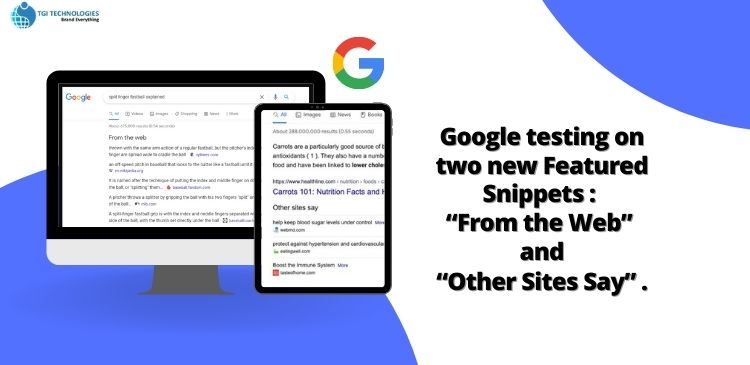
GOOGLE TESTING ON TWO NEW FEATURED SNIPPETS: ‘FROM THE WEB’ AND ‘OTHER SITES SAY’

Google is testing two new types of Featured Snippets. Both these snippets will show the users short answers to their search query from one or more sources not just a single source, unlike most snippets. Featured snippets are highlighted pieces of text that come up at the top of a Google search results page at Position 0.

As one of the best digital marketing and SEO company in Kerala, here is an article explaining more about featured snippets and the Google tests on two new featured snippets ‘From The Web’ and ‘Other Sites Say’.

Featured snippets provide users with quick answers to their search queries. They are more likely to appear when users enter informational search queries. They are displayed above organic search results, only showing the relevant section of a website as a list, table, or text, accompanied by an image or video. The featured snippet box is more predominately placed than the search results thus allowing showcased websites to expect higher click rates and increased traffic. Snippets contain relevant information from a website that matches the user’s search query.

A featured snippet consists of a number of content elements from the landing page, ranked as follows:

  • Text snippet
  • List snippet
  • Table snippet
  • Video snippet

Featured snippets usually contain an image, though the image may not come from the same source as the content selection. Sometimes, they may display video content. Google also displays the title and URL of the website in the snippet, thus providing users with more knowledge about the source domain. With the snippet being placed in Position 0, the corresponding URL of the website experiences an increase in organic traffic.

 ‘From The Web’ and ‘Other Sites Say’ are the two new additions to Google’s featured snippets.

  • From The Web- Usually in normal cases, snippets contain content and link only to a certain website. But, in this case, the featured snippet features to text and a link from one website. Google also shows brief excerpts from two or three websites linking each source separately as well as including the site’s favicon.
  • Other Sites Say- In this second variation, Google groups at least three different sites similar to the From The Web snippet under the heading ‘Other Sites Say’.

Optimizing for featured snippets will help in increasing website visibility in the corresponding search results. Though users may receive answers to simple search queries through the featured snippets, for more complex information, the snippet provides only an excerpt, list, or table pertaining to the information so the users have to click on the website to see all the information.

In conclusion, owning a featured snippet can be beneficial, as it helps increase CTR, adds credibility to your website, and improves brand awareness. If a website is already ranked in featured snippets, it can face a drop in traffic. On the other hand, if you do not have a space on the featured snippet, it provides an opportunity for you to optimize your site and drive traffic towards your site.


18Apr

WordPress All in One SEO Integrates Microsoft Clarity

The All in One SEO for WordPress is the original WordPress SEO plugin that started in 2007. Over three million smart website owners use AISEO to properly set up their WordPress SEO so that their website can gain higher ranks in search engines.

The AISEO is the most comprehensive WordPress SEO plugin and marketing toolkit that can be used to improve a website’s SEO rankings and uncover new SEO growth opportunities within minutes. AISEO’S WordPress SEO plugin features are highly optimized for Google and other popular search engine algorithms because they follow the most up-to-date SEO standards and practices.

The AISEO plugin integrates Microsoft Clarity Behavior Analytics which gives publishers insights for improving conversions and diagnosing site issues.

The benefits of the AISEO plugin are given below:

  • Understanding user intent
  • Optimizing content and web designs
  • Reducing bounce rates
  • Improving conversion rates
  • Optimizing your user experience

The AIO SEO plugin is considered one of the best WordPress plugins because of its unique features. They are given below:

  • TruSEO On-Page Analysis
  • Rich Snippets Schema
  • Local SEO
  • Smart XML Sitemaps
  • Video SEO sitemaps
  • Social Media Integration
  • Link Assistant
  • WooCommerce SEO
  • SEO Audit Checklist
  • Redirection Manager
  • Google News Sitemaps
  • Robots.txt editor

As an SEO and software development and digital marketing company based in Kochi, Kerala here is some information based on the AIO SEO plugin and the advantages that accompany it when integrated with the analytics program Microsoft Clarity.

ABOUT MICROSOFT CLARITY

Clarity is an analytics program that focuses on user behavior. Data visualization is the most important feature of Microsoft Clarity. Its top features include- heat maps, session recordings, and insights. Clarity’s behavior analytics offer insights into the actions users take on a particular site. It finds bugs, tests ideas, and is capable of tracking success with the help of heatmaps, session recordings, and ML-based insights.

  1. Heat Maps: These show how users engage with web pages, what they click, and how far they scroll on a page.
  2. Session Recordings: This shows how site visitors click and navigate through the site and the points where you may lose them. It also helps to identify friction points that can be fixed to improve user experience.
  3. Insights: These are reports that show problems with how the users interact with the site.

AIO SEO also provides the SEO toolkit required to implement these insights. This plugin helps you to optimize your site for search engines and users on all the major fronts of SEO- on-page SEO, off-page SEO, and technical SEO.

Clarity helps publishers fix problems like page abandonment and identify reasons behind users’ frustration with a site or inability in performing the desired action. This information helps in creating a better user experience, performance improvement, and a significant boost in sales conversion.

INTEGRATION OF CLARITY WITH AIOSEO

Clarity and AISEO are integrated in a modular manner. It also means that Clarity isn’t activated by default. This integration makes the use of Clarity easier because it eliminates the need for publishers to toggle between websites to activate it. The activation happens smoothly on the website itself. Another advantage is having Clarity on the website admin interface which avoids skipping between Clarity and the optimizing website.

HOW TO ACTIVATE CLARITY ON AIOSEO

  1. Go to General Settings
  2. Choose Webmaster Tools Verification
  3. Click on Microsoft Clarity
  4. Fill in your details
  5. Copy and paste required Clarity tracking code
  6. Save

USING MICROSOFT CLARITY

Microsoft makes it easier to see which pages of your site are more popular. There are other useful insights, for instance, the percentage of sessions that have ‘dead clicks’ (clicks that don’t go anywhere). The dashboard also provides the number of ‘quick backs’, which occur>? When users leave a page quickly and then come back to it. It also tracks excessive scrolling, rage clicks that occur due to rapid clicks or taps in the same area by a user, recordings of user sessions that provide information on a user’s device, operating system, and country, and the number of pages visited by a user, duration and time of their session and the number of clicks made by them.

Close attention to these metrics can help in making a site more user-friendly. Heatmaps help you in recognizing popular sections on your site based on the clicks made by a specific user. Recordings let you see where a user clicks on your site. Microsoft Clarity also plans to show scrolling on heat maps in the future.

CONCLUSION

Microsoft Clarity is a new analytics tool that offers interesting features such as free heatmaps and session recording. Microsoft Clarity is useful for users that are unable to afford premium solutions such as Hot Jar or Crazy Egg. The use of heat maps and session recording will be useful in optimizing your website or online store experience to improve user experience and boost sales.

28Mar

WORDPRESS RELEASES A NEW PERFORMANCE PLUGIN

WordPress has now announced the release of a new plugin known as the Performance Lab plugin. It was developed to help WordPress sites to speed up. This plugin gives the publisher an opportunity to use new improvements now before they are included in the core of WordPress.
As a digital marketing company based in Kochi, Kerala, here’s some information on WordPress’s new performance plugin.

ABOUT THE PERFORMANCE LAB PLUGIN

The plugin was developed by the WordPress Performance Team, consisting of WordPress developers, with some of the team members being developers from Google and Yoast. This team was created in November 2021 with the purpose of coordinating performance improvements within the WordPress core.

The Performance Lab plugin is a set of modules designed to improve performance in WordPress. The Performance Lab plugin provides improvements to WordPress allowing publishers to speed up their websites and also to diagnose any issues that arise which may be slowing their websites down. The plugin is designed in a modular fashion so that the publishers can pick and choose the improvement they want to use.

Normally, the new features are released as separate plugins but WordPress decided to group all of its new performance features into one single plugin allowing the user to select and enable the features from one central location, within a single plugin. Thus, it provides a centralized location for performance-related features that will eventually be integrated into WordPress’s core. Hence it can be regarded as a beta-testing plugin.

MODULES OF THE PERFORMANCE LAB PLUGIN

This plugin has four modules:

1. WebP uploads

It converts newly uploaded jpeg files to a faster and more efficient WebP format. This functionality is dependent on server support for WebP.

2. WebP Support

This functions as a site health module that analyses if the server supports WebP and comes up with a warning if WebP is not supported.

3. Persistent Object Cache Health Check

It is a site health check module that may suggest the use of object caching. Object caching is a way to speed up the amount of time it takes for the site to respond, it helps reduce the database load and speeds up the website for site visitors.

4. Audit Enqueued Assets (experimental)

It provides an audit of CSS and JavaScript files enqueued on the home page. This identifies unwanted CSS and JavaScript files that might reduce the speed of a website. This module is labeled as experimental because this module will be improved in the future.

To test the other three modules, visit the Site Health status tab, where each module adds an equivalent new check:

• The Audit Enqueued Assets module monitors the number of scripts and stylesheets enqueued on your homepage.

• The WebP support module examines whether your server environment supports creating WebP images or not.

• The Persistent Object Cache Health Check promotes the usage of an external object cache depending on the amount of data on your site.

Remember that each and every module you would like to test has to be activated via the plugin’s settings screen at ‘Settings > Performance’. Non-experimental modules are enabled by default. If you want to test the modules individually in seclusion, you can toggle them one by one.

ADVANTAGES

1. Extends functionalities: The custom WordPress plugin supports user requirements and lets the website work according to the owner’s satisfaction.

2. Backlink creation: Backlinks are considered as the building blocks of search engine optimization as these links direct towards a particular website. A large number of quality backlinks result in the popularity of a website in search engines. WordPress plugins have the capability of generating maximum links to a site and can also create excellent backlinks for the website which boosts its exposure.

3. Security: Website security is an important factor to avoid unauthorized access to sensitive information, cyber thieves, and hackers. A customized plugin developed by WordPress would be one of the best options for increasing security. It not only provides protection from security threats but also ensures the utmost satisfaction for its user.

4. Speed: Speed is one of the most important benefits provided by the custom WordPress plugin development. It ensures a smooth user experience and boosts the number of visitors to your website by speeding up your website with the help of custom plugins.

5. Performance Boost: Remodelling or redesigning the website regularly is tedious and a waste of time, money, and effort. Here is where WordPress plugin development comes in handy. These plugins will not only help you to add a new feature to your site but also boosts its existing functionality in an economical way.

6. Simple To Use: The intuitive interface and simple functionality of the WordPress Plugin separates it from other platforms. Since WordPress has extremely simple technology and reduces the time of formatting, it is easily accessible and also allows you to access the best features within your budget limits.

7. Compatibility With Search Engines: WordPress’s easy coding makes it easier for search engines to read website content in a well-defined manner. Additionally, every page, image, and content of the post will contain keywords, descriptions, and titles. This results in having the best search for optimization, which can further be enhanced by adding tags for better outcomes.

ADDRESSING CONCERNS

The plugin download page mentions that the plugin has been tested and should be okay to be used on a live production site. Since three out of the four modules are not labeled as experimental, all of them are considered to be stable and incapable of breaking a site. The main purpose of the plugin is to provide publishers with an opportunity to provide feedback about the modules before being integrated into the WordPress core.
A benefit of using WordPress websites is that it adds its new plugins on a staging site first and tests it there first before updating it to the main website.
Another advantage is to save a backup of the website before installing the plugin. The backup will make it easy to upload the website back to its original version in case the plugin clashes unexpectedly with another plugin or theme.
The plugin delivers clear benefits that can help you speed up your website. But it’s provided by the WordPress Performance Team as an incentive to receive feedback on brand new improvements that will eventually make their way into the WordPress core.
WordPress provides a Performance Lab plugin support forum and a GitHub repository where feedback can be sent to WordPress.