29Nov

Google MUM : Multitask Unified Model

What does the digital future look like? Yup, you talk to some machine and it responds like a human. That’s what sci-fi movies, at least, have planted in our brains. And, things have been turning that way recently. Machines are made to adopt a conversational tone for that one-on-one conversational vibe.

Big players in the digital field like Microsoft, with its new Windows 11, and others have already started this transition process. The Multitask unified Model (MUM) aims to do this with other major improvements.

The Base

It is a refined version of the Bidirectional Encoder Representations from Transformers (BERT). It is more receptive and adaptive to the human way of speech and communication. MUM aims to go further than BERT.

Ease and integration

Finding something on Google is not extremely simple. Some searches take more than a single try to get you what you really need. The average number of searches is estimated to be eight for complex queries. MUM aims to bring down this number. Through various new features, MUM is targeted at the ease of use of the consumer.

We can expect different aspects of MUM to be integrated into the Google browser in future updates.

Recommendation

E-commerce is nothing new. MUM makes a buyer’s journey as smooth as possible through improved recommendations. It lifts much of the tedious work required on the part of the customer to find the right product.

Google Lens

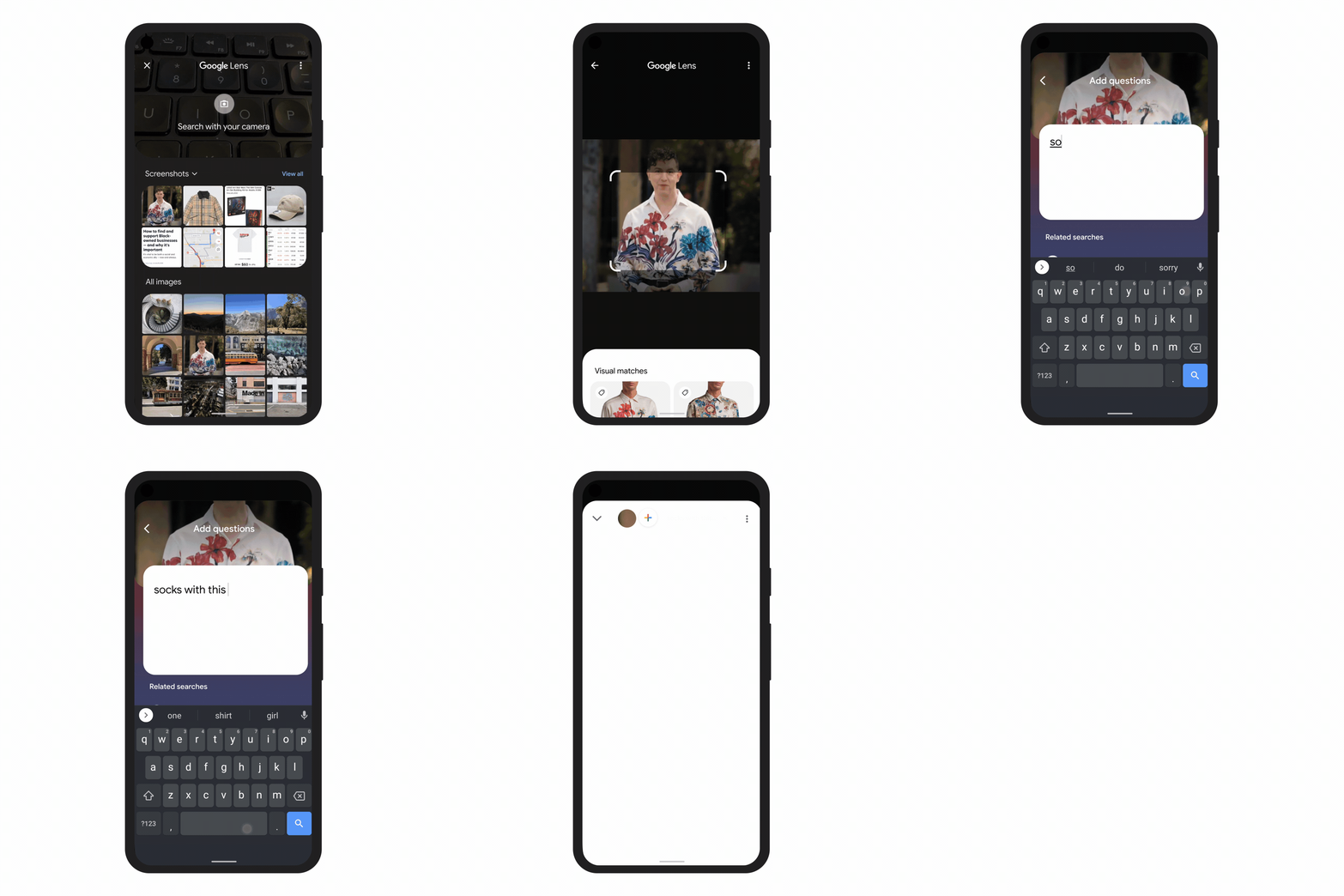
This addition is amazing and is quite a welcome surprise. MUM gives more importance to Google Lens. How exactly does it do that? Well, you could be looking for something with a certain pattern. Click a pic and ask what you want with a similar design. This short clip should help you understand better.

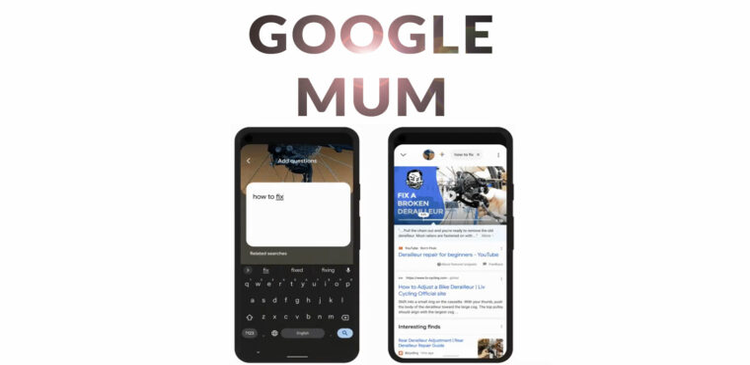
It also helps you find stuff. You could click a pic of something and ask where to buy that or how to fix a broken one or get a replacement. A pretty handy feature, right?Google LENS MUM update
 

Image Priority

Text content and videos have stayed at the top of the SERP for a while now. Now, images will share the place. Images used to be there. But, they will now be more prominent. If a query requires an image result, the images will be more pronounced. Images will be larger and the SERP will be sort of covered in images.

This might be a good time to work on relevant images for your webpage to stay on top. Speaking of staying on top…Well, there’s a bit of an issue which we will come to later.

Relevance

Things pop up based on relevance and how do you know what is relevant? Google was not the best picker. It is trying to improve with MUM. It goes deeper into content, especially videos. The closed captions help on determining the relevance of a video for a particular query.

Now, video recommendations will be better than ever with videos being analyzed more deeply.

Also, there is a hierarchy order when it comes to queries. Content, video or image? Well, depends on each query. A query that goes: “How to…” might give you more video results while something that has ‘inspiration’ or ‘reference’ in it might bring up more image oriented results.

Updated features with new names

We’re all familiar with people also ask section in the Google SERP. With the complete implementation of MUM, this section will become ‘Things to know’. From the name itself, we can see that it goes beyond a few inquiries. It gives you an opportunity to know all that is essential about a subject.

Similarly, the ‘Related Searches’ will become ‘Broaden This Search’ and ‘Refine This search’. Well, there isn’t much of a difference in this section except that the options from where to go after your initial query will be more refined. It won’t stick to a particular thing and limit you but, broaden horizons for searching.
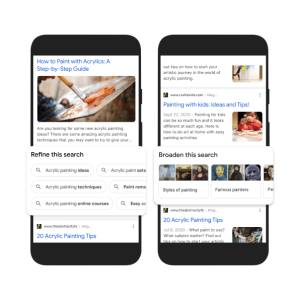
Google MUMThe suggestions are confident which is great. If it’s something that seems worthwhile, you can know more about it. If not, you can carry on regularly browsing.

The good old links

Well, links have always been the core of the browsing experience. This changed with the introduction of featured snippets. And, with progress (MUM), the links have been pushed farther down the page. With the featured snippets, Google cut down on the initial ten links and with MUM, the links will be sidelined.

This takes us back to the staying at the top thing. Well, with the links being pushed down by information filled snippets, links will attract lesser people. People browse for information and when they get precisely and concisely the information they seek, they will no longer need the links.

Versatility

With MUM Google will be more versatile than ever. The context of a query will play a huge part in MUM. Two people looking up the exact same thing in different contexts will be presented with entirely different Search Engine Results Pages (SERPs).

What makes this ‘context’? Your search history, location history, preferences, etc. Which Google can collect makes up this context.

To be or not to be featured

With Google becoming more Wiki-oriented, i.e., focused on information, rankings wouldn’t matter. You will either be featured or not. It is the content that matters. Earlier, the SERP was based on keywords and the frequency of keywords determined the position of a link on the SERP.

Things have evolved and clear, concise content takes priority over content filled with keywords. This is because of the conversational tone of questions and Google becoming more information based. Sometimes, Google may analyze and extract only the necessary parts from a link. The thing is to be featured. That is what is important now.

Is SEO a thing of the past?

No. Most definitely not. The core remains the same. Google is not undergoing a drastic change. The base algorithm of analyzing and picking data is the same. It’s just been refined. Newer elements of SEO become more prominent with such a change. SEO, like always, is still a major part of being where you want to be in the SERP.

Appeal

The thing to do now is appeal to the customer. Your website should be more customer oriented. It should have all the answers to any question that the customer may have. Think as a customer. And answer any question that a customer is most likely to ask. Keep things conversational.

Google Merchant Centre

You should be registered on the Google Merchant Centre if you are running a business. When a customer is searching for products, Google pulls up a handful of products that are verified through the Google Merchant Centre. This is why being registered on the Google Merchant Centre is important.


Things have changed a bit. Things always change. We must embrace change and move forward. If you are worried about all these new changes, fret not. We at TGI Technologies, one of the best Digital Marketing companies in Kerala will help you with any digital hiccup that you might come across. We take pride in being one of the best SEO companies in Kerala. So, if you need a helping hand with the new improvements that come with MUM, don’t forget to give us a call.
 

06Oct

Google’s new feature – ‘About This Result’

Now, Internet is a part of our daily life . Though deserving of trust, one must be careful treading the wonderful place that the internet is. We all use browsers to get to the places we want on the internet. And, Google is undoubtedly the most used of the browsers. They do have the interests of users and their well being in mind.

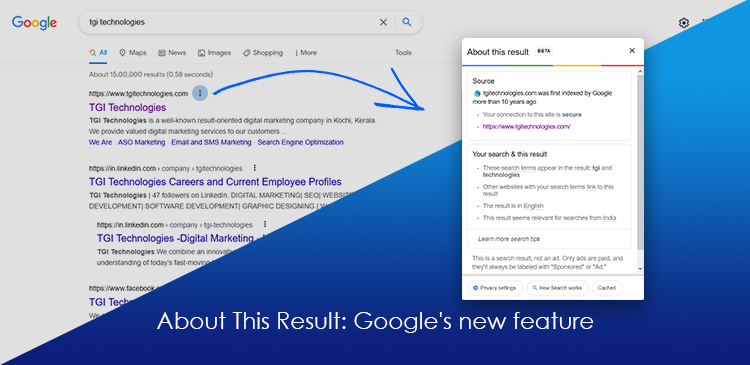
In this regard, they have introduced an ‘About This Result’ feature that would allow users to get more information about the search result that popped up with regard to their query. This has made Google more transparent, in a way, allowing users to trace the source of something without any hassle.

What does this feature contain and what to expect?

This feature contains a few details that you might find interesting and what to expect? We are not quite sure as the feature is still in it’s BETA phase and it’s too early to say anything.

Is this available here in India?

This feature has been available in the U.S. for quite some time and it is finally available here in India. It is not a finished, polished feature. It is still in early BETA, so, you must know there might be a few bumps here and there.

Where is this feature?

Search for anything and you’ll see 3 dots to the right of each result. Pressing that will bring up the “About” for that result.

What does it contain?

  • Website information

It contains general information about the website whose result you are checking up. This information is usually taken from Wikipedia and is cited so.

  • Why it showed up

There must be a reason as to why the result is relevant to your query. In this About, these are listed out. As of now, it is usually the keywords you used or something related to the keyword. It also states if other websites using the keywords have linked to this particular result (which makes it more relevant).

It will also let you know if an image related to your keyword is the reason you’re seeing a particular website.

  • Connection

It also states whether connection to the site is secure or not. Most of the times it is. This is a handy feature to avoid scams and clickbaits and non-secure sites in general.

  • Language

This also states which language the content of the particular webpage is written in.

  • Location relevance

The feature also allows us to know how a particular location is relevant to the query.  It simply states “Relevant for searches near ______”

Advertisements

This new feature clearly states whether it is an advertisement or not and also tells how one can distinguish between an advertisement and an organic Search Engine Result.

Why the ad?

This feature states why you got a particular advertisement. It might be either due to Google’s estimation of your location or things that may interest you according to your past activity on the browser.

Who put up the ad?

It also gives the advertiser’s name (who put up the particular advertisement) and their location (the country).

What about images and videos?

This feature does not support Images and videos as of now.

If by some chance, a video comes up as the most relevant, i.e., at the top of the results, the ‘About’ will show up and will say that it’s source us simply “from across the web”. This is the same for images. These videos and images are groused together and are only available on the ‘All’ tab.

If a video does pop up in the ‘all’ tab during a search, the about will contain information about the site on which the video is hosted (source). The other things listed are the same as what has been previously mentioned.

In case of results that pop up as a single word or sentence that Google sources from different places, the ‘About This Result’ feature says the information comes from Google’s Knowledge Graph.

Learn more search tips

This sub-feature is currently unavailable. We can expect  it in the future.

Feedback

Google also provides an option to send feedback on the given piece of information corresponding to a search result.


We at TGI Technologies, one of the best digital marketing agencies in Cochin, Kerala, are dedicated to keeping you updated on the digital world especially in regards to marketing. For more information of the sort that you do not wish to miss, check up on our website occasionally.

20Sep

Google Ads vs Facebook Ads: Which is good for your business growth?

Google and Facebook, both, are big players in the advertisement industry. They are true giants that put everything else of the same kind in their shadows. So, when you want to choose one, which do you choose? Both, of course. Who’s stopping you? But, let’s suppose you really need to pick one and need to know the strengths and weaknesses of each.

Which one is better then? Well, depends. Depends on a few things, in fact. What is your objective? Is it getting customers and conversion? Or is it just brand awareness? There are a lot of questions to answer. But, let’s get a general idea of the whole thing.

How it works

Google advertisements or AdWords depend on keywords. They use textual data to attract people using these keywords in their search queries. These keywords are the core of what you need to promote and are usually no more than a couple of words and corresponding to search queries, your ad pops up.

Facebook ads depend on your company’s reach on social media and your social media presence to attract customers. Ads can be tailored to a certain kind of audience unlike Google ads which just puts it out there for anyone using the keywords you paid for.

Which one has a wider reach?

Undoubtedly, Google has a wider reach. A wider reach doesn’t not mean more conversion rates. It just means wider reach. Google has a wide variety of suites to offer and a wide variety of environments when it comes to advertisement. Like, YouTube ads or through Gmail. Facebook on the other hand is limited to Facebook, Instagram and such media platforms.

Google has a wider reach but, the conversion rates could not be as high. Facebook, on the other hand, has a smaller reach but better conversion.

Budget

Budget is a very important part of the advertising process. Which is more budget friendly? Depends on your objective, length of the campaign and which business you are in.

For Google, the business you are in is really important due to their Cost per Click (CPC) or Price per Click (CPC) thing. When someone clicks your ad that takes them to an external site or an ad in the SERP (Search Engine Results Page) when clicked will cost you. And, this price depends on the kind of business you’re doing.

If your business doesn’t have a lot of competition, the price you’re looking at is really low. But, if your business has really tough competition, the prices you’re looking at will be high.

Facebook has a more stable rate for advertisements when compared to Google. But, to see results, you will have to invest long term. Because to see which kind of ads work best and getting things set up specifically for something is going to take time. We’re talking months here.

The Model/Structure

Google has a funnel model – a top, a middle, and bottom. The top is people who are in no way interested in your business or any other business of your kind. They are hard to convert into clients as Google has a wide reach and not everyone is looking for your products. The conversion rate is extremely low at the top of the funnel.

Then, there is the middle, where people are mildly interested in your products and people who come down from the top of the funnel. Here conversion rates are a bit higher, but not a considerable increase. Then, there is the bottom, where people are really looking unto your products. Here the conversion rates are high.

Facebook uses an entirely different approach. They use advertisements that look just like normal posts in the form of a picture or video, so people won’t just scroll past it. They will take the time to understand your products and what you offer. Is this why the conversion rate is high? Makes no sense. Of course not. There are things in play behind the scene.

Facebook is somewhere people’s personal lives, interests, and a lot of stuff come to be public. They do it themselves. This makes it easier to sort people with similar behaviors with regard to purchasing products or things they like. This is called “lookalike” something. So, when you have lookalikes and target them, the conversion rate is incredibly high.

Ease of use

Which one is more user-friendly from a beginner perspective? With a lot of similarities between the two platforms, such a question is to be expected. Which indeed is more user friendly? Both have their pros and cons in this…field. Google has a simple UI in the basic section. But, the basic section is very limited and if you need more control and be able to do more, you will have to switch to advanced, which can be quite daunting.

Facebook has a very simple UI where you know what everything is. It is very beginner friendly. Too friendly to the point where you can make mistakes because of it. For instance, you could just delete an entire campaign when all you wanted to do was delete a post that wasn’t attracting customers.

It all comes down to the user.

Local services

Which of the two help get a boost for local businesses? Here, Google takes the lead. Because of apps like Google Maps, Google can know where a person is. When they are within proximity of your business, Google will automatically suggest your business if they are searching for something related to it.

Facebook, unfortunately, has no such service to offer. So, if you’re a local business trying to make a name for yourself, Google is the way to go.

When can you start?

For Google ads, you can start whenever. You can think of it today and get the campaign underway today itself. With Facebook, there is ad preparation. Then, there’s a lot of trial and error to find the best thing that works for you. This could be weeks or months of preparation. And, more waiting to get results that you might like.


If you are looking to get ads made for Google or Facebook, we at TGI Technologies, one of the best digital marketing companies in Kerala can help your business. We have been helping people like you and will continue to do so. It’s for a reason why we are the best digital marketing company in Kochi. Our team can get you running in the span of a few days.

11Sep

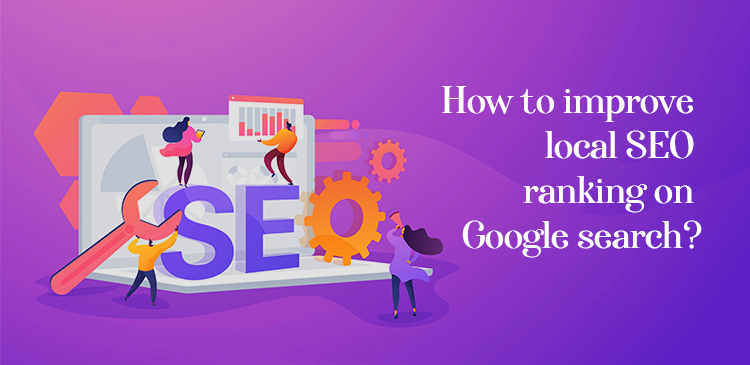
How to improve local SEO ranking on Google search?

To create better rankings for your website on search engines search engine optimization has become a necessity when it comes to digital marketing. If you want your brand to get a better reach, investing in SEO will always help.

But it is a fact that most people search online to look for local businesses. Like, most of us search on Google for example, “restaurants near me” or “mobile services nearby” etc. This is because everyone wants to find a good business but it should also be convenient or in other words within a certain region. This is why it is important to improve your local SEO ranking on Google search.

With our experts, we can improve the local SEO of your brand on Google search as we are the best SEO in Cochin, Kerala. This will help you attract customers locally and increase the reach of your brand throughout the community.

What is local SEO?

Improving the ranking of the web page of your brand on local searches on Google is what makes local SEO different from that of regular SEO. If your business provides its service to a particular region or geographical area local SEO can be of your benefit.

So if any customer searches for products or services related to what you provide along with your location in specific, with local SEO your website comes on top of the Google search results. With the coming of mobile phones, the internet, and GPS, local SEO has become extremely important for the successful growth of a lot of businesses across the world.

People will always search for services or businesses within their reach where they are comfortable. As local SEO helps to attract the maximum local audience it can be beneficial for your brand if you are the owner of a small-scale business

Do you want to improve the local SEO of your website? What are you waiting for? Contact us at TGI Technologies, the best digital marketing company in Kochi, Kerala.

Here are a few ways that can help your brand improve its local SEO:

  • Create a GMB Account

The first step of your local search engine optimization strategy is to create a Google My Business account. Claiming and optimizing your listing or in other words, your business profile is one of the few effective ways to improve your ranking.

For this, it is mandatory that you provide the essential details regarding your business as per requirements. The details you provide should be up to date. This includes the accurate and correct business name, address of your office or store, correct location, phone number for contact, and your website.

After your verification, you can also provide additional details like photos and pictures of your products or the office surroundings, the logo of your brand, working hours, and any other relevant information regarding the business you do.

Also posting regular content about your services and products to keep your audience updated is an important factor to optimize your Google My Business account.

  • Mobile friendly optimization of the website

We all prefer convenience in everything, which is why nowadays most people carry smart[phones instead of using their desktops. Mobile is the most common device used to find local businesses that function nearby.  So you have to make sure that your website is smartphone-friendly.

It is only obvious that almost everyone does their local searches that is to find businesses nearby only using their mobile phones.

Also, add a call option in your Google My Business profile as many customers can contact businesses through phone calls to make quick inquiries. If you do this, it will be more convenient for your customers and they will get exactly the information they need.

  • Get regular and positive reviews from your customers

It is a known fact that positive reviews help in increasing the reach of your business. If you want to check out a particular product or service for the first time, naturally you will ask someone else who has done the same before making your choice. This is why reviews are important.

Encouraging your customers to post their views and their experience with your company, especially positive ones. Also, reply to their reviews and thank them as they took the time to write a good one for you. This way your audience would trust you while making their choice. No one will be interested in a business with low reviews.

So it is important to collect plenty of reviews from your satisfied customers that can help you increase your reach and above all bring up your company reputation.

  • Create content that is based locally

Another strategy in local search engine optimization is posting regular and fresh content that the local audience can relate to. This is one way that can help to grab the attention of the audience within the community or locality.

Writing content on local events, stories, and others that your local audience might be interested in along with pictures and videos to enhance it.

If your business has multiple locations, create a local webpage for each location featuring content that is based exclusively on the local audience. This way you get ranked better for different branches.

  • Give more attention to keywords

Content creation and writing blogs for your website to get better ranks but keywords in these contents are much more important.

Especially when it comes to local customers, keywords are essential. Using locally relevant keywords is the strategy that is to be applied over here. Applying keywords including a particular location can also work.

People might search for a service in a particular location. For example “furniture shops in MG Road” so using such specific keywords that your local audience may use helps your brand get better reach.

  • A web page for each product

This is a useful strategy to create a unique web page for each product or service you provide. So if you provide multiple web pages not only for products but also the different locations where your company branches.

So these are some of the strategies to boost your local SEO on Google. Do contact us as we are the best SEO Company in Cochin, Kerala.