Web Analytics
23Aug

Voice Search: 8 Strategies to Optimize Your Website SEO

In a world increasingly dominated by digital assistants like Siri, Google Assistant, and Alexa, voice search has emerged as a game-changing trend that’s reshaping the landscape of search engine optimization (SEO). As more users turn to voice search for convenience and hands-free interactions, businesses need to adapt their SEO strategies to remain competitive. In this blog, we’ll explore eight effective strategies to optimize your website for voice search and enhance your online visibility.

1. Understand User Intent:

Voice searches are often longer and conversational in nature compared to traditional text-based searches. Focus on identifying and understanding the natural language queries users are likely to make when speaking to their devices. This understanding will guide your content creation and optimization efforts.

2. Long-Tail Keyword Research:

Voice searches tend to incorporate more natural language and longer phrases. Conduct thorough research to identify relevant long-tail keywords that match user queries. Tools like Google’s Keyword Planner and SEMrush can help you uncover these conversational phrases.

3. Featured Snippets Optimization:

Featured snippets hold significant value within voice search outcomes. Aim to provide concise and informative answers to common questions related to your industry. Structured content, bullet points, and numbered lists can increase your chances of earning featured snippets.

4. Local SEO is Crucial:

Many voice searches are location-based, such as “restaurants near me” or “closest gas station.” Optimize your Google My Business listing and ensure your website is optimized for local SEO to capture these location-specific queries.

5. Mobile-Friendly and Fast Loading:

Mobile-friendliness and fast loading times are critical for voice search optimization. Users performing voice searches are often on the go and expect quick results. Google’s mobile-first indexing also emphasizes the importance of a responsive design.

6. Natural Language Content:

Create content that mirrors the way people speak naturally. Incorporate conversational language and provide comprehensive answers to common questions. FAQ sections and “How-to” articles can be particularly effective.

7. Schema Markup Implementation 

Schema markup assists search engines in grasping the context of your content.

Implement schema markup to provide context for your content, making it easier for search engines to deliver relevant results to voice search queries.

8. Aim for Position Zero:

Position zero, also known as the featured snippet, is a prime spot for voice search results. Structure your content to provide concise answers to common questions, making it more likely to be selected by voice assistants.

Voice technology plays a pivotal role in enhancing customer engagement and optimizing local SEO strategies for Digital Marketing Companies in Kerala, driving personalized interactions and fostering stronger connections with the audience.

Voice search is fundamentally transforming the approach to SEO for companies in Kerala, prompting SEO firms to prioritize conversational keywords, local optimization, and user intent to ensure clients maintain a competitive edge in this dynamic digital landscape.

Conclusion:

As voice search continues to gain prominence, optimizing your website for this trend is no longer optional—it’s a necessity. By understanding user intent, conducting thorough keyword research, and implementing the strategies mentioned above, you can position your website to excel in the world of voice search. Embracing these strategies will not only enhance your SEO efforts but also ensure that your business remains relevant and accessible to a growing base of voice-activated device users.

26Apr

Google Analytics 4 Migration Guide: Best Practices for a Smooth Transition

Google Analytics 4 (GA4) is the latest version of Google Analytics, which offers a more comprehensive and sophisticated set of features compared to its predecessor, Universal Analytics. As a result, many businesses are choosing to migrate their website tracking from Universal Analytics to GA4 to take advantage of its enhanced capabilities.

But in order to achieve a smooth transition, migrating to GA4 can be a challenging process that needs careful planning and execution. In this guide, we will explore some best practices that can help you migrate to GA4 successfully, including how to prepare for the migration, how to set up your GA4 account, and how to ensure your data is accurately tracked and reported. By following these best practices, you can ensure a seamless transition to GA4 and take advantage of its advanced features to gain valuable insights into your website’s performance.

Best Practices for a Smooth Transition

  • Review your current Universal Analytics setup: Before starting the migration process, review your current Universal Analytics setup, including your goals, events, and custom dimensions. This will help you identify what needs to be migrated and what can be left behind.


  • Create a new GA4 property: Start by creating a new GA4 property within your Google Analytics account. This will allow you to start collecting data and testing the new features of GA4 without affecting your existing Universal Analytics data. Digital marketing in Kochi,  Kerala. 


  • Implement GA4 tracking code: Once you’ve created a new GA4 property, implement the GA4 tracking code on your website. This will allow you to start collecting data in your GA4 property and ensure that your tracking is working correctly.


  • Set up data streams: Set up data streams for each platform or device you want to track, such as your website, mobile app, or other digital properties. This will help you to collect data across all your digital properties in one place.


  • Configure data settings: Configure data settings such as data retention, data sharing, and data deletion to ensure that you comply with relevant data privacy regulations and to manage your data effectively.


  • Configure events and conversions: Set up events and conversions in your GA4 property, such as button clicks, form submissions, and purchases. This will help you track user behavior and measure the success of your marketing campaigns.


  • Verify data accuracy: Verify that data is being collected accurately by comparing the data in GA4 to the data in Universal Analytics. This will help you identify any discrepancies and ensure that your data is accurate.


  • Test and iterate: Test and iterate on your GA4 setup to ensure that it is working correctly and providing you with the data and insights you need. Continuously review your data and update your configuration as needed.


By following these best practices, you can ensure a smooth transition to GA4 and take advantage of its new features and capabilities. Digital marketing services in Kochi are more relevant and Provides best service for you. By the way for a smooth transition from Google we can easily appear that too. 

20Feb

Everything you need to know about ChatGPT

Chat GPT, or Generative Pre-trained Transformer, is a type of language model that has gained a lot of attention in recent years. Developed by OpenAI, GPT uses deep learning techniques to understand and generate human-like language. In this blog, we’ll take a closer look at what Chat GPT is, how it works, and its potential applications. 
 
What is Chat GPT? 
 
Chat GPT is a type of artificial intelligence model that uses natural language processing to understand and generate human-like language. It is based on the Transformer architecture, which was first introduced by Google in 2017. The Transformer architecture uses a self-attention mechanism to process input sequences and generate output sequences. Chat GPT takes this one step further by pre-training the model on large amounts of text data, allowing it to generate more accurate and coherent language. 
 
How does Chat GPT work? 
 
Chat GPT works by processing input text and generating output text based on the patterns it has learned from pre-training. The model is first trained on a large corpus of text data, such as the entire English Wikipedia or a large dataset of books. During training, the model learns to predict the next word in a sequence based on the previous words in the sequence. This pre-training allows the model to learn patterns and structures in language that it can then use to generate new text. 
 
Once the model has been pre-trained, it can be fine-tuned on specific tasks, such as question answering or language translation. During fine-tuning, the model is trained on a smaller dataset that is relevant to the current job. The model then uses the patterns it learned during pre-training to generate output text that is relevant to the specific task. 
 
Applications of Chat GPT 
 
There are numerous potential uses for Chat GPT, including: 
 
Chatbots: Chatbots are computer programs that can engage in conversation with humans. Chat GPT can be used to train chatbots that can understand and generate human-like language. 
 
Language translation: Chat GPT can be fine-tuned on language translation tasks, allowing it to translate text from one language to another. 
 
Content creation: Chat GPT can be used to generate content for websites, social media, and other platforms. 
 
Question answering: Chat GPT can be fine-tuned on question answering tasks, allowing it to answer questions based on a given input. 
 
Conclusion 
 
Chat GPT is a powerful language model that has the potential to transform the way we interact with computers. By understanding and generating human-like language, Chat GPT can be used for a wide range of applications, from chatbots to language translation. As the field of natural language processing continues to advance, we can expect Chat GPT and other language models to become even more sophisticated and powerful. 

22Aug

iPhone 14: everything you need to know

As we all know iPhone is a well-established brand during this time. As their iPhone 13 was hugely popular, as it is considered one of the best in the market.

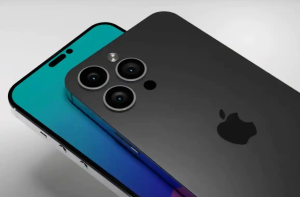
iPhone is coming out with a new launch of iPhone 14, in fact these aren’t rumors. It is a more exciting upgrade of iPhone 13. The new upgrades as of now is its redesign, removal of face id notch and they improvised their camera set up too.

Now we are going to discuss about the new iPhone release

iPhone had officially unveiled their iPhone 13 in September 2021; hence it is quite some time since they released a new idea. There aren’t any solid or satisfying dates mentioned. But iPhone releases tend to happen during the month of September . So, with that in mind we could actually assume that their new iPhone 14 release will be in September 2022.
Now we can think about when in September? As apple haven’t revealed about the confirmed date, but since iPhone 13 was announced on 14th September 2021 and iPhone 11 was announced on 12th of September 2019. It is a common talk that apple tends to release it on Tuesdays and probably second week of September.

iPhone 14 design

If you are an apple follower, you might have already guessed the design of the launch. iPhone 14 is going to look more like the departure than the iPhone 13 was. As we know that iPhone 13 is one of the best phones availableiphone 14 design in the market. And iPhone 14 is an incremental upgrade of what we have in iPhone 13. Since apple is facing competition from other famous brands in the field like Samsung and newcomers in the field like the phone nothing. It might seem like the company apple is aiming to bring out more noteworthy product to the market.

If you have guessed the design, then you are right, it’s the notch. Many of the users of apple have decried with the infamous iPhone notch which was introduced in the beginning with the iPhone X, ever since then it has been the same in all the subsequent iPhone models. Notch is not only for aesthetics but also for the face id to work. There is also a rumour that notch has been removed for the upcoming iPhone 14, in favour of the punch hole camera.

iPhone 14 display

A smartphone display level shows you a lot about the handset you hold. iPhone 13 screens have turned out to be the strength of apples current smartphone line-up. Always iPhone stands out from this because of their colourful screen and adaptive 120Hz which brings it to the next level. It also implies apples pro phones can adjust to their fast-changing displays refreshes. As far as now rumours have come up with a picture of more or less than iPhone 13. But you will find some exciting enhancements to the iPhone 14 displays that can be taken as noticeable improvements. It is because of the competitor’s pressure that iPhone has taken seriously about the display upgrade for their own handset. The iPhone 14, iPhone 14 pro and iPhone 14 pro max keeps the 6.7-inch screen size featured same like the iPhone 13 pro max. one of the expected change in the iPhone 14 pro display is they are tipped to lose the notch, it has been there ever since after the debut of iPhone x in 2017. And there are two cut outs to house the front camera and face id sensors. This can free up little extra space on both phones.

iPhone 14 camera

iPhone 14 will be in here in just a few weeks. As always camera is a big question, it has been a talk that iPhone 14 pro will have 48 MP wide camera for the first time ever in the history of iPhone. It is a massive change from standard 12 MP camera to 48MP camera. This actually means you can take sharper pictures and 8K videos. Everyone who upgraded from the iPhone 12 pro to the iPhone 13 pro got a bigger bump camera. It is expected that this time iPhone 14 camera array is expected to get much bigger.


Follow TGI Technologies , to get updated about the latest trends and news in the digital world.


19Jul

Google’s Mobile first indexing Explained

Google’s mobile-first indexing uses the mobile version of a given content for indexing and ranking. Earlier, the index used the desktop version of the page’s content when evaluating the relevance of a page to the user’s query. Now, since a majority of users access Google Search with a mobile, Google indexes the page with the smartphone agent going forward.

Since July 1, 2019, mobile-first indexing was enabled as default for all new websites. For older or existing websites, pages are continuously monitored and evaluated based on the practices detailed in the guide. Google informs site owners in the Search Console of the date when their sites were switched to mobile-first indexing.

Mobile-first indexing just means that Google uses the mobile version of the webpage for ranking and indexing. That is, if your website has both desktop and mobile URLs, Google presents the desktop URL to desktop users and mobile URL to mobile users. The indexed content, however, will be the mobile version.

MOBILE-FIRST INDEXING AS DEFAULT FOR NEW WEBSITES

Websites published after July 1, 2019, have mobile-first indexing enabled by default. This announcement was made by Google in May 2019 and further explained that the change applied to websites were previously unknown to Google Search. The reason why Google made mobile-first indexing default for new websites were detailed in the announcement.

MAKING MOBILE AND DESKTOP EXPERIENCES THE SAME

An emphasis on providing a similar experience on mobile and desktop was added to mobile-first indexing’s best practices on January 2020. A summarized list of what was meant by providing a similar experience is given below:

  • Ensuring access to desktop and mobile page content and resources to Googlebot.
  • Ensuring that both mobile and desktop content are the same.
  • Using meta robot tags on mobile and desktop site.
  • Using the same headings on mobile and desktop sites
  • Ensuring that mobile and desktop sites have the same structured data.

Google warns that a purposeful lack of content on the mobile version of a page than the desktop version will likely cause a drop in traffic. According to Google, the users wouldn’t be able to access much information from the page as before, that is, while using the desktop version. Instead, it is recommended that the primary content be the same on both the mobile and desktop pages, including the headings.

BEST PRACTICES OF GOOGLE’S MOBILE-FIRST INDEXING

A comprehensive list regarding the best practices of mobile-first indexing by Google is given below. Most of the information given in the list isn’t really new. The list itself is a compilation of recommendations and advice provided by Google over the years. In addition to recommendations regarding the creation of similar experiences on both mobile and desktop pages, the list also includes:

  • Ensuring that the error page status remains the same for both mobile and desktop pages.
  • Avoiding fragmented URLs on mobile version.
  • Ensuring desktop pages and mobile pages are equivalent.
  • Verifying desktop and mobile sites on Search Console.
  • Checking the hreflang links on separate mobile URLs.
  • Ensuring that the mobile site can handle an increased crawl rate.
  • Ensuring robot.txt directives are the same on desktop and mobile sites.

Google also offers an entire section on suggestions for separate URLs. In Google’s mobile-first indexing documentation, it is strongly recommended to have a mobile version of your pages, even if it isn’t required.

HOW TO IMPROVE PERFORMANCE IN GOOGLE’S MOBILE-FIRST INDEX

  1. Make sure important content is shown on all versions, if you own multiple versions

Ensure that important content- including structured data, internal links, images etc. is on the mobile version of your website. Google warns that less content on mobile page than desktop page will lead to a decrease in traffic.

  1. Letting Googlebot access and render content

It is recommended by Google to use the same meta robot tags on the mobile site, avoid lazy-loading primary content and to allow Googlebot to access your resources.

  1. Verify structured data

Check that the structured data is same on both desktop and mobile versions and make sure that the URLs are correct.

  1. Improving mobile page speed

Page speed is an important factor to consider and it has become even more important with mobile-first index and Page Experience update.

  1. Keeping an eye on mobile errors

Getting a site to perform well in the mobile-first index is not an easy task. The Search Console needs to be closely monitored so that mobile errors can be identified and fixed.


Follow TGI Technologies,  to get updated about the latest  news and informations regarding Google and Tech world.


08Jul

Pinterest Launching New Product Display Options, Updated Shopping API.

Pinterest declared that it’s rolling out new merchant options, along with product tagging on Pins and a Pinterest API for shopping. The corporate says all of the new options are designed to create it easier for merchants to form participating shopping experiences for users.

With the introduction of the new Pinterest API feature for shopping, merchants can now get access to new catalogue management and the products metadata options to alter additional efficient data quality for merchant products. The company says that the merchants who have used this tool have already seen a 97% accuracy level for the price and accessibility of data or information.

The new shopping feature “Product Tagging on Pins” permits merchants to create their lifestyle Pins purchasable. With the product tagging, merchants will be able to add products from their catalogue to their seen images. Users will then buy the exact things from the images they find. Pinterest also says that the users show a 70% higher shopping intent on product Pins tagged in seen images than standalone product Pins in initial tests.

Additionally, Pinterest is sanctioning video assets in product catalogues to give users a correct look at items from multiple angles when they are making the purchase decision. With the launch of this feature, Pinterest says that it seems a promising result from video-like advertising formats.

Finally, Pinterest is launching a brand new Shop Tab on business profiles that may enable merchants to simply display purchasable products. The company also noticed that the new feature not only allows easier product group management directly on a merchant’s Shop Tab, but it additionally brings customizable product descriptions and an enhanced mobile interface.

Jeremy King the senior vice chairman of Engineering at Pinterest, said in a statement that “At Pinterest, our goal is to turn inspiration into action, and our vision for shopping is to create potential to shop for anything and Pinners are inspired by the platform.”

The new shopping option like the API for shopping enables the brands and retailers to succeed in high-intent Pinners throughout the earliest stage of their shopping journey with the foremost updated catalogue data.”

Pinterest has set its eyes on the rising of the online shopping experience on its platform over the past few months because the company recently declared that it is getting an AI-powered shopping service for fashion which is known as the Yes. The company was supported by the e-commerce veteran and former stitch Fix COO Julie Bornstein and technical co-founder Amit Aggarwal. Pinterest said that the acquisition will be facilitated to determine a brand new strategic organization among the company to assist to drive the company’s shopping efforts, along with the development of features for each shopper and retailer.

Pinterest also says that these new shopping options for merchants, the acquisition of the Yes and also the appointment of Google executive Bill Ready as Pinterest’s new chief executive officer, show that it’s targeted on creating Pinterest the house of taste-driven shopping and dealing toward a vision of creating it potential for shoppers to shop for something they’re impressed by on the platform.


Follow TGI Technologies, One of the best Digital marketing company in Kerala to get updated about the new informations and news regarding the digital world.