12Jul

How to Promote Travel Tourism Website and Enquiries ?

Importance of SEO for Travel Industry

Allow the figures to do the talking. A recent study conducted by  Travel Commission concluded that as many as 72% of the trips were booked through internet. This is not it. There is a rise in the internet bookings by 45% since 2009. Hence, it is clear that more and more customers are relying upon online channels to fulfill their travel requirements and this trend is sure to get more popular, all thanks to the widespread use of smartphones and internet using devices.

SEO allows you to target customers for a range of keywords. Unlike other strategies (PPC, Facebook admangers), targeting keywords in SEO is fairly easy and pocket friendly. SEO lets you target a large number of keywords along with their variations, for no extra costs. For example, if you are in the business of booking hotels, you might like to target keywords like ‘hotel reservation’ and ‘hotel booking’. But why restrict yourself? You could also try your hands on other related keywords like ‘kerala hotels’, ‘best hotels in kerala’ and so on. SEO doesn’t restrict your keywords with a budget. SEO gives you the liberty to explore more and target a range of related keywords for no extra costs.

travel

Positive Online Customer Reviews
Positive online customer reviews instill the confidence in your brand. Positive reviews speak of your good will in the market. Manage your reputation online by earning some good customer reviews. You could do this by asking your customers to leave positive reviews on popular travel forums. TripAdvisor is one of them. Make sure that the reviews are honest and left from genuine people. Further, also keep a close eye over the negative reviews and take all possible measures to address them.

23Apr

Remove Spam Links using Google’s Disavow Tool

Are you familiar with Disavow Tool.  It’s a power tool introduced by Google in October 2013.  You are familiar with certain spammy or low quality links in your site. These unnatural links pointing to the site may cause your site to get into Google’s Penguin Updation. Or, in some cases they can even get  a manual unnatural links penalty. Through Disavow tool you can ask Google not to consider unnatural links, while accessing your site.disvow tool

Google itself give a documentation regarding how to use the tool. In this part they tell us that we should use this tool with more care. This is an advanced feature. If it is used incorrectly, it may even harm our site performance in Google search result.

Before disavowing backlinks from your site you have to go through this

  1. Compare website analytics with Google calendar.
  2. Check backlinks using Google Webmasters Tool and download all links to your site.
  3. Check for Penguin updation affected your site or not.
  4. Create a document containing only the links you want to disavow.
  5. Try to contact the spam site through mail or other source to remove their links.

Penguin updation is a major updation made by Google to avoid link spamming. You may add some links to your site to create backlinks using certain link building schemes. On the other hand certain sites may points to your site without your intention. In both cases if any link is found spam or low quality you should remove it. Otherwise your site will naturally got punishment from Google. By comparing your website analytics with Google calendar you can easily understand you have got any punishment or included in any updation or not.

Using Google Webmasters Tool you can download all links to your site. For this go to Search Traffic >> Links to your site >> More. This will give a file containing all the pages linking to your site. Use this file to create a document containing list of links you want to disavow. Disavow document should be in .txt file and it must be encoded in UTF-8 or 7-bit ASCII. So create it in notepad. Don’t upload entire list of downloaded links. Text file should contain only the links that you want Google to ignore.

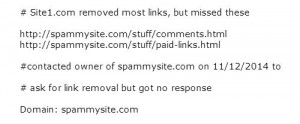
Disavow the links in domain level is good. The format should be like this “domain: website.com” You can also add comment to this site using “#” . Entering comment in text file is good when you are editing this file in future.

Here an example of disavow file

disavow file format

Next step is to upload this file into disavow tool. For this go to Disavow links tool page > >Select your website >>Click Disavow links > >Disavow links again and then  >>choose file. This is where you will upload the .txt file that just created.

By disavowing a domain, Google will apply an invisible nofollow  tag to each link that points to your site from this domain. Google will take some time to disavow a link. And also uploading a new file will replace all previously uploaded ones.

For any type of queries or enquiries please free to contact  TGI Technologies

21Apr

Website Analysis – Key Aspect of Website Optimization

Business organizations or firms or many of the institutions keep websites of their own. Websites give an extra grade to an organization or it can be considered as another level of marketing. Webmasters are trying to get high rank in the organic search by optimizing their websites. Website analysis can be considered as awebsite analysis good practice for optimizing the sites. So many factors we have to consider while analyzing the sites. Analysis give a brief idea about a site. Site problems, its present level, Page ranking, Google visibility, Traffic Ranking, Keywords etc can be analyzed thoroughly through this process. So many online sites are available for website analysis. Many of them suggest some solutions for rectifying problems. Thus one can make their site SEO friendly too.

Here there are some sites for analyzing your site.

  • Seobook.com                                                                                                                                                  It is a leading SEO website, founded by Aaron Wall. This site provides SEO training programs which includes tools, videos etc. We can install SEO toolbar with Firefox extension using this site. This toolbar shows Google Page Rank, Links to Domain, Page links, Site age and many more.
  • Moz.com                                                                                                                                                        Website that provides so many needful things for SEO’s. We can add SEO tools using this site. This site also provides a SEO toolbar called MozBar. Here we can view Page authority, Domain authority, social metrics for Facebook, Twitter and Google+ and so many other features. Using Open Site Explorer we can research about site’s backlinks, link building opportunities and so on.
  • Semrush.com                                                                                                                                                  A  search engine marketing tool. This  is meant for analyzing a website. For this we have to give the URL of a site. While we enter the URL, it provides a domain overview which includes organic search, paid search, Backlinks, display advertising, top organic keywords, competitive positioning map etc.
  • Alexa.com                                                                                                                                   Specialized for providing traffic ranking. SEO traffic ranking is an important factor for making report. For this we should enter a site URL. It gives global ranking of the entered site and also ranks in India. Alexa ranking is the best traffic ranking measurement. It also provides Bounce rate, Daily page views per visitor, daily time on site, search traffic, related sites etc. We can make a detailed report about a site while going through this site.
  • Woorank.com                                                                                                                                                  Website’s auditing can be done effectively with this site. Site auditing is an important part in website analysis. It can address various issues on our site and also identify opportunities to go ahead. It provides each and every details about a site including title, meta description, headings broken links, keywords, mobile friendliness, details about URL, Favicon, page size, load time and so on.
  • Gtmetix.com                                                                                                                                            This is meant for optimizing a site. It provides some recommendations for optimization. It analyzes site speed and gives suggestions to improve speed. Gtmetrix provides a detailed report on how our site loads and also detects where the bottlenecks are. It gives performance score, page details, so many recommendations for page speed and so on.
  • Screaming Frog                                                                                                                                       Screaming Frog SEO Spider is a website crawler. Basically used for quick website analysis. Analyses a site from SEO perspective. Download for free, but should have java enabled in our system. Find broken links, generate XML Sitemaps, discover duplicate contents are some of the features.

    These are some of the site analyzing tools.  Page Speed Insight is a product from Google developers to measure the the performance of a page for mobile devices and desktop devices. There are so many other website analysis tools also.

    Make your site SEO friendly and get identified in the Organic Search. Then automatically traffic will increase. Website Analysis will be the first step for optimizing your site. TGI Technologies can help to develop your business. You can hire our service for Website designing, SEO and Digital marketing, Online Branding and any type business development services.